




Check out my discord: https://discord.gg/kQYX2eM
VERY BIG PROJECT COMING SOON...^^^^^^^^^^
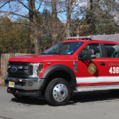
You can find the truck models here: https://modification-universe.com/forums/index.php?/files/file/36-els-vg-pierce-arrow-xt-pack/
Thank you for downloading my product!
How to add the texture into OpenIV:
- Choose your vehicle/item
- Locate the .YTD file associated with the vehicle/item.
- Double-click on the file and then find a file(s) called (Ex: explorer_sign_1).
NOTE: Not every vehicle developer has the texture name as "sign". If there is no name like that, keep scrolling until you find the correct texture to replace.
- Once you locate the correct file, click 'Replace' in the top right of the window and locate the .DDS file.
- Click on the file and press 'Open'.
- Press 'Save' in the bottom left and wait for the window to close.
- Once the window closes, scroll and locate the vehicle's .YFT file(s) and verify that the texture purchased works.
Enjoy your wonderful product!
- Austin Reid
You can find the model for the texture here:
https://modification-universe.com/forums/index.php?/files/file/36-els-vg-pierce-arrow-xt-pack/
















Recommended Comments
Create an account or sign in to comment