Skip to content
View in the app

A better way to browse. Learn more.

LCPDFR.com

A full-screen app on your home screen with push notifications, badges and more.

To install this app on iOS and iPadOS
  1. Tap the Share icon in Safari
  2. Scroll the menu and tap Add to Home Screen.
  3. Tap Add in the top-right corner.
To install this app on Android
  1. Tap the 3-dot menu (⋮) in the top-right corner of the browser.
  2. Tap Add to Home screen or Install app.
  3. Confirm by tapping Install.

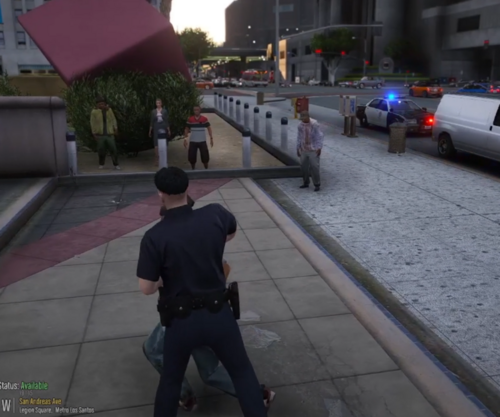
[ELS] Unmarked 2011 Ford Crown Victoria Police Interceptor 1.0.2

(2 reviews)

6 Screenshots

Starting the new year off with a CVPI. This is the last vehicle I have made to be uploaded. I'll make some new ones soon. 


Make sure to join my discord for future work and updates: https://discord.gg/atpTS4z


EXTRAS:

Extra 12- ALPRs

Extra 10- Radar


Videos with this vehicle:

Spoiler


Vehicle's from Series:

Spoiler


Bugs:

-Wrong file name on Add-on version of els file. 

Testing wasn't incredibly in-depth, please report any issues to myself. 


Disclaimer:

-Don’t re-upload to any other sites without permission from me.

-If you want to make a skin. Just link the model in the description

-If you use ELS on FiveM. Feel free to use it.

-Don’t Rip any parts off this vehicle.

-If you make a video with this, please consider linking it in the description or comments.

Edited by Steve6645

What's New in Version 1.0.2

Released

Changes 05/01/2025:

-Updated ELS file name on Add-on version


Changes 09/01/2025:

-Uploaded correct template to Add-on version


Short Description

Unmarked 2011 Ford CVPI

User Feedback

Recommended Comments

0xShelby

Members

Awesome! Been looking for one that hasn't been around for awhile. Surprisingly there really are not a lot of Unmarked Vics around. Love you're vehicles mate.


Real quick though, I think you put the R&B ELS file for the Taurus in the zip file for the addon, not the vic file. Or it could just be named wrong.


Nonetheless, thanks mate!

Steve6645

Members Author

2 hours ago, 0xShelby said:

Awesome! Been looking for one that hasn't been around for awhile. Surprisingly there really are not a lot of Unmarked Vics around. Love you're vehicles mate.


Real quick though, I think you put the R&B ELS file for the Taurus in the zip file for the addon, not the vic file. Or it could just be named wrong.


Nonetheless, thanks mate!

Yeah I copied the file format over. I think I’d changed the all blue but missed out the main one. You’ll be able to rename that els file to Un11vic as they use the same set up anyway. I’ll fix it soon. 

CrossIsDeadly

Members

If I see your name, I just hit download.....doesn't matter what the vehicle is.  Love the Crown Vic!   Tinted windows would make this an 11/10.....  Thanks for doing these cars for us !

Steve6645

Members Author

2 hours ago, Violet Velocity said:

Love the car but, the template is from a FPIS not from The vic haha.

God dammit haha. 

On 1/6/2025 at 11:44 PM, CrossIsDeadly said:

If I see your name, I just hit download.....doesn't matter what the vehicle is.  Love the Crown Vic!   Tinted windows would make this an 11/10.....  Thanks for doing these cars for us !

There is a window template that did exist for the vehicle, but I never set it up after editing it. I'd fitted a new rear window which messed it up. I'll try and remember to fix it for when the full pack is completed. 

max703862

Members

The rear window is really dark for me so you cant see the lights?

Steve6645

Members Author

On 10/28/2025 at 7:29 PM, max703862 said:

The rear window is really dark for me so you cant see the lights?

Have you installed the vehicle meta files? Police4 by default is tinted so that also applies to this vehicle if the metas aren't installed. 

BC34

Members

(edited)

Hey Steve any chance you can make a Unmarked 2020/2025 FPIU with the same light set up as the vehicle in this unmarked series please?

Edited by BC34

Steve6645

Members Author

On 1/5/2026 at 10:14 PM, BC34 said:

Hey Steve any chance you can make a Unmarked 2020/2025 FPIU with the same light set up as the vehicle in this unmarked series please?

I would like to. It's just finding a good quality base model to work with. I don't like putting out rubbish which is why I don't release often. Most of the good base models are paid and it's not something I can really justify spending money on cause I don't make any profit out of making content. I'll look into it though.

BC34

Members

35 minutes ago, Steve6645 said:

I would like to. It's just finding a good quality base model to work with. I don't like putting out rubbish which is why I don't release often. Most of the good base models are paid and it's not something I can really justify spending money on cause I don't make any profit out of making content. I'll look into it though.

Okay sounds good hope you find a good model and hopefully looking forward to the outcome

and also I appreciate the reply.

BC34

Members

(edited)


https://www.lcpdfr.com/downloads/dev-resources/vehicle-parts/32884-dev-2020-ford-police-interceptor-utility/

21 hours ago, Steve6645 said:

I would like to. It's just finding a good quality base model to work with. I don't like putting out rubbish which is why I don't release often. Most of the good base models are paid and it's not something I can really justify spending money on cause I don't make any profit out of making content. I'll look into it though.

Forgot to ask you do you plan on updating your 2014 Tahoe, 2016 FPIU and 2010 charger to the latest lighting with the amber TA Bar and also making them a addon?

Edited by BC34

BC34

Members

1 minute ago, Steve6645 said:

The same issue applies for the 2016 FPIU. I'd like to do those again at some point but I've haven't had time or motivation to do them.

Fair Enough

Create an account or sign in to comment

Latest Mods

Account

Navigation

Search

Search

Configure browser push notifications

Chrome (Android)
  1. Tap the lock icon next to the address bar.
  2. Tap Permissions → Notifications.
  3. Adjust your preference.
Chrome (Desktop)
  1. Click the padlock icon in the address bar.
  2. Select Site settings.
  3. Find Notifications and adjust your preference.