





Came across more problems with meh game, so here's the finished half of my "Special Police Pack". Cars are kinda based of the Metro Transit Police Dept from DC,VA, and MD.
Features:
- Tahoe and Charger SXT
- Extra Rambar w/ lights, extra seat organizer
- Breiht Lehgtz
Installation:
- For RDE users: Install into update.rpf\update\x64\dlcpacks\rde\dlc.rpf\x64\levels\gta5\vehicles.rpf\
-
Non-RDE users will have to rename the cars to whatever you want, then place in the latest patchday: update.rpf\update\x64\dlcpacks\patchday9(or 10)\dlc.rpf\x64\levels\gta5\vehicles.rpf\
- The sirensettings is 1, so change the .metas accordingly, if you need to(Probably won't at this point)
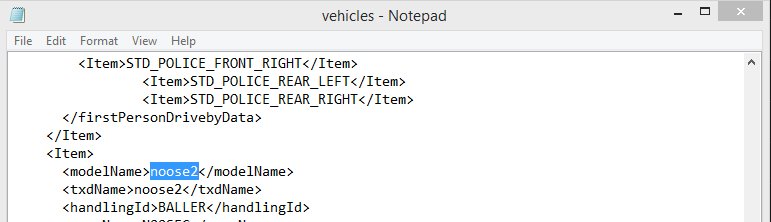
To edit handling for the tahoe:
Go to the necessary vehicles.meta, and change the handling id of the slot your using for the tahoe. Replace the handling id with "baller" or "baller2"
Spoiler
Please report any bugs. I haven't gotten a chance to test the cars in a while, but I don't believe there are any problems.
skins by Black Jesus
Cars:
- Model from free 3D site, author unknown.
- Converted and edited by GeorgieMoon.
- 2008-13 Chevrolet Tahoe/Suburban Aluminum Alloy Wheel modeled by VooDoo/Trauma with the assistance of bxbugs123. Textured and converted by VooDoo
- Interior by 4x4 Hummer merged and textured by GeorgieMoon.
- Interior converted by FightingNote, fitted by Black Jesus
- 2011 Dodge Charger R/T from Real Racing 3, ripped by DMN.
- Converted and edited into a 2013 Dodge Charger Pursuit by GeorgieMoon.
- Taillights, headlights & interior by Forza.
- Steelrim made by GerryStudio, textured and converted to GTA by GeorgieMoon.
- Slight edits by Black Jesus
Lights:
- Code 3 Defender modelled and converted by Kygo, Mounts by Kygo.
- Code 3 Citadel by Him1250, Code 3 XT4 by Vertex3d.
- Code 3 Xt6 by Macgregor
- Whelen Inner Edge by EvansCornelius
- Whelen Dominator by Unknown (tell me who, if you know)
- Inner Beams by Hoffman
- Whelen Par32 by Black Jesus
- Whelen Linz6 by cooeprcm
Equipment:
- Spotlight from Cynax, converted by Black Jesus
- Havis Console by Vertex3d, modified by Him1250.
- Radios from Driver:SF, converted and modified by Him1250.
- Toughbook Laptop by PFCBarefoot.
- Misc Equipment by IronicRainbow, Bxbugs & NickieB.
- Progard seat by Vertex3d
- Partition by Dannyboy
- Pushbars by Vertex3d and NickieB
- Guns by Grimm
- Dome light by Lt Caine
- Coffee cup by CockStar
- Antenna by Priman
Cars:
- Model from free 3D site, author unknown.
- Converted and edited by GeorgieMoon.
- 2008-13 Chevrolet Tahoe/Suburban Aluminum Alloy Wheel modeled by VooDoo/Trauma with the assistance of bxbugs123. Textured and converted by VooDoo
- Interior by 4x4 Hummer merged and textured by GeorgieMoon.
- Interior converted by FightingNote, fitted by Black Jesus
- 2011 Dodge Charger R/T from Real Racing 3, ripped by DMN.
- Converted and edited into a 2013 Dodge Charger Pursuit by GeorgieMoon.
- Taillights, headlights & interior by Forza.
- Steelrim made by GerryStudio, textured and converted to GTA by GeorgieMoon.
- Slight edits by Black Jesus
Lights:
- Code 3 Defender modelled and converted by Kygo, Mounts by Kygo.
- Code 3 Citadel by Him1250, Code 3 XT4 by Vertex3d.
- Code 3 Xt6 by Macgregor
- Whelen Inner Edge by EvansCornelius
- Whelen Dominator by Unknown (tell me who, if you know)
- Inner Beams by Hoffman
- Whelen Par32 by Black Jesus
- Whelen Linz6 by cooeprcm
Equipment:
- Spotlight from Cynax, converted by Black Jesus
- Havis Console by Vertex3d, modified by Him1250.
- Radios from Driver:SF, converted and modified by Him1250.
- Toughbook Laptop by PFCBarefoot.
- Misc Equipment by IronicRainbow, Bxbugs & NickieB.
- Progard seat by Vertex3d
- Partition by Dannyboy
- Pushbars by Vertex3d and NickieB
- Guns by Grimm
- Dome light by Lt Caine
- Coffee cup by CockStar
- Antenna by Priman


.thumb.png.a0f80464539c2dd42ee2519c1bda91f2.png)



![Generic Whelen 2023 F150 B/B [FiveM & Single Player]](http://s3-screenshots.int-cdn.lcpdfrusercontent.com/resize/500/-/monthly_2026_05/enb2026_5_13_15_23_48_06.thumb.png.ecbdfb941234f496e3fd959033f602d4.png)










Recommended Comments
Create an account or sign in to comment