
Skip to content
View in the app

A better way to browse. Learn more.

LCPDFR.com

A full-screen app on your home screen with push notifications, badges and more.

To install this app on iOS and iPadOS
  1. Tap the Share icon in Safari
  2. Scroll the menu and tap Add to Home Screen.
  3. Tap Add in the top-right corner.
To install this app on Android
  1. Tap the 3-dot menu (⋮) in the top-right corner of the browser.
  2. Tap Add to Home screen or Install app.
  3. Confirm by tapping Install.

Traffic Control 1.1.1

(46 reviews)

4 Screenshots

Traffic Control for GTA V
Copyright (C) 2018 Stealth22. All rights reserved.

Any unauthorized modification, reverse engineering, or distribution (including re-uploading of any kind) is strictly prohibited.


Requirements
You must have version 0.63 (or newer) of RAGE Plugin Hook. You must have a fully legal, non-pirated version of GTA V.


Automatic Installation
- Extract the ZIP archive; ensure that setup.exe and Traffic Control.msi are both in the same folder
- DON'T run Traffic Control.msi unless you know what you're doing
- Run setup.exe, and ensure that the installation directory detected matches the main/root folder of your GTA V install directory
- If setup.exe is unable to detect your GTA V directory, or fails in some other fashion, start Traffic Control.msi, AND SELECT YOUR GTA V PATH AS THE INSTALL DIRECTORY


Manual Installation
- Copy the TrafficControl.dll and TrafficControl.ini files into the Plugins folder of your GTA V directory.
- Copy the Stealth.Common.dll and RAGENativeUI.dll files into your main/root GTA V directory.


Features
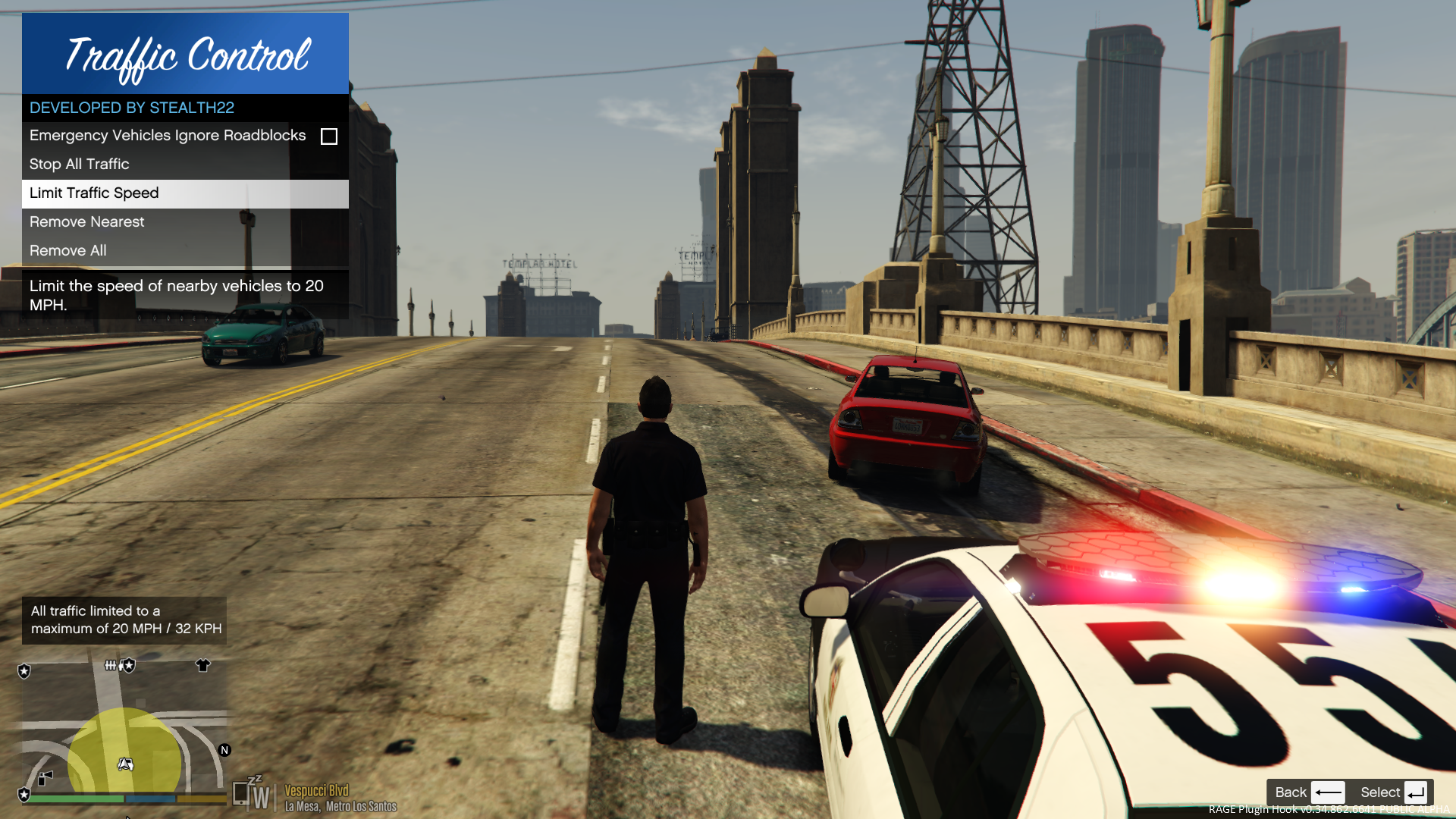
- Stop or slow down all traffic within a certain radius of the player, in order to close a road for investigative purposes, or for safety reasons during a traffic stop
- Multiple "roadblocks" or "speed zones" can be placed
- Roadblocks will remain in place until removed by the player
- A (beta) setting to allow any emergency vehicles to drive through "roadblocks"/"stop zones" can be enabled in the INI file ("Stop Traffic" orders only; speed restrictions are not affected)
- The above setting can also be changed on-demand through the new in-game menu
[NEW!] - Traffic Control now includes a new in-game menu, powered by RAGENativeUI!
[NEW!] - Keyboard shortcuts can now be changed in the INI file!
[NEW!] - Keyboard shortcuts can be disabled, if desired (to use the in-game menu exclusively)

[NEW!] - Integration with Police SmartRadio!


Usage
- Press the menu keybind (CTRL + F10 by default) to open the Traffic Control menu; use the menu options to place/remove roadblocks
- Alternatively, you can use the shortcut keys (see the INI file) to place/remove roadblocks
- Keyboard shortcuts can be disabled through the INI file, if you wish to only use the in-game menu


Forum Thread

http://www.lcpdfr.com/forums/topic/51961-rel-traffic-control-beta-close-off-the-road-while-you-investigate-and-clear-a-scene/ 

What's New in Version 1.1.1

Released

VERSION 1.1.1

  • Added missing Police SmartRadio files; fixed directory structure
  • Had some issues building the auto installer; this version will be manual drag and drop only
     

VERSION 1.1.0

  • This version requires RPH 0.62+, as well as RAGENativeUI v.1.6.3.0
  • This version also requires Stealth.Common v2.0+ (included; older versions will not work)
  • Brought this plugin into the 21st century, and best of all...
  • Integration with Police SmartRadio, built by our very own @Albo1125!!

User Feedback

Recommended Comments

lilmisschloe

Members

Can you upload a video of this in action....

ititanisdead

Members

Can you upload a video of this in action....

It's broke.

[7/8/2015 8:42:12 PM.354] Console variable 'WarnOnPluginLoad' is false, returning true.
[7/8/2015 8:42:12 PM.354] Loading plugin from path: D:\Program Files (x86)\Steam\steamapps\common\Grand Theft Auto V\Plugins\TrafficControl.dll
[7/8/2015 8:42:12 PM.641] UNLOADED: Initializing input system
[7/8/2015 8:42:12 PM.645] UNLOADED: Initializing game console
[7/8/2015 8:42:12 PM.646] UNLOADED: Initializing forms manager
[7/8/2015 8:42:12 PM.668] ERROR: Could not load plugin from "D:\Program Files (x86)\Steam\steamapps\common\Grand Theft Auto V\Plugins\TrafficControl.dll". Plugin Traffic Control in assembly tmpA0D7.tmp (TrafficControl, Version=0.0.0.1, Culture=neutral, PublicKeyToken=null) does not have a suitable entry point.
[7/8/2015 8:42:12 PM.668] Parameter name: assemblyPath


It's broke.

-Snipy snip-


Did you install the Ill-Gotten-Gains Part 2 update?

Caprice

Members

broken. didnt update.


[7/8/2015 8:42:12 PM.641] UNLOADED: Initializing input system
[7/8/2015 8:42:12 PM.645] UNLOADED: Initializing game console
[7/8/2015 8:42:12 PM.646] UNLOADED: Initializing forms manager
[7/8/2015 8:42:12 PM.668] ERROR: Could not load plugin from "D:\Program Files (x86)\Steam\steamapps\common\Grand Theft Auto V\Plugins\TrafficControl.dll". Plugin Traffic Control in assembly tmpA0D7.tmp (TrafficControl, Version=0.0.0.1, Culture=neutral, PublicKeyToken=null) does not have a suitable entry point.
[7/8/2015 8:42:12 PM.668] Parameter name: assemblyPath


ititanisdead

Members


Did you install the Ill-Gotten-Gains Part 2 update?

no

not on my backup

which im using

Stealth22

Friends of LSPDFR Author

Strange...I'll take a look and reupload if necessary. 

Stealth22

Friends of LSPDFR Author

It's broke.

[7/8/2015 8:42:12 PM.354] Console variable 'WarnOnPluginLoad' is false, returning true.
[7/8/2015 8:42:12 PM.354] Loading plugin from path: D:\Program Files (x86)\Steam\steamapps\common\Grand Theft Auto V\Plugins\TrafficControl.dll
[7/8/2015 8:42:12 PM.641] UNLOADED: Initializing input system
[7/8/2015 8:42:12 PM.645] UNLOADED: Initializing game console
[7/8/2015 8:42:12 PM.646] UNLOADED: Initializing forms manager
[7/8/2015 8:42:12 PM.668] ERROR: Could not load plugin from "D:\Program Files (x86)\Steam\steamapps\common\Grand Theft Auto V\Plugins\TrafficControl.dll". Plugin Traffic Control in assembly tmpA0D7.tmp (TrafficControl, Version=0.0.0.1, Culture=neutral, PublicKeyToken=null) does not have a suitable entry point.
[7/8/2015 8:42:12 PM.668] Parameter name: assemblyPath


broken. didnt update.


[7/8/2015 8:42:12 PM.641] UNLOADED: Initializing input system
[7/8/2015 8:42:12 PM.645] UNLOADED: Initializing game console
[7/8/2015 8:42:12 PM.646] UNLOADED: Initializing forms manager
[7/8/2015 8:42:12 PM.668] ERROR: Could not load plugin from "D:\Program Files (x86)\Steam\steamapps\common\Grand Theft Auto V\Plugins\TrafficControl.dll". Plugin Traffic Control in assembly tmpA0D7.tmp (TrafficControl, Version=0.0.0.1, Culture=neutral, PublicKeyToken=null) does not have a suitable entry point.
[7/8/2015 8:42:12 PM.668] Parameter name: assemblyPath


This issue has been fixed with v0.0.2.

MikeyBrown

Members

I will try it after updating ragehook. :)

AitGamers

Members

Stealth22 please add barrier roadblock to use in checkpoint like this in next version, please respond me

Checkpoint Barrier2.jpg

EastBoroughBridge-GTA4-tollboothrecreation.jpg

Nutronic

Members

Can you upload a video of this in action....

That would be nice, so yeah - any chance of a video?

Stealth22

Friends of LSPDFR Author

Can you upload a video of this in action....

That would be nice, so yeah - any chance of a video?

I'll try, but I can't promise anything.

If anyone else wants to make a video and post it here, by all means, be my guest.

72will

Members

Could you add-

You can place a roadblock/barrier and that stops the traffic only in that lane on that side for more realistic/precious closures.

davidp027

Members

Hey to prevent the police/tow trucks/coroner from getting slowed down, you could just check the vehicle's hash / skiin hash and if it matches something then prevent any action on this specific vehicle/peds. At least that's how  I do it

Stealth22

Friends of LSPDFR Author

Hey to prevent the police/tow trucks/coroner from getting slowed down, you could just check the vehicle's hash / skiin hash and if it matches something then prevent any action on this specific vehicle/peds. At least that's how  I do it

I wish it was that easy, man. Unfortunately its an all or nothing sort of deal at the moment. For now there is a workaround...once I get Keep Calm stable, I may have another look at it.

davidp027

Members

Well, idk your source but in asi files that's how I'd do it. (Not tested, just wrote that quickly(C++))

Hash cops[14] = {"police", "police2", "police3", "police4", "policet", "fib", "fib2", "riot", "sheriff", "sheriff2", "pranger", "policeold1", "policeold2", "policeb"};
				const int numElements = 100;
				const int arrSize = numElements * 2 + 2;
				Entity vehs[numElements];
				int count = GET_PED_NEARBY_VEHICLES(PLAYER_PED_ID(), vehs);
				for (int i = 0; i < count; i++)
				{
					int offsettedID = i * 2 + 2;
					//Make sure it exists
					if (vehs[offsettedID] != NULL && DOES_ENTITY_EXIST(vehs[offsettedID]))
					{
						//Do something
						Entity mveh = vehs[offsettedID];
						Hash currentVehicle = GET_ENTITY_MODEL(mveh);
						for(int x = 0; x < 14; x++){
						    if(cops[i] == currentVehicle){
						        //Vehicle is a cop car
						    } else {
						        //Vehicle isn't a cop car
						    }
						}
					}
				}


Well, idk your source but in asi files that's how I'd do it. (Not tested, just wrote that quickly(C++))

Hash cops[14] = {"police", "police2", "police3", "police4", "policet", "fib", "fib2", "riot", "sheriff", "sheriff2", "pranger", "policeold1", "policeold2", "policeb"};
				const int numElements = 100;
				const int arrSize = numElements * 2 + 2;
				Entity vehs[numElements];
				int count = GET_PED_NEARBY_VEHICLES(PLAYER_PED_ID(), vehs);
				for (int i = 0; i < count; i++)
				{
					int offsettedID = i * 2 + 2;
					//Make sure it exists
					if (vehs[offsettedID] != NULL && DOES_ENTITY_EXIST(vehs[offsettedID]))
					{
						//Do something
						Entity mveh = vehs[offsettedID];
						Hash currentVehicle = GET_ENTITY_MODEL(mveh);
						for(int x = 0; x < 14; x++){
						    if(cops[i] == currentVehicle){
						        //Vehicle is a cop car
						    } else {
						        //Vehicle isn't a cop car
						    }
						}
					}
				}


Well made a mistake and can't edit it so in the for loop with x it should be instead:

if(GET_HASH_KEY(cops[x]) == currentVehicle){
    //Vehicle is a cop car
} else {
    //Vehicle isn't a cop car
}


Sebik48

Members

How to unstop traffic :D? 


BigDeluxe

Members

@Stealth22, do you think that you may potentially be able to add a feature that will get the ped drivers within the radius of a roadblock, primarily, a limited speed roadblock (20mph speed limit roadblock) to move around a congested lane? Because currently when I do traffic stops in some areas where I can not pull all the way over to the far right, ped drivers will not move around me, even if the roadblock is set to 20mph. This may not have anything to do with ur mod but just the AI in general, but if possible, do you think you could add a feature like this in?

Stealth22

Friends of LSPDFR Author

@Stealth22, do you think that you may potentially be able to add a feature that will get the ped drivers within the radius of a roadblock, primarily, a limited speed roadblock (20mph speed limit roadblock) to move around a congested lane? Because currently when I do traffic stops in some areas where I can not pull all the way over to the far right, ped drivers will not move around me, even if the roadblock is set to 20mph. This may not have anything to do with ur mod but just the AI in general, but if possible, do you think you could add a feature like this in?

I can check, but I don't think there is a way to control the AI in this manner.

Its sort of based on the attitudes of the drivers. Just yesterday, I had pulled over a vehicle on the freeway and limited the speed to 20 MPH. The traffic was really congested, but the cars in my lane were moving over to the other lane when there was a gap in traffic.

I guess its based on how the AI is feeling that particular day, lol.

JUMBOxSIZE

Members

can you add a .ini to change key bindings?

Ezakasan

Members

I can't download the files. Chrome blocks it and there is no way to allow it anyway. Is it a virus? How can i fix it?

I can't download the files. Chrome blocks it and there is no way to allow it anyway. Is it a virus? How can i fix it?

I downloaded it from another browser. My anti-virus program couldn't find any viruses. It's just wierd that chrome blocks it for harmful reasons.

Thanks anyways.

lilmisschloe

Members

Feature request - Ability to change the speed limit enforced?

Nutronic

Members

I can't download the files. Chrome blocks it and there is no way to allow it anyway. Is it a virus? How can i fix it?

I downloaded it from another browser. My anti-virus program couldn't find any viruses. It's just wierd that chrome blocks it for harmful reasons.

Thanks anyways.

This website is getting the error via Google. It's nothing to do with this mod.

Create an account or sign in to comment

Latest Mods

Account

Navigation

Search

Search

Configure browser push notifications

Chrome (Android)
  1. Tap the lock icon next to the address bar.
  2. Tap Permissions → Notifications.
  3. Adjust your preference.
Chrome (Desktop)
  1. Click the padlock icon in the address bar.
  2. Select Site settings.
  3. Find Notifications and adjust your preference.













