
Skip to content
View in the app

A better way to browse. Learn more.

LCPDFR.com

A full-screen app on your home screen with push notifications, badges and more.

To install this app on iOS and iPadOS
  1. Tap the Share icon in Safari
  2. Scroll the menu and tap Add to Home Screen.
  3. Tap Add in the top-right corner.
To install this app on Android
  1. Tap the 3-dot menu (⋮) in the top-right corner of the browser.
  2. Tap Add to Home screen or Install app.
  3. Confirm by tapping Install.

Ambient AI Police, Sitting patrols and Traffic Stops 2.2

(1 review)
Message added by SuperPyroManiac,

File looks to be entirely made with AI, and may have stability issues.

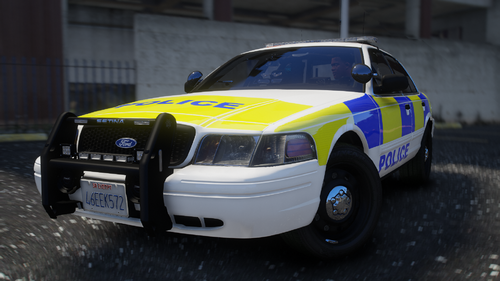
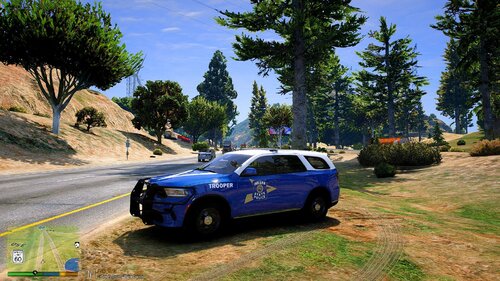
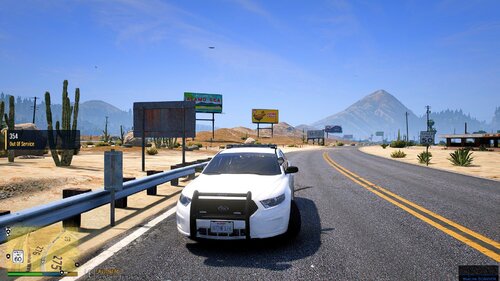
4 Screenshots

Overview:

Showcase video:https://www.youtube.com/watch?v=IZAp9k2m1kg

Traffic Stop Scenario Video:
https://www.youtube.com/watch?v=Qfp_TPufgB4

I have been told this works in enhanced with:

https://www.gta5-mods.com/tools/script-hook-v-net-enhanced

Hello All. Here is my first plugin. I have been testing some AI coding techniques and figure I would start with this. This is an open-source ScripthoookvDotnet script. Please give original credit if you change and re-upload mod. Thanks for 3,000+ downloads! I appreciate any feedback.

This is a GTA V plugin that goes into the scripts folder. This has been tested with single player mode with the latest LSPDFR running. This is designed to dynamically spawn ambient police activity across Los Santos, Blaine County, and surrounding regions. It creates a realistic, reactive environment where police units — including sitting patrols, traffic stops, and park rangers — spawn based on the player’s proximity, enhancing immersion without overwhelming the world with excessive AI vehicles.

Key Features

Dynamic Proximity-Based Spawning

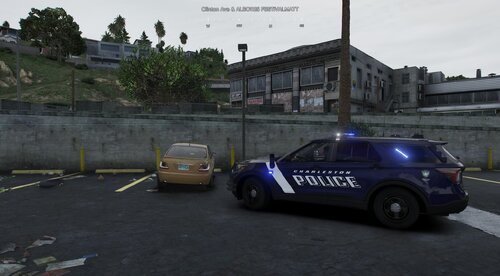
Sitting Patrols: Spawn when the player is within 500 meters of designated patrol locations. These units are idle, engines running, ready to respond if the player approaches.

Traffic Stops: Spawn when the player is within 500 meters of designated stop points. Traffic stops simulate police interactions with civilians, including ticket writing animations and vehicle pulls.

Automatic Unit Management

Each spawned unit is tracked as an ActiveUnit, preventing duplicate spawns at the same location.

Units are cleaned up automatically if they are invalid or complete their activity.

No units are removed unless their sequence (e.g., traffic stop completion) finishes — ensuring realism and consistency in the world.

Spawn Probability Mechanics

Each eligible spawn location is evaluated every 20 seconds.

V 2.2 Updated (5/10/26)

-Added K-9 scenario to traffic stop

-AI Police should now chase the player if they are wanted

-.ini file is unchanged, only copy and delete "unchanged_" if a 1st time installer.


V 2.0 Updated (2/25/26)

Changed name to "1803 Ambient Police" to stay consistent with my brand renaming and newer mods.

To update: .INI file does not need replaced, just renamed to "1803 Ambient Police.ini"

-Replace .dll and pdb files.

-Fixed siren issues, no more sirens after traffic stops end

-Cleanup/deleted patrols happen when player is out of range so it is not visible

-Added spawn check so if callout or other script occupies spawn spot, spawn spot is skipped until it is free then probability chances take effect

V 1.9 Updated (2/8/26) (Been busy pre-game (coding) on Superbowl Sunday!)

-Added notepad props to traffic stops

-Fixed pat down

-See Youtube video for new traffic stop scenarios (and a new location at the gas station!)

V 1.8 Updated (2/8/26)

- Fixed driving logic after traffic stop

-Added more locations to LS Coastal, Blaine Ranger, and LS Central Zones.

-Fixed the Paleto Forrest (highway) location

-Added an extra scenario to traffic stops, Police will either write ticket or pat down suspect.


V 1.7: (Released 2/5/26) Major update!

Now includes 10 zones, maps included in download.

.INI file updates, each zone now can customize: percentages of ambient events, cars, percentages of loca/sheriff/highway cops,

Fixed issue with sirens, police should only have emergency lights on during traffic stop and no sirens or lights otherwise.

Fixed issue with suspect and cop not driving correctly after ending traffic stop

Deleted bad locations, added some new ones

Zones: (Map included with download)

1. BlaineSandyGrapeseedSenoraFwy - Coordinates in Blaine County, Sandy Shores, Grapeseed, Senora Freeway area

2. BlainePaletoGreatOceanHwy - Coordinates in Blaine County, Paleto Bay, Great Ocean Highway area

3. SenoraLocal - Coordinates in Senora Desert local roads

4. LSSouthPort - Coordinates in Los Santos South and Port area

5. LSNEHighway - Coordinates in Los Santos Northeast Highway area

6. LSCoastalWest - Coordinates in Los Santos Coastal West area

7. LSCentral - Coordinates in Los Santos Central area

8. LSWestSheriffRanger - Coordinates in Los Santos West, Sheriff/Ranger area

9. LSIA - Coordinates in Los Santos International Airport area

10. BlaineParkRanger - Coordinates in Blaine County Park Ranger area


Traffic Stop Simulation

Traffic stops are fully scripted:

Officer exits vehicle and approaches the civilian.

Officer moves to passenger window and performs a ticket-writing animation.

Officer returns to patrol car and drives off.

Civilian drives away after interaction.

All animations, vehicle sirens, and movement are handled automatically.

Performance Considerations

Units spawn only when the player is nearby, minimizing unnecessary AI units.

Active unit list ensures no duplicate spawns at a location.

Spawn checks occur every 10 seconds, balancing performance and realism. Since duplicates wont spawn, checking every 10 seconds essential does nothing to populated AI police areas and will add some to a new/unpopulated AI area if player is driving around.

This has been tested in SP mode with the latest LSPDFR version. I have also used "clean world" commands and "Clean world" mods and units will delete and start to respawn without any crashing issues.

Edited by 1803 Creations
Added showcase video

What's New in Version 2.2

Released

Add all files except cs file to the GTA/scripts folder.

To update: INI file has not changed since V1.7, replace .dll and pdb files, INI file does not need replaced.

"1803 Ambient Police.ini" should be the name of the .ini file

Some of you gave me suggestions and I listened!

V 2.2 Updated (5/10/26)

-Added K-9 scenario to traffic stop

-AI Police should now chase the player if they are wanted

- .ini file remains unchanged

V 2.1 Updated (3/7/26)

Fixed siren issues for good: sometimes a bad spawned entity would keep siren audio on still

Siren audio suppression for first 10s of traffic stop spawn:

new method EnforceSilentSirenWindow()

Keeps emergency lights behavior while repeatedly muting siren audio every 250ms for 10s.

V 2.0 Updated (2/25/26)

Changed name to "1803 Ambient Police" to stay consistent with my brand renaming and newer mods.

To update: .INI file does not need replaced, just renamed to "1803 Ambient Police.ini"

-Replace .dll and pdb files.

-Fixed siren issues, no more sirens after traffic stops end

-Cleanup/deleted patrols happen when player is out of range so it is not visible

-Added spawn check so if callout or other script occupies spawn spot, spawn spot is skipped until it is free then probability chances take effect

V 1.9 Updated (2/8/26) (Been busy pre-game (coding) on Superbowl Sunday!)

INI file remains unchanged. No updates/replacement needed.

-Added notepad props to traffic stops

-Fixed pat down

-See Youtube video for new traffic stop scenarios (and a new location at the gas station!)

V 1.8 Updated (2/8/26)

- Fixed driving logic after traffic stop

-Added more locations to LS Coastal, Blaine Ranger, and LS Central Zones.

-Fixed the Paleto Forrest (highway) location

-Added an extra scenario to traffic stops, Police will either write ticket or pat down suspect.

V 1.7: (2/5/26)
Major update!

Now includes 10 zones, maps included in download.

.INI file updated, each zone now can customize: percentages of ambient events, cars, percentages of local/sheriff/highway cops,

Fixed issue with sirens, police should only have emergency lights on during traffic stop and no sirens or lights otherwise.

Fixed issue with suspect and cop not driving correctly after ending traffic stop

Deleted bad locations, added some new ones

Blaine Ranger and Sheriff Ranger zones spawn Ranger for the cop category. Sheriff and Highway should be their respective departments.

**Yes I am aware LS Central and Blaine Park Ranger zone only have one location each. More to come in the future. Each zone is going to have at least 5 spots. We are over a total of 50 now but not 5 for each zone yet. That is my goal for the next release.

V1.6 (Updated 1/28/26)

Added percentage chances for each zone in .ini file.

Now each zone can have its own spawn chance. For example, LSIA is 100% cop, whereas Blaine county is 50% sheriff, 30% cop, 20% highway patrol spawn chances. (Can be changed, just make sure totals add to 100 for each zone)

V1.5 (Updated 1/24/26)

Changed clean-up:

Now traffic stop units dont delete

Now sitting patrol only deletes if not moved

These changes prevent units from deleting if they join in pursuits.

V1.4 (Updated 1/19/26)

-Changed Spawn percentages for each spawn point. Probability runs if

distance checks pass and there is no emergency vehicle within 100 feet of spawn. Runs every 20 seconds.

30% sitting patrol

30% spawn nothing

40% spawn traffic stop

-Added cleanup for sitting patrol, now deletes after sitting for 2 mins.

Version 1.3:

Added a pre-spawn check and if any non-player emergency vehicles exist near (within 100 feet) of spawn point, spawn point is skipped.

This will help prevent spawning over callouts/spawned units by the game, or any map builder maps that may be spawned and contain emergency vehicles/peds.


Version 1.2:
Fixed an issue with version 1.1 not spawning in LS county zone.

Changed spawning distance

Changed traffic stop logic to properly make traffic stop inactive if a clean world mod is used (if used before, spot could stop spawning after clean up).

Version 1.1:

--Added a .ini file so you can customize which cars are in each zone, including add-on cars.

Note: LSIA will only spawn local cop cars, the other zones are needed so the script can read the .ini file format correctly.

Park Ranger spawns from Cop vehicle like LSIA zone. COP PED does appear to be ranger in game.

Senora Zone: Local Route 68 and surrounding areas like Harmony, Grand Senora Desert, Lago Zancudo.

HWY Blaine: Paleto Bay area/Great Ocean Hwy in Blaine County

Blaine: Sandy/Grapeseed/Senora Fwy

--Added more locations. Shoutout to BJUSA for the locations.

--Changed/Fixed Traffic Stops:

Traffic Stops now last 30 seconds

Pulled over car drives away first, then cop car 2 seconds after to prevent them from almost crashing into each other when ending the stop.


Short Description

Script to spawn ambient police that either sit on patrol or are engaged in a traffic stop

AI disclosure

The author has disclosed that AI tools were used in creating the following aspects of this file:

  • Mod and Mod Content (Substantial)

AI helps me create a new idea that I do not know how to code by myself

User Feedback

Recommended Comments

1803 Creations

Members Author

2 minutes ago, Legendk456 said:

Gotcha. In the future, would you consider adding custom ped support (with mp_freemode)?

For the police officers in the script? Yeah, I can look into that

Legendk456

Members

3 hours ago, 1803 Creations said:

For the police officers in the script? Yeah, I can look into that

Yeah. And I haven't looked at the code myself, but if there are lines that tell which peds should be in what vehicles (which I assume there has to be something like that), you could create variables that link to the ini which can be changed from there. What's currently there is probably S_M_Y_COP_01 or the equivalent for other departments. You could probably make that a variable and read from the ini where someone can add whichever ped, including MP_M_FREEMODE_01. Not sure how you would add the props and everything, but I'm sure there's a way. Then I'd create a fallback that if the ped wasn't valid, use default S_M_Y_COP_01. That's how I would go about it anyway. Hope this helps!

1803 Creations

Members Author

1 minute ago, Legendk456 said:

Yeah. And I haven't looked at the code myself, but if there are lines that tell which peds should be in what vehicles (which I assume there has to be something like that), you could create variables that link to the ini which can be changed from there. What's currently there is probably S_M_Y_COP_01 or the equivalent for other departments. You could probably make that a variable and read from the ini where someone can add whichever ped, including MP_M_FREEMODE_01. Not sure how you would add the props and everything, but I'm sure there's a way. Then I'd create a fallback that if the ped wasn't valid, use default S_M_Y_COP_01. That's how I would go about it anyway. Hope this helps!

Yes, exactly, I chose the default police peds so police for police, sheriff for sheriff and highway for highway. I will look into changing it

PrinceChristian

Members

(edited)

This plugin as well as the 1803 Speeders no longer works since the latest GTA update. I've already updated Script HookV Dot Net using the latest update. These plugin were working prior to the update and now they aren't so there's no issues with the INI. Any recommendations?

Edited by PrinceChristian

1803 Creations

Members Author

55 minutes ago, PrinceChristian said:

This plugin as well as the 1803 Speeders no longer works since the latest GTA update. I've already updated Script HookV Dot Net using the latest update. These plugin were working prior to the update and now they aren't so there's no issues with the INI. Any recommendations?


According to another user, Scripthookdotnet has an update that resolves the issue.

https://github.com/scripthookvdotnet/scripthookvdotnet-nightly/releases.

Make sure that is the update that you've ran and that should fix the issue.

M.Williams

Members

I havent tried this stuff out yet man, but one thing I wanted to do, was add a comment and say that I really appreciate not only your demo videos, but the detail in the descriptions you place. It has not gone unnoticed

1803 Creations

Members Author

4 hours ago, M.Williams said:

I havent tried this stuff out yet man, but one thing I wanted to do, was add a comment and say that I really appreciate not only your demo videos, but the detail in the descriptions you place. It has not gone unnoticed

Thank you! Ironically someone gave me a 1 star rating on my speeders script on the other site because they didn't read the description and said there was no install instructions, LOL!

I appreciate the kind words and feedback! If you do use/download any of my mods, let me know what you think/if you have any ideas for improvements!

occoz

Members

On 1/5/2026 at 6:46 PM, 1803 Creations said:

The two AIAmbientPolice_DefaultCars files (dll and pbd) go in the GTAV/Scripts folder. The .cs file is the open-source code that can be opened and modified in a program that can read/compile cs files if you wish to change the script. (Visual Studio is an example of a software that can do this).

Here ya go:

https://www.youtube.com/watch?v=IZAp9k2m1kg

i cant find that /scripts folder

1803 Creations

Members Author

On 4/13/2026 at 5:57 PM, occoz said:

i cant find that /scripts folder

You can create a new folder called scripts at the root of your GTAV directory and place any/all script files in there.

You also must have scripthookdotnet for these scripts to work.

Create an account or sign in to comment

Account

Navigation

Search

Search

Configure browser push notifications

Chrome (Android)
  1. Tap the lock icon next to the address bar.
  2. Tap Permissions → Notifications.
  3. Adjust your preference.
Chrome (Desktop)
  1. Click the padlock icon in the address bar.
  2. Select Site settings.
  3. Find Notifications and adjust your preference.