Skip to content
View in the app

A better way to browse. Learn more.

LCPDFR.com

A full-screen app on your home screen with push notifications, badges and more.

To install this app on iOS and iPadOS
  1. Tap the Share icon in Safari
  2. Scroll the menu and tap Add to Home Screen.
  3. Tap Add in the top-right corner.
To install this app on Android
  1. Tap the 3-dot menu (⋮) in the top-right corner of the browser.
  2. Tap Add to Home screen or Install app.
  3. Confirm by tapping Install.
Due to overzealous filtering on Microsoft’s side, some emails to Outlook and Hotmail addresses may not be delivered. If you’re affected, please use a different email address or try again later.

ApxRadio UI 1.0.0

(0 reviews)

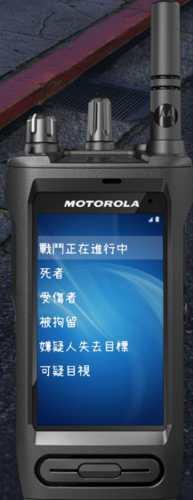
1 Screenshot

ApxRadio is a functional Motorola APX7000 style radio UI for LSPDFR. It includes a handheld and in-car radio for a nice visual display for dispatch plugins like, GrammarPolice, NexusDispatch, etc. It CAN be used with any dispatch plugin.


Early Access Build v1.0

Features include:

  • Interactive handheld and in-car radio controls

  • Three customizable zones and channels

  • Wi-Fi, Bluetooth and GPS toggle buttons

  • Custom activation and deactivation for audible voice prompts

  • GTA time synchronized day and night displays

  • Manual display switching from the in-car radio

  • Animated signal, connection and transmission indicators

  • Customizable push-to-talk keybind that can be sync'd with your dispatch plugin.

  • Power, channel selection and home controls

  • Configurable settings through apxconfig.ini

  • Custom radio sound effects when clicking buttons and turning knobs.

  • Options to hide the radio or unlock the mouse for interaction. Unlock with F9. Hide with -

ApxRadio is a visual and immersion focused plugin and does not replace your existing dispatch plugin.

Video Demo

https://www.youtube.com/watch?v=3MGMG7rbxm8


Watch the demo here.

Check the Instructions.txt file for more information on setting this plugin up. After installation, you MUST match ApxRadio’s transmit keybind to the transmit keybind used by your primary dispatch plugin if you want the "transmitting" text to appear on your radio.

Requirements:

  1. GTA V Legacy

  2. RAGE Plugin Hook

I tried to make it as "spec" as possible, I do intend on giving the in-car radio have better realism as right now it's just partial. Though if anyone has suggestions to improving please leave them in comments.

Edited by SuperPyroManiac


Short Description

A fully functional Motorola APX-style handheld and in-car radio UI compatible with any dispatch plugin.

AI disclosure

The author has disclosed that AI tools were used in creating the following aspects of this file:

  • Mod and Mod Content (Moderate)

Fixing broken code/debugging.

User Feedback

Recommended Comments

0pheIia

Members

how come this is marked as a Visual & Data file and not as a script or plugin?

Austin.Tech

Members

(edited)

Please give an option to move the placement of the radios!.

Edited by Austin.Tech

OwenAb

Members Author

5 minutes ago, Austin.Tech said:

What button do I click to turn on the radio, and can I move it?

F9 then click the top right knob to turn it on, I'll add moving it as a feature in the next update.

16 minutes ago, 0pheIia said:

how come this is marked as a Visual & Data file and not as a script or plugin?

I put in a request to have it moved to script/plugin so I'll just have to give it a few days probably, mistake on my part.

Create an account or sign in to comment

Account

Navigation

Search

Search

Configure browser push notifications

Chrome (Android)
  1. Tap the lock icon next to the address bar.
  2. Tap Permissions → Notifications.
  3. Adjust your preference.
Chrome (Desktop)
  1. Click the padlock icon in the address bar.
  2. Select Site settings.
  3. Find Notifications and adjust your preference.