Skip to content
View in the app

A better way to browse. Learn more.

LCPDFR.com

A full-screen app on your home screen with push notifications, badges and more.

To install this app on iOS and iPadOS
  1. Tap the Share icon in Safari
  2. Scroll the menu and tap Add to Home Screen.
  3. Tap Add in the top-right corner.
To install this app on Android
  1. Tap the 3-dot menu (⋮) in the top-right corner of the browser.
  2. Tap Add to Home screen or Install app.
  3. Confirm by tapping Install.

Ko's Tactical Weapon Reanimations 1.0.0

(5 reviews)

20 Screenshots

Timeline1-ezgif.com-crop.gif

Title created by me, not generated by AI.

This pack includes custom YCD ClipMotion movement reanimations.

- Choose Your Style:

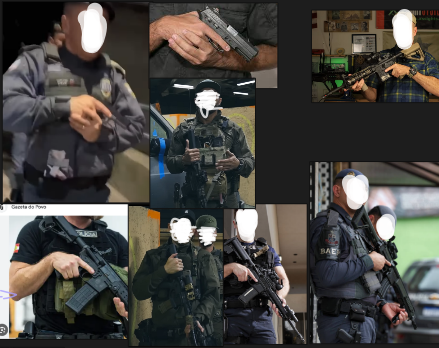
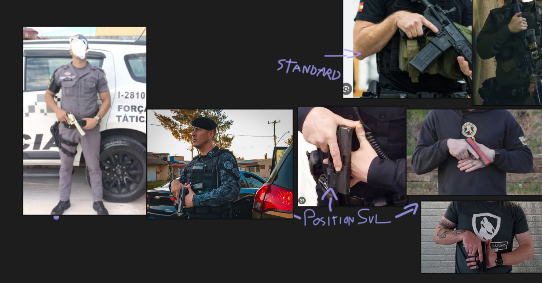
Position SUL / Temple Index / Low Ready / High Ready More CQB & Police Tactical.

The folder included in the pack allow you to choose different animation styles, including Move/Stealth/Cover.

Preview screenshots are included in each folder to help you choose your animation style.

Timeline3-ezgif.com-optimize (4).gif

All animations style are safe to use, it's recommend to test all the animations before playing game.

Be careful when using mods that replace weapon animation YCD files.

Follow Installation on README.txt

Making Off / Reference
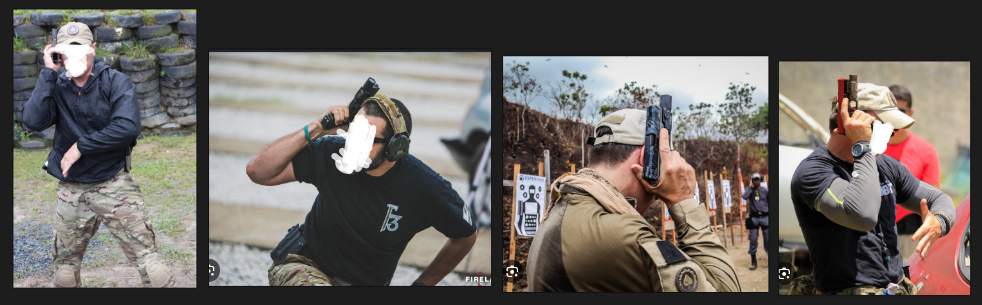
image.pngimage.pngimage.png

- Special Thanks:

ThugPlays

DehMods

Pedro

NsLziin

Beatriz

(for testing the animations and helping identify crash and bug ❤️)

Edited by Mr.KobraX
is > are / Added color text


Short Description

Choose Your Style Tactical Animation Style Gameplay

User Feedback

Recommended Comments

Code 3 Dev

Members

is it compatible with fivem ?

Mr.KobraX

Members Author

Just now, Code 3 Dev said:

is it compatible with fivem ?

i've never tried doing this in fivem, but i think its possible

PelicanzAh

Members

12 minutes ago, Mr.KobraX said:

i've never tried doing this in fivem, but i think its possible

You should try to, this is good and would love to have in my server!

Code 3 Dev

Members

i've tried not working but you should really make a fivem version would be so cool to have that in fivem

Mr.KobraX

Members Author

Just now, Code 3 Dev said:

i've tried not working but you should really make a fivem version would be so cool to have that in fivem

i idk sorry, i will try testing on my first private fivem server, thx for liking mods ;)

Cyanotic

Members

These are fantastic. Having trouble getting the stealth pistol (calm down) to work. It's possible that I've installed something in the past that's interfering though.

Lapd Code 3

Members

Bro im using these on my next episode testing them now and pardon my swearing but i fk'ing love em thank you so much for making my game more fun

OfficerAlexis

Members

Are these animations for police AI too?

Van Zeng

Members

(edited)

Can You Make The Fivem Use RPF I Really Like It

Edited by Van Zeng

Mr.KobraX

Members Author

(edited)

13 hours ago, Cyanotic said:

These are fantastic. Having trouble getting the stealth pistol (calm down) to work. It's possible that I've installed something in the past that's interfering though.

thx :D, i don't think you install wrong, idk what you using unarmed holster ready or pistol calm down, pistol calm down require you to use a pistol in stealth mode. unarmed holster ready require to you no have weapon in your hand in stealth mode. but unarmed Holster Ready can remove pistol stealth animation ,because is cause crash/bug :/

6 hours ago, Lapd Code 3 said:

Bro im using these on my next episode testing them now and pardon my swearing but i fk'ing love em thank you so much for making my game more fun

thx you s2

5 hours ago, OfficerAlexis said:

Are these animations for police AI too?

yes, but ai can't use stealth.

3 hours ago, Van Zeng said:

Can You Make The Fivem Use RPF I Really Like It

i think make soon ;), i to try setup a private fivem server to test it.

Edited by Mr.KobraX

Van Zeng

Members

I Make A RPF Use TO Fivem But It Doesn't Work Can You See it ?Ko'sWeapon

Officer034

Members

Anyway to make this compatible with the addon version of the DDM4 by TLS?

Oh also, would love reload animations of similar quality! Maybe go away from always being an empty reload, do tactical reloads, ect. Ive debated on trying to see if I can swap the Combat Shotgun (I think thats what its called, the SPAS) for the regular shotgun to actually load a full combat load. Wasnt how I was trained but its becoming more common.

Mr.KobraX

Members Author

3 hours ago, Officer034 said:

Anyway to make this compatible with the addon version of the DDM4 by TLS?

Oh also, would love reload animations of similar quality! Maybe go away from always being an empty reload, do tactical reloads, ect. Ive debated on trying to see if I can swap the Combat Shotgun (I think thats what its called, the SPAS) for the regular shotgun to actually load a full combat load. Wasnt how I was trained but its becoming more common.

i never used DDM4, i think this mod is paid, i'll think about making it compartible. also reload animation, i liked your idea, and yes it has 2 animation reload and empty reload, from what i saw, but i need confirm the ycd clipmotion limit, because the game might bug or crash.

Lapd Code 3

Members

can i use one of each folder or do i have to pick only 2

Cyanotic

Members

4 hours ago, Mr.KobraX said:

i never used DDM4, i think this mod is paid, i'll think about making it compartible. also reload animation, i liked your idea, and yes it has 2 animation reload and empty reload, from what i saw, but i need confirm the ycd clipmotion limit, because the game might bug or crash.

Yeah DDM4 is paid. A lot of people use it, myself included. I tried looking at the metas that come with it to see what needed to be edited to make it work with KTWR but I didn't have time to keep looking through them all.

Create an account or sign in to comment

Account

Navigation

Search

Search

Configure browser push notifications

Chrome (Android)
  1. Tap the lock icon next to the address bar.
  2. Tap Permissions → Notifications.
  3. Adjust your preference.
Chrome (Desktop)
  1. Click the padlock icon in the address bar.
  2. Select Site settings.
  3. Find Notifications and adjust your preference.