




Moin,
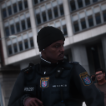
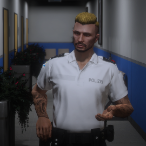
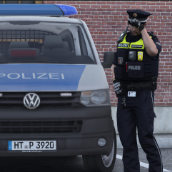
Hier das neue Gürtel-Pack aus der Zusammenarbeit von mir, Jordan, Cleav und TimLP.
Enthalten sind für den Anfang insgesamt 10 verschiedene Gürtel. Darunter 2 mit Taser X2 und 2 für die Bundespolizei.
Weitere Gürtel werden mit der Zeit released.
Das RSG lässt sich bei jedem Gürtel über die Textur verändern.
Bei diesem Pack handelt es sich um ein eigenes DLC.
Installation:
Ordner aus "Files"-> V\mods\update\x64\dlcpacks\
Darauf muss die Folgende Zeile in die dlcpacks.xml
(V\mods\update\update.rpf\common\data) eingetragen werden:
<Item>dlcpacks:/maxdesignsgoertel/</Item>
(Unter die anderen Items)
Nutzungsbedingungen:
1. Es ist strengstens untersagt, diese Datei modifiziert und / oder erneut hochzuladen
2. Es ist ebenfalls untersagt, diese Datei auf anderen Webseiten erneut hochzuladen
3. Sollte es geplant sein, diese Datei auf einem Server wie FiveM (o.Ä.) zu verweden, so wird
die klare, eindeutige, schriftlich nachweisbare Einverständnis von MaxDesigns benötigt!
Dafür bitte meinem Discord beitreten. https://discord.gg/AdbCWJ5
Viel Spaß
_____________________________________________________________________________________
Hi,
Here is the new belt pack created in collaboration between me, Jordan, Cleav, and TimLP.
For the beginning, a total of 10 different belts are included, among them 2 with the Taser X2 and 2 for the German Federal Police (Bundespolizei).
More belts will be released over time.
The RSG can be changed on every belt via the texture.
This pack comes as a standalone DLC.
Installation:
Move the folder from *"Files" -> V\mods\update\x64\dlcpacks*
After that, add the following line to your dlcpacks.xml
(V\mods\update\update.rpf\common\data)
<Item>dlcpacks:/maxdesignsgoertel/</Item>
(Place it below the other items)
Terms of Use:
-
It is strictly prohibited to modify and/or re-upload this file.
-
It is also prohibited to re-upload this file on other websites.
-
If you plan to use this file on a server such as FiveM (or similar), you must have the clear, explicit, and verifiable written permission of MaxDesigns!
To obtain this, please join my Discord: https://discord.gg/AdbCWJ5
Have fun!
Edited by MaxDesigns
Short Description
Beltkeeper: TimLP148
Gearkeeper: MaxDesigns
Handfesseln + Holster: MaxDesigns
Handschuhe: TimLP148, Jordan
Karabiner: MaxDesigns
Schlagstöcke + Holster: MaxDesigns
Magazine + Holster: Cleav
RSG: Cleav
Schlüssel: TimLP148








![[EUP] Met Custody SGT Softshell fleece](http://s3-screenshots.int-cdn.lcpdfrusercontent.com/resize/500/-/monthly_2026_05/metsoftshell.thumb.png.e4097f75eb2b1152517ba60a3dd3c088.png)
![[ELS][REPLACE] Škoda Kodiaq 2018 Czech Police Pack - 3 Variations](http://s3-screenshots.int-cdn.lcpdfrusercontent.com/resize/500/-/monthly_2026_05/20260502191956_1.thumb.jpg.e3466489ca866b63ffeeb7c0dc576069.jpg)



![[EUP] COLP](http://s3-screenshots.int-cdn.lcpdfrusercontent.com/resize/500/-/monthly_2026_05/COL_2.thumb.png.8f6eb8191867522992ea01416d182a80.png)
![[EUP] CBRN](http://s3-screenshots.int-cdn.lcpdfrusercontent.com/resize/500/-/monthly_2026_05/CBRN_2.thumb.png.f03f06680f58ccff02223a2fe99e473b.png)

.thumb.png.bd195e42a078bb7c7f3a1182f03e9694.png)
Recommended Comments
Create an account or sign in to comment