Skip to content
View in the app

A better way to browse. Learn more.

LCPDFR.com

A full-screen app on your home screen with push notifications, badges and more.

To install this app on iOS and iPadOS
  1. Tap the Share icon in Safari
  2. Scroll the menu and tap Add to Home Screen.
  3. Tap Add in the top-right corner.
To install this app on Android
  1. Tap the 3-dot menu (⋮) in the top-right corner of the browser.
  2. Tap Add to Home screen or Install app.
  3. Confirm by tapping Install.

Osceola County Sheriff EUP pack 4.0.0

(2 reviews)

13 Screenshots

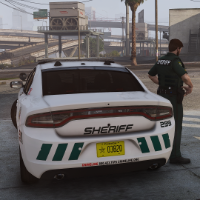
Thought I'd have a go at some Osceola uniforms as I believe the current higher quality ones are paid.


Includes:

Class A-C Shirts

Patrol & Cargo pants

Traffic Vest

High Vis Raincoat 

Texture for ThinLineSanctuary's Guardian LBV

Pyro's Pointblank Endeavour vest (Black & green variants)

Lewis H's Gang unit Plate Carrier

Vanilla EUP Vest

Undershirt (For use with coats, jackets etc)

cbear's Traverse Vest pack

ThinLineSanctuary's Beanie & Baseball hat


May update with lore-friendly at some point in the future.

No female outfits included, but they use the same textures, so feel free to use the textures provided to replace them.

Please do not redistribute 🙂


Any questions, suggestions or problems, let me know!

Discord: dannyy21__

Could contain: building, art, maroon, painting, brick, brickwork, wall, red, outdoor, painted


Edited by Dannyy

What's New in Version 4.0.0

Released

Small optional update: I've just updated the quality of Class A-C shirts so no more discoloration.

Also, added texture for Reece Design's cargo pants & new texture for Pyro's Pointblank vest with better fitting text.


Screenshots have not been updated to reflect changes.


You do not need to redownload, you can just download the 'Osceola UPDATE' file:)


Short Description

Osceola County Sheriff, Florida EUP uniforms

User Feedback

Recommended Comments

oroborus04

Members

Danny is out here making banger after banger. Nice work! 

Legendk456

Members

I just spent an entire day making my own Florida-themed skins and then you release this...


Thanks haha I'll give it a look!! Wish I found these before I did all that work LOL.

Legendk456

Members

I didn't see that some of the vests are paid. I'd like to use another vest as well, but it's probably going to be hard for me to get the color right. Would you by ANY chance be able to add the texture for the vest below? Only the left side of the texture file is the vest color. The whole right side is just the attachments, and I think only one vest texture is needed because all of them share.


Dannyy

Members Author

1 hour ago, Legendk456 said:

I didn't see that some of the vests are paid. I'd like to use another vest as well, but it's probably going to be hard for me to get the color right. Would you by ANY chance be able to add the texture for the vest below? Only the left side of the texture file is the vest color. The whole right side is just the attachments, and I think only one vest texture is needed because all of them share.


Been looking for some vests like this, I’ll get them done and uploaded by tomorrow 🙂

Legendk456

Members

(edited)

You're awesome! Also which texture compression method do you use to export your stuff? I use B8G8R8A8 (Linear, A8R8G8B8) and use Fant.

Edited by Legendk456

Dannyy

Members Author

19 hours ago, Legendk456 said:

You're awesome! Also which texture compression method do you use to export your stuff? I use B8G8R8A8 (Linear, A8R8G8B8) and use Fant.

New version with the Traverse vest uploaded:)


I use Paint.NET with the export settings below:

Could contain: text, screenshot, font, number

Untidytaper

Members

What did you use for your badge? i cant find it in the EUP menu.

Dannyy

Members Author

2 minutes ago, Untidytaper said:

What did you use for your badge? i cant find it in the EUP menu.

Which badge are you referring to?

Untidytaper

Members

Just now, dannyy said:

Which badge are you referring to?

In the fourth photo the only one without a vest on, i see a badge, but when i go into the menu to find it i dont see any badge for OCSO that looks like that one

Dannyy

Members Author

1 minute ago, Untidytaper said:

In the fourth photo the only one without a vest on, i see a badge, but when i go into the menu to find it i dont see any badge for OCSO that looks like that one

Not sure of the creator but I downloaded it here, its a generic 5 point star badge

Untidytaper

Members

1 minute ago, dannyy said:

Not sure of the creator but I downloaded it here, its a generic 5 point star badge

ohhh okay thanks for the reply

Legendk456

Members

Sorry for the late reply, thanks for adding the vest!

Legendk456

Members

(edited)

Also I hate to ask this, but could you also retexture the hat? It's located under eup_componentpeds_p.rpf > mp_m_freemode_01_p_mp_m_vinewood and is p_head_diff_000_f. Perhaps a yellow and white text version? If not, it's okay!

EDIT: Re-reading this, I don't mean this to come off demanding lol. If you would consider adding the hat, it would complete the collection haha.

Edited by Legendk456

cheetah5667

Members

great pack, is the duty belt included? cant find in game


cheetah5667

Members

(edited)

thanks wow, quick reaction time haha


Edited by cheetah5667

Dannyy

Members Author

(edited)

On 5/18/2025 at 5:30 PM, Legendk456 said:

Also I hate to ask this, but could you also retexture the hat? It's located under eup_componentpeds_p.rpf > mp_m_freemode_01_p_mp_m_vinewood and is p_head_diff_000_f. Perhaps a yellow and white text version? If not, it's okay!

EDIT: Re-reading this, I don't mean this to come off demanding lol. If you would consider adding the hat, it would complete the collection haha.

Sorry, never saw this message. I'll update shortly with a Baseball hat & beanie:)


Edit: Now updated!

Edited by Dannyy

perc30

Members

Hey I am new with .DDS files and I am trying to replace the texture to the Traverse Pack, how exactly do I do this? I tried importing the texture into the file but it came out wrong.

Dannyy

Members Author

11 minutes ago, perc30 said:

Hey I am new with .DDS files and I am trying to replace the texture to the Traverse Pack, how exactly do I do this? I tried importing the texture into the file but it came out wrong.

If you find the texture that needs replacing in the .ytd, select it and then use the replace button in the top right corner:)

Could contain: text, screenshot, software, web page, computer icon, website, font, operating system, number, online advertising, brand

Legendk456

Members

(edited)

On 6/4/2025 at 10:22 AM, Dannyy said:

Sorry, never saw this message. I'll update shortly with a Baseball hat & beanie:)


Edit: Now updated!

LOL all good. I took the liberty of doing it myself. I can send you the files if you want, or I can give you the colors to how I got it very close. Let me know which you prefer. Or actually I see you already updated I think xD

Edited by Legendk456

Legendk456

Members

Hey, so my friend and I put the OCSO badge to the LBV vest, not sure if you want to add me so I can send the .dds' to you in case you wanted to add it to your mod.

itxaydin

Members

Would it be possible to add a badge to to the other vests?

Kadzt

Members

On 6/4/2025 at 4:06 PM, Dannyy said:

If you find the texture that needs replacing in the .ytd, select it and then use the replace button in the top right corner:)


Hello! I was wondering if its a possible if you have a FiveM verison? If not totally understandable, I'm just trying to get EUP for it.

Benjaa

Members

Work on EUP 9.3?

Create an account or sign in to comment

Account

Navigation

Search

Search

Configure browser push notifications

Chrome (Android)
  1. Tap the lock icon next to the address bar.
  2. Tap Permissions → Notifications.
  3. Adjust your preference.
Chrome (Desktop)
  1. Click the padlock icon in the address bar.
  2. Select Site settings.
  3. Find Notifications and adjust your preference.









