Jump to content
View in the app

A better way to browse. Learn more.

LCPDFR.com

A full-screen app on your home screen with push notifications, badges and more.

To install this app on iOS and iPadOS
  1. Tap the Share icon in Safari
  2. Scroll the menu and tap Add to Home Screen.
  3. Tap Add in the top-right corner.
To install this app on Android
  1. Tap the 3-dot menu (⋮) in the top-right corner of the browser.
  2. Tap Add to Home screen or Install app.
  3. Confirm by tapping Install.
FiveM scripts have moved to Resources & Assets.

LSPD Character Outfits 1.0.0

(5 reviews)

5 Screenshots

This is a simple edit of the multiplayer character police outfits.  I decided to make this to complement the new character system in LSPDFR 0.4.  It is perfect for anyone who simply wants more realistic and very lore-friendly police outfits, but doesn't want all of the content and agencies included with EUP.


Main features:

  • Bigger, better, LSPD badges with improved textures.
  • Polished shine effect added to the badge and nametag.
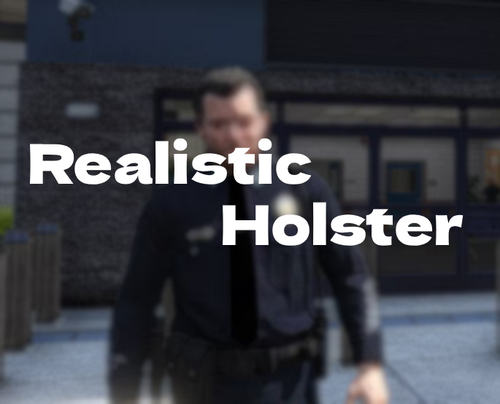
  • Gun holster added to the duty belt.
  • LAPD style Officer III, Senior Lead Officer and Sergeant rank patches.


There are a couple of other changes too:

  • The badge and rank patches use the same component slot (10), meaning that a sergeant will always have the correct sergeant badge and patches.  This also means you can wear the shirt without a badge.  It also significantly reduces the filesize and texture space required.
  • Minor texture edits which make the uniform colours more consistent.
  • The female version has been reworked to use the same shirt texture as the male version, which I think looks much better.


The models and textures should be very well optimized, and this shouldn't cause any issues with any other mods.  It can be used in addition to EUP as well.
Tested and working on LSPDFR 0.4 🙂


How to install:

Installation should be really simple, just use the OpenIV package manager.  You need a mods folder with the latest update.rpf copied into it.  This mod will not change any files, it installs itself as its own content pack.


After you install, you might need to update your LSPDFR outfit data so that everyone wears the outfits correctly.  See below for this.


LSPDFR 0.4 Outfit XML:

Use the following XML in the outfits.xml file to modify your outfit data so that everything works nicely:


Spoiler


<Outfits>
	<Outfit>
		<Name>The Cop</Name>
		<ScriptName>lspd_cop</ScriptName>
		<Variations>
			<Variation>
				<Name>Officer</Name>
				<ScriptName>m_base</ScriptName>
				<Gender>male</Gender>
				<Components>
					<Component id="1" drawable="0" texture="0" />
					<Component id="3" drawable="0" texture="0" />
					<Component id="4" drawable="35" texture="0" />
					<Component id="5" drawable="0" texture="0" />
					<Component id="6" drawable="25" texture="0" />
					<Component id="7" drawable="0" texture="0" />
					<Component id="8" drawable="58" texture="0" />
					<Component id="9" drawable="0" texture="0" />
					<Component id="10" drawable="8" texture="0" />
					<Component id="11" drawable="55" texture="0" />
				</Components>
			</Variation>
			<Variation>
				<Base>m_base</Base>
				<Name>Officer III</Name>
				<Gender>male</Gender>
				<Components>
					<Component id="10" drawable="8" texture="1" />
				</Components>
			</Variation>
			<Variation>
				<Base>m_base</Base>
				<Name>Senior Lead Officer</Name>
				<Gender>male</Gender>
				<Components>
					<Component id="10" drawable="8" texture="2" />
				</Components>
			</Variation>
			<Variation>
				<Base>m_base</Base>
				<Name>Sergeant</Name>
				<Gender>male</Gender>
				<Components>
					<Component id="10" drawable="8" texture="3" />
				</Components>
			</Variation>
			<Variation>
				<Name>Officer</Name>
				<ScriptName>f_base</ScriptName>
				<Gender>female</Gender>
				<Components>
					<Component id="1" drawable="0" texture="0" />
					<Component id="3" drawable="14" texture="0" />
					<Component id="4" drawable="34" texture="0" />
					<Component id="5" drawable="0" texture="0" />
					<Component id="6" drawable="25" texture="0" />
					<Component id="7" drawable="0" texture="0" />
					<Component id="8" drawable="35" texture="0" />
					<Component id="9" drawable="0" texture="0" />
					<Component id="10" drawable="7" texture="0" />
					<Component id="11" drawable="48" texture="0" />
				</Components>						
			</Variation>
			<Variation>
				<Base>f_base</Base>
				<Name>Officer III</Name>
				<Gender>female</Gender>
				<Components>
					<Component id="10" drawable="7" texture="1" />
				</Components>
			</Variation>
			<Variation>
				<Base>f_base</Base>
				<Name>Senior Lead Officer</Name>
				<Gender>female</Gender>
				<Components>
					<Component id="10" drawable="7" texture="2" />
				</Components>
			</Variation>
			<Variation>
				<Base>f_base</Base>
				<Name>Sergeant</Name>
				<Gender>female</Gender>
				<Components>
					<Component id="10" drawable="7" texture="3" />
				</Components>
			</Variation>
		</Variations>
	</Outfit>
</Outfits>


Alternatively, just replace your default outfits.xml with this one:

outfits.xml

User Feedback

Recommended Comments

TheSteel

Members

Only 1 Agency to have a decent uniform for. lol.

Relevant

Members

Will this ever be included as part of 0.4? Or always as a standalone?

TattooDude

Members

Awesome pack! The uniforms look really good for LSPD now. I was using them just now. Thanks for the simple OIV install. Keep up the good work.

271590_screenshots_20190226222621_1.jpg

neotyrant

Members

confused...


can u make more clear how to install it?


if u show the installation path...would be great~


(edited)

6 minutes ago, neotyrant said:

confused...


can u make more clear how to install it?


if u show the installation path...would be great~


use open iv package install lol there is no path first click edit mode. then this key then install in mods folder. 

Screenshot_1.png

Edited by Officer Nolan Cooper

neotyrant

Members

(edited)

I cannot see the .oiv file in the downloaded file.


only one content file and one xml in the file.


totally confused. lol ~


Edited by neotyrant

  • Management Team
5 minutes ago, neotyrant said:

I cannot see the .oiv file in the downloaded file.


only one content file and one xml in the file.


totally confused. lol ~


The downloaded file is an OIV file.

neotyrant

Members

which one u means???  EUP mod file by alex or mpuniforms file by sam???


yes, eup file has oiv.   but sam's file hasn't.


this archive dose not have oiv file.  inside.


check it out~

mpuniforms.zip

emptw1

Members

(edited)

I've just tried to download this, but it doesn't appear to be working (I'll try again later, could be an issue on my end).


That said, when trying to download the file, I see this: Your download 'mpuniforms.oiv' (2.04 MB) will start shortly.

So it is trying to download a .oiv file for me. You shouldn't find the .oiv file inside the archive, as the archive itself is a .oiv. 


.oiv files can be unzipped just like .zip or .rar files, are you sure you're not downloading a .oiv file and you're unzipping it?


EDIT: Suddenly, right after typing this comment, I was able to download the file no problems, probably on my end. It's definitely a .oiv for me.

Edited by emptw1

neotyrant

Members

thx for helping me out anyway.  but still cant find .oiv in the downloaded file except 2things (content file and assembly.xml).

Sam

Community Founder Author

It should be really simple to install.  All you need to do is download the file - the file is the .oiv file - do not open or extract it, just download it.  Once you have downloaded it, run Open IV and select GTA V, then click Tools and choose Package Installer.


Choosing Package Installer will bring up a file picker window.  Select the mpuniforms.oiv file and that's it.


It's really really easy.


2 minutes ago, neotyrant said:

thx for helping me out anyway.  but still cant find .oiv in the downloaded file except 2things (content file and assembly.xml).


Stop looking IN the file.  The file IS a .oiv.  You do not open it unless you know what you are doing.  You let Open IV's Package Installer open it.

neotyrant

Members

u mean archive is  a .oiv????


Sam

Community Founder Author

2 minutes ago, neotyrant said:

u mean archive is  a .oiv????


The thing you get when you click download on this page is an .oiv

neotyrant

Members

Oh...thx sam~ u r right.


finally I solved it.

Fox7

Members

Oh my gosh this is just perfect! It was driving my insane not having a holster and gun on my hip. Now with your mod i have that AND a nicer looking uniform. Thank you for your time and effort on this.

TheLordEmperor

Members

(edited)

I'm using the Steam version. For me the game crashes now with this OIV package because "Game files are corrupted" (I chose install in game folder directly because don't have OpenIV.asi)

I'm currently restoring the files with my backup folder. Why is this happening, what was my mistake ?


EDIT0: with the old update.rpf (from my backup folder) the game starts. I'll see if it works correctly or not soon.

EDIT1: My name is Candide. It doesn't work (and it's normal). So, my game is return to normal and I'll test with OpenIV.asi

EDIT2: It works perfectly now, thanks for this @Sam

Edited by TheLordEmperor

Melodie

Members

I just tried this and it looks great, but it seems regular officers are not wearing any badges now?

Sam

Community Founder Author

58 minutes ago, Melodie said:

I just tried this and it looks great, but it seems regular officers are not wearing any badges now?


Use the outfit config provided.

JohanB

Members

@SamJust wanted to say I love seeing you engage this actively with the community and getting involved and tons of stuff. Also wanted to say good job on 0.4, it's awesome

patchadams69

Members

Any way to contribute a few bones to you guys for your work?

Melodie

Members

(edited)

How do I apply the outfit config provided exactly?

Edited by Melodie

Sam

Community Founder Author

1 hour ago, Melodie said:

How do I apply the outfit config provided exactly?


We have a lot of new data files in LSPDFR 0.4 which you can use to customize the mod to your liking and there's quite a lot on our wiki about them.  The one you're looking for is called outfits.xml and it has the default police outfits defined in it.  Just replace it with the one I provided here:

outfits.xml

Lspdfr Officer Mike

Deactivated

When are the outfits for the other agencies coming out ? like the fib, Sherrif, Corrections and Park ranger? we only have lspd and IAA at the moment.

Create an account or sign in to comment

Account

Navigation

Search

Configure browser push notifications

Chrome (Android)
  1. Tap the lock icon next to the address bar.
  2. Tap Permissions → Notifications.
  3. Adjust your preference.
Chrome (Desktop)
  1. Click the padlock icon in the address bar.
  2. Select Site settings.
  3. Find Notifications and adjust your preference.