
Skip to content
View in the app

A better way to browse. Learn more.

LCPDFR.com

A full-screen app on your home screen with push notifications, badges and more.

To install this app on iOS and iPadOS
  1. Tap the Share icon in Safari
  2. Scroll the menu and tap Add to Home Screen.
  3. Tap Add in the top-right corner.
To install this app on Android
  1. Tap the 3-dot menu (⋮) in the top-right corner of the browser.
  2. Tap Add to Home screen or Install app.
  3. Confirm by tapping Install.

Realistic Time Cycle v5

(16 reviews)

9 Screenshots

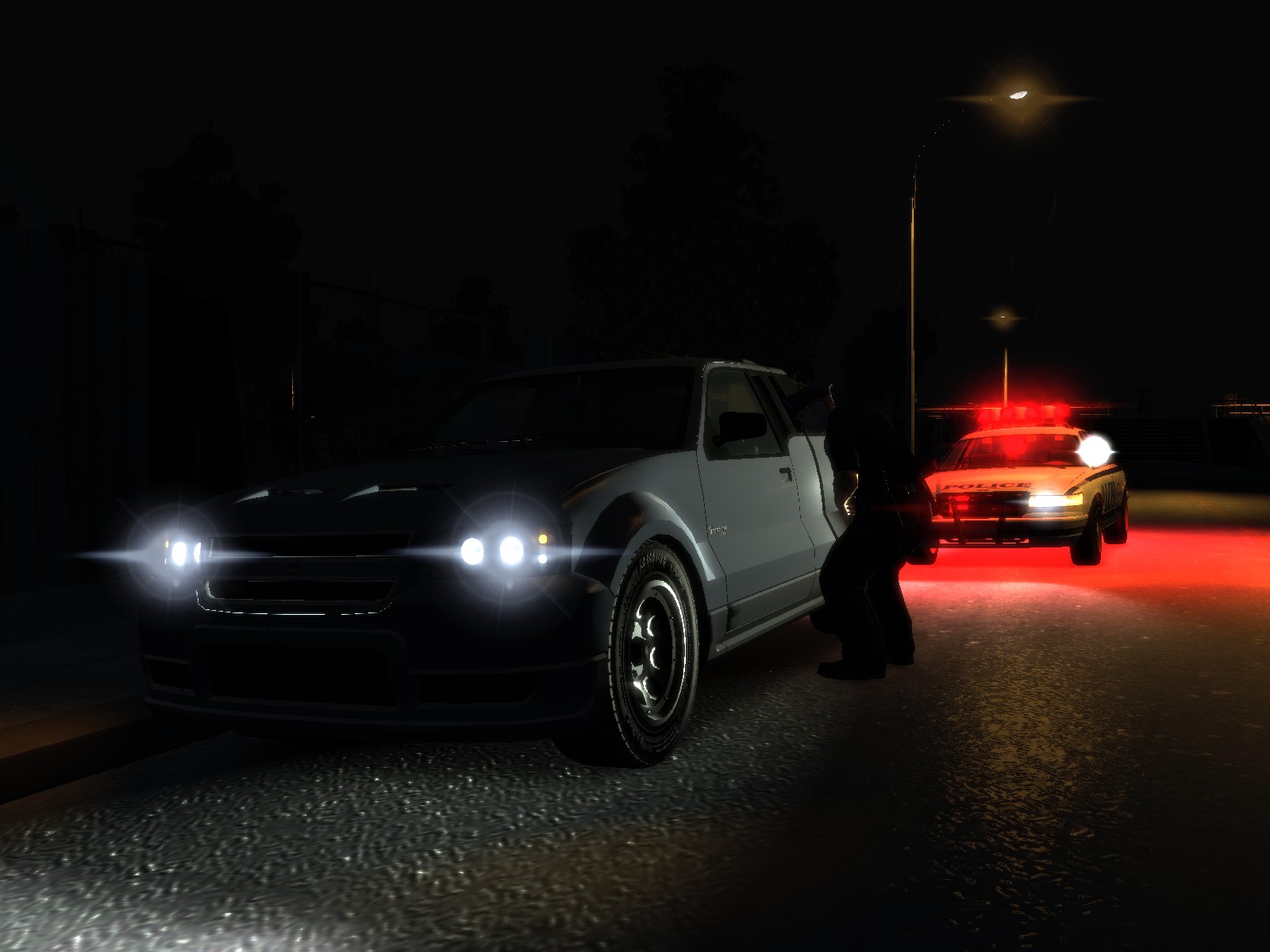
Realistic Time Cycle is a timecyc.dat modification that gives you enhanced graphics, featuring brighter daytime, darker nights, increased reflections, realistic headlights etc.

This mod works on all patches, however it has not been tested with ENB or iCEnHancer.

For those who have the noise effect or grain filter problem, you need to open up The Lost and Damned DLC, when you're in game, go to Display, and turn the Noise Effect off. After that GTA IV or TBoGT won't have the noise effect / grain filter on anymore.

User Feedback

Recommended Comments

Caesar

Members

Looks nice :D

BroCop

Members

I'll try it out on Icenhancer as soon as I get the missing texture bug worked out.

Deactivated Member

Deactivated

Even without another ENB installed everything was a bit blurry, Early morning was blurred beyond words., It does seem nice though.

Sgt.Kanyo

Members Author

Blurred? I don't know I tried disabling DOF in this mod, and with definition on, it doesn't look blurry here. Can you explain what you mean?

lynyrdskynyrd

Members

man great pics!!just a question..what fcv is that?? i've got one like that but..the wheels are different..is your modification?? or i can find that fcv around here?

szuperzsaru

Members

Hi! I install this mod, but my game is very grainy... why? o.O

BroCop

Members

Confirmed: It does not work with icENHANCER 2.1. Brightness can be described as nuclear explosion, and the screen is a giant pile of grain. It's a shame too, I used RTC 4 before ICE and really liked it.

OfficerT

Members

same thing mine is grainy and looks nothing like what the pictures do. It is like an antena TV over the air instead of from cable its never good quality. that is what it is like. any help to fix this would be great!!

0 Seven

Members

Night time was great, sharp as a pin and the car reflections and lights were nice, soon as morning came it went very very grainy (i have a good system my settings are pretty much maxed out) and the roads looked like they were made of chrome and it wasn't even raining!

OfficerT

Members

that is what it was for me except opposite. my was very grainy and terrible. Daytime wasnt too bad but had some grainy texture to it

OfficerT

Members

so i think i followed instructions right I replaced the Common and Pc folders with ones downloaded. is that correct?

Thats what i did and it was really grainy so if i did that wrong or if there is a better way let me know

HookerHeels

Members

Will try! As most ENBs won't work on my game..idk why not.. but yea...

JMcCormack24

Members

can someone assist me in removing this?

Lil_phiya

Members

Get the grainy look. Got a fix?

drdetroit

Members

What changes from RTCv4?

Sgt.Kanyo

Members Author

To those who have this grainy looking thing, what patch are you using? I'm on the latest patch, and I have no grainy textures at all. Also this mod was intended for those people who don't want or cannot use ENB, so I suggest not using it with ENB. Also have you added the shaders folder too?

0 Seven

Members

To those who have this grainy looking thing, what patch are you using? I'm on the latest patch, and I have no grainy textures at all. Also this mod was intended for those people who don't want or cannot use ENB, so I suggest not using it with ENB. Also have you added the shaders folder too?

Sgt.Kanyo

Members Author

The chrome roads is unfortunately part of the mod. You can't increase car's reflection only, you can only increase the so called Global Reflection, and therefor it changes the reflection of everything. I have no idea what imbecil thought at rockstar that roads tend to reflect stuff, but yeah. Anyway my friend tried it on patch 1.0.4.0 and 1.0.7.0 and he has no grain / noise filter. Is it possible that this grain filter is caused on your end? I'm not saying it doesn't exist, just that I can't recreate the grain filter here. Can you try installing only the visualsettings.dat and the timecyc.dat and leave the shaders folder alone? That really shouldn't be the problem, since I'm using those exact shaders folder, but let's give it a try.

0 Seven

Members

The chrome roads is unfortunately part of the mod. You can't increase car's reflection only, you can only increase the so called Global Reflection, and therefor it changes the reflection of everything. I have no idea what imbecil thought at rockstar that roads tend to reflect stuff, but yeah. Anyway my friend tried it on patch 1.0.4.0 and 1.0.7.0 and he has no grain / noise filter. Is it possible that this grain filter is caused on your end? I'm not saying it doesn't exist, just that I can't recreate the grain filter here. Can you try installing only the visualsettings.dat and the timecyc.dat and leave the shaders folder alone? That really shouldn't be the problem, since I'm using those exact shaders folder, but let's give it a try.

Sgt.Kanyo

Members Author

Nope it's definately not that. I've seen this noise effect bug, but only with patch 1.0.6.0 I think, I could fix it by turning a value to pitch black, but in the meantime it kind of ruined the graphic mod as well. I haven't seen that bug pop up since. What makes it weird though is that some people have it at night, where that value is on pitch black by default, so it shouldn't even be there. But like I said, I can't see this noise effect anywhere. Not in GTA IV, not in TLAD, and not in TBOGT. I have a gtx570 video card btw.

JohnDoe

Members

I've got the same problem... I have no other "graphic enhancers" installed and I get that grainy filter. Version 4 did work for me, though.

Sgt.Kanyo

Members Author

I've just checked TLAD and I can turn on the noise effect there by going to display, and I can get the exact result as you, but only in TLAD, and it can be turned off. So it seems I don't have any mods that'd alter the noise effect. Have you tried without the new shaders folder?

woody5503

Members

its to grainy for me....almost there

Sgt.Kanyo

Members Author

I got it. It's really retarded, but it works. All you have to do is open up TLaD go to display settings and disable the noise effect. After you disable the noise effect, it somehow turns it off for GTA IV and TBOGT as well. Don't ask me how, but it worked. I turned on the noise effect in TLAD, and then I had the same bug like you did. Having grainy stuff in GTA IV, then I went back to disable it, and tadaa GTA IV doesn't have the noise effect or grainy filter.

Create an account or sign in to comment

Latest Mods

Account

Navigation

Search

Search

Configure browser push notifications

Chrome (Android)
  1. Tap the lock icon next to the address bar.
  2. Tap Permissions → Notifications.
  3. Adjust your preference.
Chrome (Desktop)
  1. Click the padlock icon in the address bar.
  2. Select Site settings.
  3. Find Notifications and adjust your preference.








