
Skip to content
View in the app

A better way to browse. Learn more.

LCPDFR.com

A full-screen app on your home screen with push notifications, badges and more.

To install this app on iOS and iPadOS
  1. Tap the Share icon in Safari
  2. Scroll the menu and tap Add to Home Screen.
  3. Tap Add in the top-right corner.
To install this app on Android
  1. Tap the 3-dot menu (⋮) in the top-right corner of the browser.
  2. Tap Add to Home screen or Install app.
  3. Confirm by tapping Install.

Gta Iv Enb Series Mod Red Bug SKY FIX 1.11

(11 reviews)

18 Screenshots

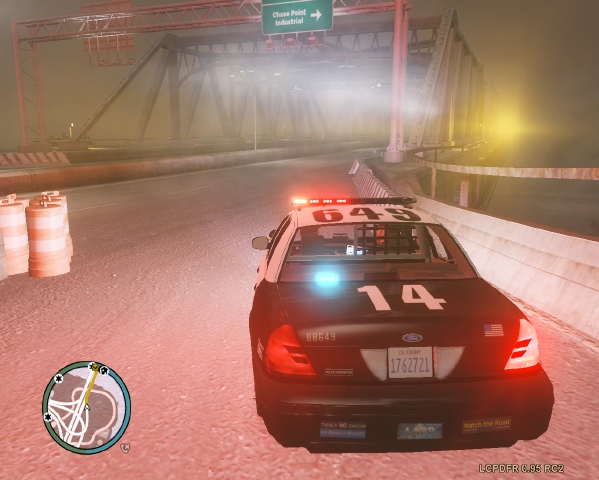
This is a second release of my ENB mod that is originally named Gta Iv Enb Series Mod. This upload will fix the red bug sky issue. The sun will be visible during the day, the moon & stars will be visible at night time. To Install Just Simply Run The exe file and when it asks you where to install this mod, select your Grand Theft Auto Folder/Common/Shaders/ Then your done.

What's New in Version 1.11

Released

  • No More Red Sky Bug.
  • +Moon Showing At Night
  • +Stars Showing At Night
  • +Sun Showing During The Daytime.

User Feedback

Recommended Comments

Carrythxd

Members

Ooh :o Nice one, thx! :D

Pengi

Members

How frame intensive is it??

Cuz Fraps takes like 15 so I dont really like using ENB's that take a lot of frames!

Bardeous

Members

i still get the red sky bug

Bardeous

Members

i still get the red sky bug but usually around 20:00

Wayne George

Members Author

Honestly, I haven't noticed any performance drop so you should be alright. I don't believe it's intensive at all.

How frame intensive is it??

Cuz Fraps takes like 15 so I dont really like using ENB's that take a lot of frames!

Wayne George

Members Author

Strange because that hasn't happened for me. Ever since i installed it i have not received anymore red sky bug.

i still get the red sky bug

Wayne George

Members Author

No problem:)

sdpd

Members

i still get the red sky bug

if that's the case thanks for the heads up, not downloading considering i rarely get the red sky on my custom enb file.

TUNES

Members

Thanks Bro, It works

Wayne George

Members Author

no problem. Glad it works for you and your enjoying the fix

Thanks Bro, It works

xX82XxMadMoniE

Members

how do i install this! and will a GTX 650 overheat if i use?

looks wounderful greate work!

Wayne George

Members Author

All you need to do is run the setup and when it asks you for the location to where to install the mod, Click Browse, Go to your main GTA IV folder/Common/Shaders and thats all. Thanks for the compliments too:)

how do i install this! and will a GTX 650 overheat if i use?

looks wounderful greate work!

Pengi

Members

Hey man, so I put it in and all but it doesnt look anywhere near the pics you have showing it!!!!

James

Members

That's a huge sun.

Wayne George

Members Author

Yup Lol.

That's a huge sun.

Ryllic27

Members

How can I uninstall this? It's lowering my framerate and it didn't even work. The game looks the same. The uninstaller in the shaders folder doesn't work either. Any help please?

OFFICERDRANGUS

Members

While this one doesn't cause the red sky bug, it conflicts with LCPDFR...

OFFICERDRANGUS

Members

It would be nice of you to put a note in the description saying that you will have to uninstall the game and reinstall everything if you want to get rid of this....

Gorgon

Members

install in game folder?

avengedtaco15

Members

is there an auto uninstaller I uninstalled or replaced all of the shader files and both visual settings and deleted the enb named files in the main directory is there anything else to uninstall I get low frames with it

Officer0Ford

Members

Thankyou Bayareabuggs Best fix no bugs at all,good youtubing mate

Create an account or sign in to comment

Latest Mods

Account

Navigation

Search

Search

Configure browser push notifications

Chrome (Android)
  1. Tap the lock icon next to the address bar.
  2. Tap Permissions → Notifications.
  3. Adjust your preference.
Chrome (Desktop)
  1. Click the padlock icon in the address bar.
  2. Select Site settings.
  3. Find Notifications and adjust your preference.










