Skip to content
View in the app

A better way to browse. Learn more.

LCPDFR.com

A full-screen app on your home screen with push notifications, badges and more.

To install this app on iOS and iPadOS
  1. Tap the Share icon in Safari
  2. Scroll the menu and tap Add to Home Screen.
  3. Tap Add in the top-right corner.
To install this app on Android
  1. Tap the 3-dot menu (⋮) in the top-right corner of the browser.
  2. Tap Add to Home screen or Install app.
  3. Confirm by tapping Install.

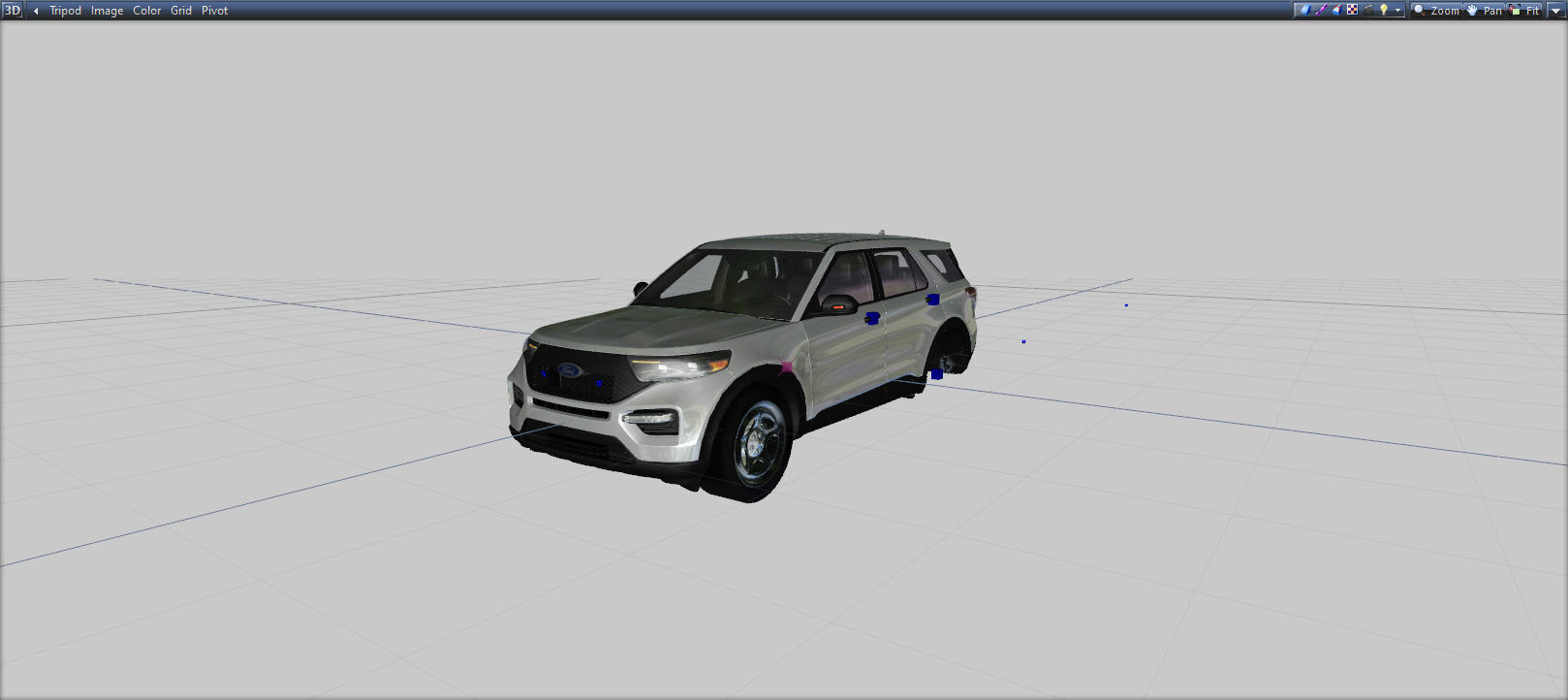
[DEV] 2020 FPIU 1.0.0

4 Screenshots

purchased and ported by me a few months ago, finally here for a dev release

includes a tow hitch by default and custom FPIU mirror lights as well

better than other FPIU models in some areas, worse in other areas (no hood/trunk animations atm).

What's New in Version 1.0.0

Released

added template download

User Feedback

Recommended Comments

Samthegreat123

Members

so whats the differences from your model to krazzys 


Sohl

Members

11 minutes ago, Samthegreat123 said:

so whats the differences from your model to krazzys 


this one doesnt have the roof racks and on krazzys there were little slits in the roof because of it

is there a template for it?


JackTheDev

Members

Okay yes. It's a hell of a lot better than Krazzys, but I don't get why you kept the boot in the body shell but a dev would still have to do a lot of work before it would be an actual decent base. For Example, there is still holes in the doors in places. It also seems you took a single polly from the rear left seat pluss the seat belt is just floating. But it's easily the one of the best free bases we have. 

otatoprm

Members

idk why everuone wants to buy a 2020 base, but its really not worth it. Just use hp's base it's the best one out there, all it needs is a little bit of work. his interior as well is 3d, the rest so far isn't. save your money honestly

MarkTheDev

Members

Your a legend.

SentryGunMan

Members Author

16 hours ago, Samthegreat123 said:

so whats the differences from your model to krazzys 


krazzy's explorer: is an ST not an interceptor,  has the rims from a 2016 FPIU, has DRLs which the interceptor does not, has quad exhaust, and appears to not have functioning interior dials

4 hours ago, Gump said:

For anyone wondering what it looks like in game:
-pics-

looks good, just remember to disable mipmaps on your skin and also meta edit to remove the tint, I still never properly mapped this thing for tinting yet.

Samthegreat123

Members

3 hours ago, SentryGunMan said:

krazzy's explorer: is an ST not an interceptor,  has the rims from a 2016 FPIU, has DRLs which the interceptor does not, has quad exhaust, and appears to not have functioning interior dials

looks good, just remember to disable mipmaps on your skin and also meta edit to remove the tint, I still never properly mapped this thing for tinting yet.

Srry, Im quite late. Anyways thanks for the info. Now I need to wait for my county to use this car so I can make it.

puppytreats4u

Members

OwO, what's dis?

Tactical Donut

Members

(edited)

I like this a lot better than HP's base, not sure why people keep using that one. 

Pros:

  • You support a dev that releases quality content for free
  • It has the chance of being updated in the future
  • Dials work
  • Textures are actually included so you don't have to individually extract them from zmod only for OpenIV to fail to import them or import them with the wrong compression or mip-map levels
  • There are window collisions, because some people actually care about realism
  • The template doesn't need to be remapped, because some people actually care about attention to detail
  • There aren't random holes in the grille and grille covering, because some people actually care about attention to detail
  • The textures are small enough so your YTD isn't 17 mb, because some people actually care about game performance
  • Template is actually included so you don't have to extract it from the UV mapper or go to the comments to find it only to discover it's completed screwed up and needs to be remapped, because some people actually care about ease of use and quality
  • Body parts are cleanly divided into sections so they can easily be selected with the separated tool if you need to remap the body for whatever reason

Cons:

  • Trunk doesn't open
  • Holes in doors (only visible when doors are open, which can be corrected by merging the door panels from HP's FPIU)
  • Seems way over-scaled, at least compared to HP's
  • Interior is 2D for the most part (textures are high-quality enough that it doesn't really matter though)
  • Steelie texture looks low-quality
  • Tires look completely bare (i.e. no treads)
  • No LODs (but HP's doesn't have them either)

Edited by Tactical Donut

Prestoniskey

Members

(edited)

No YTD?

I tried creating one and the model bugged the frick out

Capture.JPG

Edited by Prestoniskey

TKPhantom

Members

On 11/29/2020 at 6:01 PM, Prestoniskey said:

No YTD?

I tried creating one and the model bugged the frick out

Capture.JPG

I am having the same issue


OfficerGlover

Members

^It looks fine in-game

SentryGunMan

Members Author

On 11/29/2020 at 8:01 PM, Prestoniskey said:

No YTD?

I tried creating one and the model bugged the frick out

Capture.JPG

Sorry I haven't checked LCPDFR in forever, it only looks like that in OpenIV. It's because I duplicated the back side of the doors as a quick and easy to prevent them from being fully see-through. Ends up looking fine ingame.

Trp. Keaton

Members

(edited)

How would I go about fixing this, I have tried everything, even remapping and still nothing. 20201229051452_1.thumb.jpg.435ce392b4da5e511f78ee55f44c3252.jpg

Edited by Trooper Keaton

On 12/29/2020 at 6:16 AM, Trooper Keaton said:

How would I go about fixing this, I have tried everything, even remapping and still nothing. 20201229051452_1.thumb.jpg.435ce392b4da5e511f78ee55f44c3252.jpg

Either you're missing a texture or the UV mapping is not what you're intending it to be

Pls put a setina rambar and a light bar. will be the best 2020 fpiu on lspdfr

Create an account or sign in to comment

Latest Mods

Account

Navigation

Search

Search

Configure browser push notifications

Chrome (Android)
  1. Tap the lock icon next to the address bar.
  2. Tap Permissions → Notifications.
  3. Adjust your preference.
Chrome (Desktop)
  1. Click the padlock icon in the address bar.
  2. Select Site settings.
  3. Find Notifications and adjust your preference.












