


Creators: Due to background reprocessing of files, approvals and file security checks may be delayed. Thanks for your patience.

TheWhiteEagle
Members
-
Joined
Everything posted by TheWhiteEagle
-
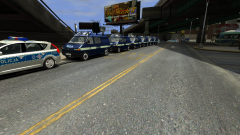 Man... When there is match in Poland a lot of T4s an Sprinters are parked in a row :)
 -
No problem bud. I like the Swift. It was somewhere between 30 - 40 mins
-
Nice video bud!
-
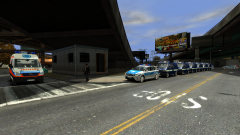
From the album: Polish Emergency Services
Polish President is coming to LC to open new Bus Depot. Police has a lot of work. On pictures we can see their T4s and two Kia. Paramedics are there too with their Sprinters. -
From the album: Polish Emergency Services
Polish President is coming to LC to open new Bus Depot. Police has a lot of work. On pictures we can see their T4s and two Kia. Paramedics are there too with their Sprinters. -
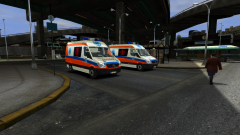
From the album: Polish Emergency Services
Polish President is coming to LC to open new Bus Depot. Police has a lot of work. On pictures we can see their T4s and two Kia. Paramedics are there too with their Sprinters. -
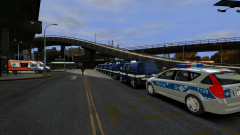
From the album: Polish Emergency Services
Polish President is coming to LC to open new Bus Depot. Police has a lot of work. On pictures we can see their T4s and two Kia. Paramedics are there too with their Sprinters. -
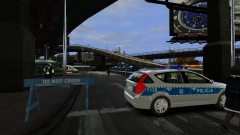
From the album: Polish Emergency Services
Polish President is coming to LC to open new Bus Depot. Police has a lot of work. On pictures we can see their T4s and two Kia. Paramedics are there too with their Sprinters. -
-
O_O You really like making paintjobs. I hate doing them. btw Good Job!
-
Nice! My bud was looking for a few of them :)
-
-
Looks nice bud :)
-
![[WIP] Mercedes-Benz Sprinter Polish Ambulance](//s3-gallery.int-cdn.lcpdfrusercontent.com/gallery/album_2016/sml_gallery_95623_2016_61505.png)
From the album: Developer Stories
Thanks to JayOne87 for providing me unlocked model. Lights: 1x Elektra LZP Lightbar 2XW with audio speaker (Elektra GES110 Siren) 1x Elektra LBX-10T (Old type) Strobe Blue 6x White non-emergency lights 2x Wesem 6LPR grill lights Coming soon! -
 Thanks :D. I've converted it from Emergency 4 (my Polish buddies made them) and I have improved it.
 -
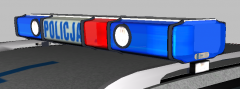
From the album: Developer Stories
To make my Polish Emergency Car More real I've converted accurate model of Elektra LZP! -
-
Good job bud. I like Vision Alert Version
-
Try running it offline (turn off your internet if you are online)
-
1.Re-install your GTA 2.If this won't help re-Install graphic card driver 3.If this won't help re-install your system 4.If this won't help - YOU HAVE F****D UP YOUR GRAPHIC CARD!
-
One of your car mods is making this problem. I have this problem with one of my models (when I replaced it with other car it started working fine)
-
The texture "police_sign_1" is transparent, so it looks like that. Rename and copy template from pack to your textures folder.
-
You should remap it to other material (for example "black mesh"). It worked fine for me after this little fix :)
-
I check website everyday :)
-
Maybe I'll try if I have free time :)

![[WIP] Mercedes-Benz Sprinter Polish Ambulance](http://s3-gallery.int-cdn.lcpdfrusercontent.com/gallery/album_2016/sml_gallery_95623_2016_61505.png)
