


Sentinel55
Members
-
Joined
-
Last visited
Everything posted by Sentinel55
-
 No.
No. -
Hast du seitdem es noch ging etwas verändert?
-
Thanks! Let me know if you need any help. I don't really know that at the moment. Thanks! Use the picture.
-
Yes.
-
Thanks a lot!
-
I can try. Within the next year.
-
From the album: Work in Progress V
WIP -
 Thanks.
 -
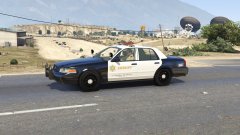
Because I don't know how long it takes to finish the conversion. Period. If everything goes well, I can release the car in a few weeks. But, if something goes wrong, or I just don't want to work on the car for a few months, you'll just have to wait. That's it.
-
No. How long does it take to finish the conversion? I have absolutely no clue myself.
-
Kinda.
-
Yes, without a doubt.
-
It looks great actually!
-
Not really, I'm using a vanilla lightbar at the moment.
-
Of course! I want to upload a midnight picture in the next hours. Maybe tomorrow
-
There is no ELS. It would be a vanilla styled lightbar anyways. I don't want to slag my own work, but the LASD pack I've uploaded some months ago is crap compared to this one. Thanks by the way!
-
I don't know. Probably within the next year. The lightbar has no function at the moment, but the car remains the same, doesn't matter how far you go away. Yes. Well, that's true. I didn't knew that. I'm not using your Arjent again, sorry if I caused any trouble to you. I'll try my best!
-
From the album: Work in Progress V
WIP -
-
Bekommst du irgendeine Fehlermeldung? Neuster Patch? Scripthook? Crack? Ein paar Informationen brauche ich.
-
Bekommst du immer noch die oben genannte Fehlermeldung?
-
Kein Problem! Wenn du noch Fragen hast dann stell sie einfach. Meistens findet sich eine Lösung. ~ Sentinel
-
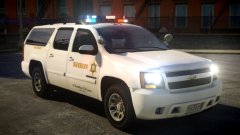 I have a functional DROT MX-7000. You can use it if you want to.
 -
Hi! Du musst nach dem Kauf erstmal auf eine E-mail warten. Speicher das Spiel, dann gehen 6 Stunden vorbei.
-
Probier die Links aus.


