


Sheriff Van Dyck
Members
-
Joined
-
Last visited
Everything posted by Sheriff Van Dyck
-
I hope that all of you be reading this right now: I feel really happy. Fixing this thing took me this 2 days and all of this night, now i can go to sleep! (Just for a while) LOL @Powler, bro i really appreciate your help, thanks a lot for your time and ideas, really helped me. And also thanks a lot to all of you guys for taking your time to help me. I've tried everything you said and i got rid of my problem in about 70%. Here's what i did: Get up my graphics settings to 745mb, my draw distance and distance quality in 50/50, traffic density over 25/30, found a TCS that works for a longer time instead of the other, changed from Ice to a lighter ENB, changed my road textures, and change some things on my commandline. It works great now, even the game looks better and much more realistic, btw somehow game crashes after 1 or 2 hours (guess the game run out of memory) but i reboot my system and then go play again (that's the sacrifice, LOL). Hope the game stills the same until the day i die. I don't know how to thank to all of you, i know it's not enough but if you like any of my mods or anything you need you can ask me and i will send it to you, and hope this works for all da people having the same problem. I send you my best regards and greetings from Mexico, to all of you. THANK YOU! Gracias! PD: You are the masters, keep it cool!! mhmmm... this is kinda embarrasing. I changed the wrong name section on my profile. Don't put attention to that.... Sorry had to said that for you to don't confuse me with someone else...
-
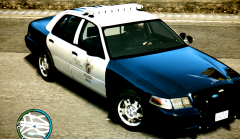 On Google Images, google ford or dodge or any brand rim textures or simply "ford rims models" for this one i guess that is ford crown victoria rim textures ie "wheel rim textures thread"
 -
I did it, twice. And still have the same, idk what is the cause of that, even on the fresh installations i try to see if there was a mod causing it, tried one by one, and without mods is the same. All the traffic fixes i've tried make this bug bigger
-
Oh great bro!! I'll be very grateful if u could send it to me, if you want any of my mods you can ask me for them too :D
-
Thanks a lot bud, i've changed my modded gtxd.img and the thing was a lot better, but i still stucked in the same fuq bug :( Hope R* release some 1080 patch LOL Thanks again bud, :)
-
The police cars too? Did it fixed it for you?
-
Sure but i only use 4 scripts, counting on a traffic fix, and just put ten real cars, i think it's not a big deal, its getting me really angry every day!!!
-
Silmory yes, it is :)
-
lynyrd if you want any texture n your wheels just google them on google images, and then make the new rim image fit into the image called "steel rim" or "wheel rim" into the wtd file of your Cvpi
-
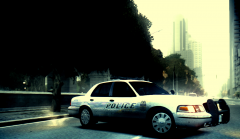 Thanks man, this was icenhancer 1.2. When the day got cold it was all in black and white but before that it turns more or less this color, btw it has my little touch mwahaahaha
 -
mhmm, thats weird bro even without graphics mod it happens, but i don't know then why dafuq any traffic fix works :/
-
Traffic Control System works great for a while, after 15 minutes (more or less) only taxis and police cars are on the streets and no other cars are shown. Anybody knows about it?
-
Ok ill give it a try and then tell u Still al the same. Is there really any traffic fix that works on 1070 without the textures bug???
-
Oh thanks dude Im using right now TCS and some ENB i've found and changed my road textures, i see a difference but still have the bug (not as bad as it was)
-
Thanks guys!! You can do the same with all the wheels you like :-)
-
Ok i'll try with traffic flow V5. I can't find that icenhancer. Do you use any commandline?
-
It's for 1070? Icenhancer or enb are too causes for that bug? Dude, if im not bothering you with my question, could you tell me if you can play without that bug? If it is, could you tell me your settings in game, and wich enb/ice works on you, and any commandline wich works? Thank you again
-
Putting up the settings in-game? Thanks for replying friend :) Nope. I did that, put my graphics up to 800MB, then 750 and then 700MB and textures still missing. Ive put my setting like: 1280*1024 (60Hz) Texture Quality High Reflections High Water: Low Shadows (Day and night) Medium Texture Filter Anisotropic x8 and then x4 Visible Distance 65 and then 45 Detail distance 50 Vehicle Density 16 Active Vsync I'm on icenhancer 1.2 idk if has something to do with this bug. This is how it looks like; first all ok, then some things start to disappear, and finally all of the roads and buildings are gone. It's driving me mad :( On the 2nd image there supposed to be a lamp post, wich disappears in front of me
-
I dont understand you man, those 365 means what im using right? So you are saying that i should up (i.e. shadow texture from low to high) messing around with the options so i get those 700 or 800? Sorry if my question is a little dumb, i appreciate your help friend
-
Listen, i don't know if this has something to do with my problem but i've installed a modification wich changes the billboards and advertisements in all the cities for real ones. Before and after doing that, i was having the same bug. No it's not too bad i guess, i can play any other game with high setting without any problems, i keep up to date all my drivers. And the resource usage says 365 MB / of 1945MB (Without the commandline 1945 says 945MB) Oh and yes, i follow every step to install them (im not new on this but to ensure that it's ok i do that) i put every file it says right where it says
-
Thanks dude!!
-
Thanks for the fast reply :D I've used trafficload.asi, realtraffic spawn 1.02 /1.01, traffic control system, realtraffic.asi, traffic flow v3,v4 and v5, and each one gives me the same problem
-
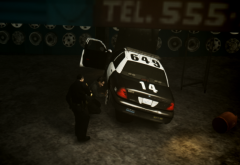
From the album: Patrolling Streets
Getting my cruiser fixed after a long chase around Dukes Expressway, one of the tires went off with a gun shot. -
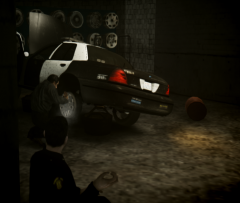
From the album: Patrolling Streets
Getting my cruiser fixed after a long chase around Dukes Expressway, one of the tires went off with a gun shot. -
From the album: Patrolling Streets
This is how the LCHP shall be!! On a real old and classic highway!

