


NickieB
Members
-
Joined
-
Last visited
Everything posted by NickieB
-
The OP posted in the wrong section. He asked about "GTA 4 on pc for free" that could be looked at as "GTA IV on pc" or GTA for on pc" either way GTA V isn't even out so he couldn't be referring to that, he had to be talking about IV. I'm not trying to be an ass, I'm just saying :)
-
I think I might cry a little if I see another one of these topics. Here is a way to fix the taser for people with the problem: otherwise you will just have to do without a taser.
-
This is normal, its a ELS bug. to fix the siren thing re-map the siren key in the ELS.ini
-
You still need cars capable of ELS even though you have them enabled in the script. Here is an example: that is a ELS enabled car. Cars that have ELS will say it in the name 99% of the time. Probably 95% of the cars out there are ELS anyway. You have to download and install these car to use ELS. There are soooo many to chose from, check out Cj24's download section here for just a few options: http://www.lcpdfr.com/index.php?app=core&module=search&do=user_activity&search_app=downloads&mid=2547
-
Is zmodeler exporting the file without any errors? If it has errors it will still show the file in the destination you exported it to but because it had errors the file isn't there. Its like saving a word document with no text inside. So if there are errors they will show up in the bottom box in zmodeler. Example below. Thats an error because two parts are named the same thing. It will tell you what you have duplicates of. Sometimes if your making copies of things, other parts will get copied to like bodyshell_L0 or chassis_L0. Just erase all the duplicates until one remains along with L1. Be careful with the names though because some things have to be named what they are. Like the ELS Lights have to be extra 1-9. This happened to me mostly with the "misc" folders/files. Just have to find a letter that isn't used to go after misc_ I'm not guaranteeing this is the answer to your problem but its a place to start checking. Hope it helps. If the image doesnt show up for you, here is the direct link: http://www.4shared.c...Untitled-1.html click on it to make it bigger
-
Wow cp702 - EPIC. Super easy once you read through it and take it step by step. The results are great. Some things I tried didn't work i.e. hats being in peoples heads, sunglasses not fitting correctly but maybe that can be adjusted. Awesome job +1
-
-
-
Whats the point of torrenting it when you can get it now from steam or online store for $10 and then you have a legit copy. If you say there is a way to bypass it, well I hope they fix that before the next release. I guess if he chooses to torrent it, thats his choice/risk. I'm not going to support that. I just noticed but this is in the wrong section...
-
You are using ELS-enabled cars right? *beat me to it Asuna
-
Are you using Simple Native Trainer? If so the keybindings are probably conflicting. Just go into the ELS.ini and change the settings for turning on/off your els. Or you can turn off the keybindings for SNT. That option is under SNT "options" in-game
-
Sigh - No you can't get it for free and if you do download it off a torrent, FR(this mod) won't work. You need a legit copy of the game which you would get from a store.... WalMart, Best-Buy or online at Amazon or Steam.
-
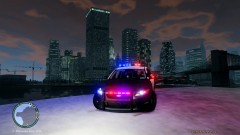 Title: Ford Taurus ENB Caption: my new impala... FAIL
 -
I'm almost useless when it comes to deciphering that but maybe a problem with the taser?
-
Yikes, that makes it even worse.
-
Yeah, I was just lurking in the shadows but I was around. I wasn't referring to you getting banned, more so to the crap support and the people who have the answers turning a cold shoulder. But that sucks man, your obviously an asset to the forums. You and me have been firing off answers to most recent topics lol.
-
This is exactly why I rarely use the site anymore. I've posted for help and sent PM's to more people than I can count and no responses. They use to have new mod uploads almost daily and now it seems like it takes a week to see a new mod. *** I'm not talking smack, I'm simply stating facts. Anyway.... @hectrixz - Just read the ReadMe's in all the mods you download and follow the install directions step-for-step and you will be fine. We can't sit here and try and type instructions, every mod is different. Try it first and if you run into problems then you can come back and ask for help. A few tips: If your changing files make sure to remove the "read only" settings. For mods with automatic installers or any program associated with this game always "run as admin". Lastly ALWAYS BACK UP YOUR FILES before you change anything. Its a pain having to re-install the whole game because you didn't back-up a simple file. I backup my whole GTA IV folder every few weeks so I have my most recent setup available if something goes wrong.
-
I'm sorry but thats kind of hard to understand what you were saying. Below are mods that a lot of people use to enhance the experience. You don't have to use all of those but the ones you need are the top 2 and then one version of ELS, if your using ELS enabled cars. I use V6 but some say V5 is more reliable. These cars can be found on here and GPM. I can't recommend any specific one because there are so many, it would be your personal choice. All of the mods include instructions on how to install them. Follow the instructions and you shouldn't have any issues. I've put in bold the mods I use. Traffic flow is only needed if you want to eliminate the "Taxi Bug" which comes from using modded police cars. So thats your decision. There are other scripts that eliminate the bug so its your choice as to which you like best. I hope this gives you a good start on getting your game setup! I'm not exactly sure as to what you meant about ELS screwing up your "hacky thing to spawn cars and stuff" but I'm guessing it could have been conflicting keys. So when you install your scripts you can change the mapping of the keys so they don't conflict. With Native Trainer I would recommend turning off the key shortcuts because there are so many it conflicts with other things. This can be done in-game. I can't remember exactly what its called but its under "options", I think its "keybindings on/off" You just have to navigate through the trainer to spawn or activate what you want instead of using key shortcuts. I hope I didn't confuse you with all that information. Just trying to help! FR 0.95 RC-2: Simple Native Trainer 6.4: http://www.gtagaming...cript-mods/2115 ELS V6: http://gtapolicemods...do=file&id=1764 ELS V5: http://gtapolicemods...do=file&id=1379 Indicator: Spotlight: Dash-Cam: Traffic Flow: Speed Radar: http://gtapolicemods...light=radar mod Advanced Car Actions: http://www.gtaforums...howtopic=401682
-
@Chevymanusa - thanks thats what I wanted to know +1 @Kubeanie - I'm not entirely sure what that means...
-
EFLC might be in my future for a price like that. When is the 8 hour sale? Just whenever they decide? How does steam work? Do you just download it right to your computer from the site and then its just like you installed it from the disc? That might be a stupid question but I've always just bought it from a store.
-
I did something like this a long time ago. I had prostitution areas and some other stuff listed on mine. Nice job though
-
I would try what Jorge said, make sure everything is accessible(un-select read-only) With everything that you run always right click and " Run as Administrator" because from this line " Problemsignatur 09: System.UnauthorizedAccess" it looks like that could be the issue I don't know how to translate the install error for FR but it looks like a problem with the taser. Are you doing everything right when it comes to the installation of the taser?
-
I don't think so. I've downloaded every Tahoe/Suburban model to try and find one unlocked and no luck. We just have to keep waiting and hoping someone will be nice enough and release one for the community
-
First - No need to write in size 30 font.... This happens when you start IV or when you press ALT+P to start FR? Are you using ELS? If your using ELS, try removing ELS and see if the problem persists. I'm not sure if that error is related to FR or ELS. You can always run the diagnostic tool and post the results, good chance they might ask you to do this. The staff might be able to spot a issue in the report. They will probably have more insight as to the root of that error than myself but at least you have somewhere to start.
-
Looks pretty good for your first try buddy. There is a way to make him stand by editing some files but I don't remember where I saw that guide. What I did was export the swat model and his helmet from "pedprops.img" and import it as the noose heli pilot. Then you can spawn the heli pilot and its the swat model except he stands normal. You can PM me if you want a more detailed instruction on how to do that. I'm willing to help you with that if you want

