Cyan
Management Team
-
Joined
Everything posted by Cyan
-
Reverify your game files, that should re-apply the update and fix your game.
-
Earlier builds are no longer available.
-
 Moved to Visual & Data File.
 -
Your topic has been moved to LSPDFR 0.4 Support. Please post in the correct location in the future.
-
On LCPDFR.com, you cannot upload content here without the permission of the creator, see our File Guidelines.
-
Your topic has been moved to GTA V Support, this is not LSPDFR related. Please post in the correct location in the future.
-
Hello, as mentioned during posting this is an English forum. This topic will be closed, but you are welcome to post again if you use include an English translation.
-
Your topic has been moved to LSPDFR 0.4 Support. Please post in the correct location in the future.
-
Your topic has been moved to LSPDFR 0.4 Support. Please post in the correct location in the future.
-
Your topic has been moved to GTA V Support, this is not LSPDFR related. Please post in the correct location in the future.
-
Hey! Happy Thursday too! you sadly haven't included any information that we could use to help you. Can you let me know what exactly happens and perhaps attach a RAGEPluginHook.log (you can find this in the root of your game folder)? A crash to desktop is usually not caused by STP, Ultimate Backup or Compulite but instead related to adding other assets into a mods folder or potentially using scripthookvdotnet with RPH/LSPDFR.
-
yup, you simply wait for an update.
-
thanks for the report - I can confirm there's an issue. I'll update you here when it's fixed.
-
Your topic has been moved to GTA V Support, this is not LSPDFR related. Please post in the correct location in the future.
-
Your topic has been moved to LSPDFR 0.4 Support. Please post in the correct location in the future.
-
Your topic has been moved to LSPDFR 0.4 Support. Please post in the correct location in the future.
-
Something in your mods folder is broken, that error occurs when LSPDFR cannot load game assets.
-
Your topic has been moved to LSPDFR 0.4 Support. Please post in the correct location in the future.
-
Your topic has been moved to LSPDFR 0.4 Support. Please post in the correct location in the future.
-
Your topic has been moved to LSPDFR 0.4 Support. Please post in the correct location in the future.
-
LSPDFR depends on the latest version, so you'll need that sadly. The current build will not work with previous game versions.
-
I really doubt a website update could fix your installation issue I'm afraid Yup, we added a lore tag. https://www.lcpdfr.com/downloads/tags/?filter_tag[0]=4
-
Your topic has been moved to GTA V Support, this is not LSPDFR related. Please post in the correct location in the future.
-
 Introducing the Spring Update 2023 on LCPDFR.com! We're excited to bring you a range of new features and improvements that will enhance your browsing experience. Our brand new file tagging system is now live, making it easier than ever to find the files you're looking for. We've also implemented AI alt-text for images, improved real-time interactivity, and boosted speed and performance. Additionally, we've addressed various fixes and changes to ensure a smoother user experience. Join us as we take LCPDFR.com to new heights with our latest update.
 -
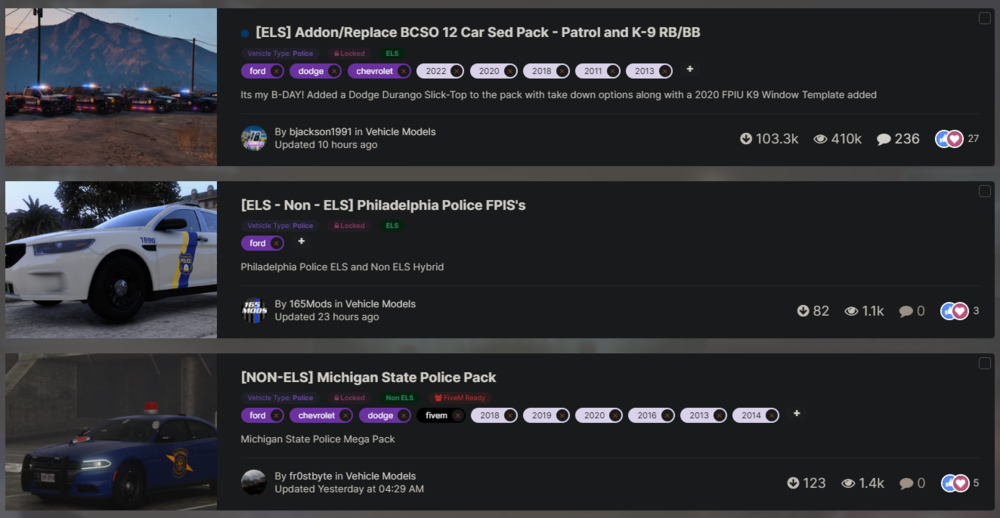
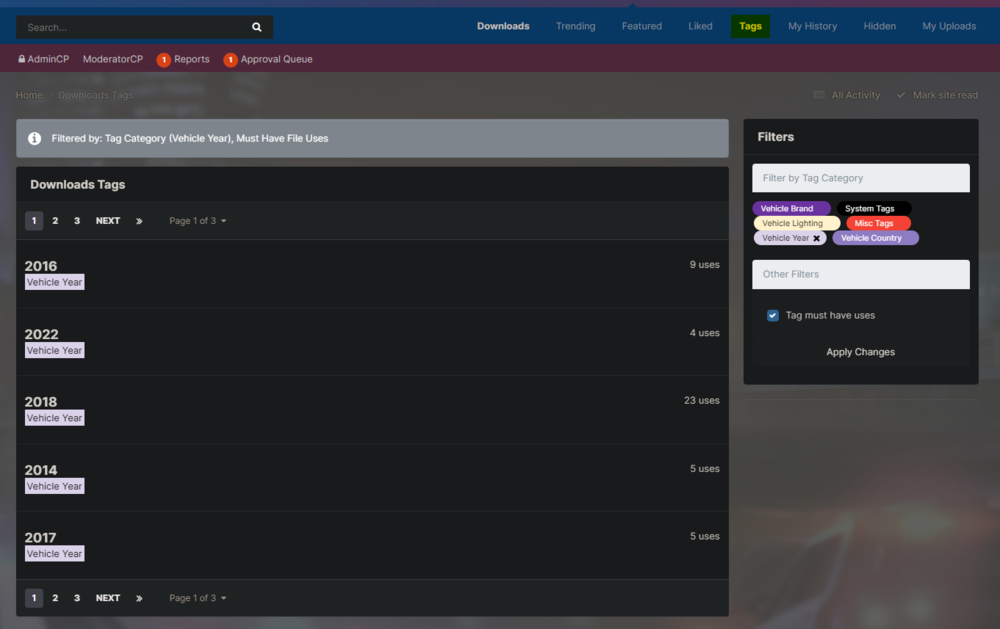
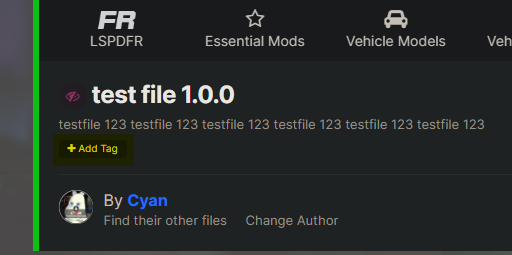
Hello everyone, I hope you're having a fantastic springtime and looking forward to the summer! It's been a long time since we've posted a website roundup update, but there's a few changes we're really excited to let you know about. Some of these changes you may have already seen, some will definitely be new. File Tagging System Rollout We've started Phase 1 of our file tagging system rollout. This update went live today and additionally we've spent some time tagging the first few pages of Vehicle Models to introduce you to it. A look at some files with new tags, different tag types are distinctively coloured. One of the reasons we have not used the built-in tagging system that comes with the software we are using is because it lacks a lot of features a community our size needs. The new home-grown solution combines the tagging solution that comes with our software natively, but extends it with many features: The ability for our moderation staff to manage tags Tag "categories" with distinctive features, for example; Vehicle Brands, Vehicle Year, System Tags Ability for us to easily see tag use Ability for members to easily navigate tags Ability for authors to find the tags they want to apply easily, and with tag categories, ensure they're picking the correct tags. System and gated tags. For example, the tags fivem and lml will be automatically applied to files and cannot be applied manually. Certain tags can also be gated as author-only, or site-staff only for future expansion. We have started the system today with some vehicle-specific tags (Vehicle Brand, Vehicle Year and Vehicle Country). More tags and tag categories will come as we move into the other phases of this new tagging system. If you've got any feedback on what tags and tag categories we could further add, feel free to leave feedback on this post. Here's a small list of what we're working on for future updates: Community and reputation based tagging (users can tag old files to help tag files which are never going to be updated) A new part of the site where you can see all tags on a certain page, and sort by their uses. Automatic tagging based on image analysis and OCR. A page where anyone can recommend tags (and perhaps tag categories) which can be voted on. Making it easier to tag files, by not allowing arbitary input into the tag box. Using the new downloads tag page to find tags that have files you're interested in. Authors, you can get started today tagging your files, just hit the 'Add Tag' button next to your file title. Tagging is always optional, but helps users find your file in the sea of uploads. thorium_9XtQr4UChBbmgLFCyZI0AGJu1.mp4 A short video showing how to tag files. AI alt-text and Image Precheck We now automatically generate an alt-text for all images uploaded. You can see these on image attachments on the forum, as well as file screenshots. These will help discovery both via LCPDFR.com site search (these tags are now inserted into our search index) and Google as well as aid to make the site a bit more accessible. Along with this, images are now checked via our Image Precheck system for compliance with our Community Guidelines. Images which may not be in compliance with our Community Guidelines may be held for approval or rejected. We hope this keeps the community safer. Speed & Performance We fixed two major causes of latency for logged in users over the past few weeks. Both of these were caused by bad database queries. We've shaved off around ~4s worst case of viewing the LCPDFR.com homepage, and around ~1.5s worst case of latency per file listing. Thank you to the ULSS Discord Server for bringing this to my attention (specifically @SuperPyroManiac). Other Fixes & Changes Introduced WebAuthn 2FA support. While this is going to be used mostly internally for securing administrative accounts, this option is also available to all users. Show a warning when using colors in the website editor, reminding users of the different themes. LSPDFR Sync no longer shows deactivated members' characters. Fixed an issue with recording and displaying file checksums on the post-download page. Fixed file embeds from rendering an entire page on error. Fixed an issue IPS refuses to fix, correctly lazyloaded content between paginations. Added a game filter to user download special pages. Fixed an issue with file comments/reviews being removed from the search index. Guest views now correctly increment content view counts. ...And numerous other backend changes that would be too expansive to list. Cyan.