Thehurk
Members
-
Joined
-
Last visited
Everything posted by Thehurk
-
 To install the vehicle i always put it in the latest patch day, so i do patch day 8 and it over rides whatever else is there. For the extra file for the lights, i would say just re-read the instructions. I always have to when i install that. I hope this helps What? The lights dont move when you crash because the meshes aren't actually being damaged. There isnt any fix im aware of at the moment. I probably could do something with that
- 112 comments
- 36 reviews
-
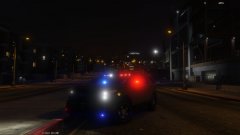
From the album: Thehurk's WIPS
Probably going to be the next vehicle i release. -
-
To get the lights like i have them in the screenshots, you MUST install radiance V, have your post FX set to ultra and shader quality to high or above.
- 112 comments
- 36 reviews
-
Just read the file that i included in the extras folder named: Use this to make police3 act like police
- 112 comments
- 36 reviews
-
You dont even need to do that. You just have to simply rename the files. I tried to make it so it would work in any available police slot
- 112 comments
- 36 reviews
-
I'd encourage you to read the description of the file, i added everything you need to know in there.
- 112 comments
- 36 reviews
-
I would guess you didn't add the extra files i put in there. What is happening is the car is acting like the default police3, messing with the rotations of the lights.
- 112 comments
- 36 reviews
-
-

- 1
-
-
If it's like the screenshots, the little dark marks on it are supposed to be ridges.
- 112 comments
- 36 reviews
-
-
Fuck, im sorry guys, i forgot to add the file to the message. I shall update it with it now! I decided to use the liberty so everyone would be happy with the set up. Some people don't like some of the other bars i have, so i just decided to use a liberty instead. I will be releasing more models of this with different lightbars. I would just say enjoy the fact that you have a 13 Interceptor to use in game. @everyoneelse Thank you for your positive encouragement and all the kind words you've given me. Its driving me to make even better modifications for you guys to enjoy!
- 112 comments
- 36 reviews
-
-
- 2
-
-
IF YOU HAVE PREVIOUSLY DOWNLOADED THIS FILE, I HAVE ADDED THE MISSING FILE FOR THE LIGHTS!!!! Since some people are still having issues with getting this vehicle to work. I've uploaded my personal carvariations.meta HERE. Secondary link if the first one doesn't work: here MODEL OVERVIEW ================================= - NAME: 2013 Los Santos Police Department Ford Police Interceptor - VERSION: V1.0 - EXTRA PARTS: N/A - OPTIMIZED FOR: ANY(acts like police3) *********** IMPORTANT *********** ================================== I HAVE INCLUDED A FILE TO MAKE THE LIGHTS FROM THE DEFAULT POLICE3 TO ACT LIKE THE POLICE. IF YOU DO NOT ADD THIS FILE TO YOUR GAME, T H E C A R W I L L N O T W O R K AS I DESIGNED IT TO!!!!!!!!! YOU HAVE BEEN WARNED. NOTES ================================= -This car features two or three setups, depending on how you like your cars. I have designed it to work as a marked vehicle and also as a slicktop. To change the vehicle from a marked vehicle to a slicktop/ghosted vehicle, all you have to do is go and toggle the extras 2 for the inner bar, and 3 for the outer lightbar. -It also features two skins, one fully marked, and one ghosted. If you want an unmarked, all you have to do is go into a photo editing program and delete everything off the skin, and add your own licence plate. -There has been alot of work put into this model, from merging the interior to numerious bugs that we had during the creation of this model. There might be some small ones that have gone un noticed, if you notice any, please, feel free to tell me about them. -The lights on the vehicle were designed to be used with Radiance V. I used the bright setting to take the screenshots shown -There are some small errors with the interior but i didn't mind them. -This model was designed for its handling to act like the Police3. -I have also included light textures to make the car Red & Blue or Blue and Blue, they are in the extras folder. -The model is a little on the higher poly side (130k+) but it shouldn't cause any issues. -The templates are in the extras folder. -This is the first vehicle I have released, and i'd like to give a huge shout out to all the people who actually made this possible, from sitting up for hours with me helping my dumbass, to giving me vehicles to fix because they are too lazy or just don't know how to fix it. You all know who you are, so, Thank you. -The file included in the extras folder to make the lights act differently is not made by me. I did not get credits for whoever made the file and added the change to the vehicle. DISCLAIMER ================================= -You are not to attempt to modify or rip this model in any way shape or form. -I (Thehurk) am not resposible for any damages done to your game. Please make a backup of any edited files! -Do not attempt to make a profit off this model in any way shape or form. -Do not re-upload this vehicle, please make a link -Do not upload this file to any other site, claiming it as your own. -If you want to use this file in a clan, PLEASE ask me before doing so. Enjoy!!
- 112 comments
- 36 reviews
-
-
- 24
-
-
The default cars use a mix of coronas and emissive textures, so as a modder, it is very hard to use coronas in the proper way. I don't know what exactly you have to change i the settings, you would have to do some digging to actually see.
-
Originally before radiance was released, to get the lights to be bright in game, a modeler would have to turn up the emissive multiplier for the vehicle making the lights brighter. The only way unless you can go into zmod3 and turn down the muliplier manually, would be to tone down whatever Radiance changes in your visual settings.
-
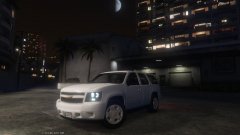
From the album: Thehurk's WIPS
I decided I wanted to do my own version of the Tahoe for GTA V. Still a number of things I need to do like make sure the hands are on the wheel and make sure the windows actually break, but its gone pretty smoothly so far. -
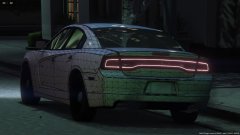 I personally watched him fit the interior, and convert the interior, so i can vouch for him on this one.
 -
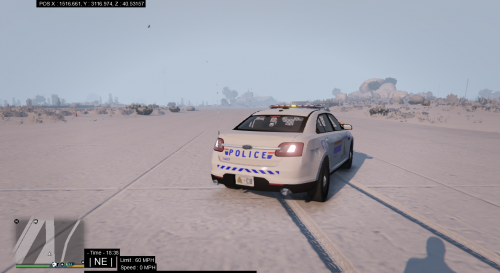 This is a good attempt at a skin, for a first one doing RCMP is a challenge. My suggestion would be to look carefully at the RCMP's design, specifically on the doors. Their emblem and text next to them need to be a slight bit higher (https://gyazo.com/d044993fb9006e07eb6501d5ef107262). Other then that man, well done! I hope to see your skins in the future!
 -
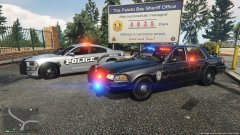 Dude, those emissives look soo good. Do you use any graphics mods? The cars look beautiful!
 -
-
-
-
-
-
-
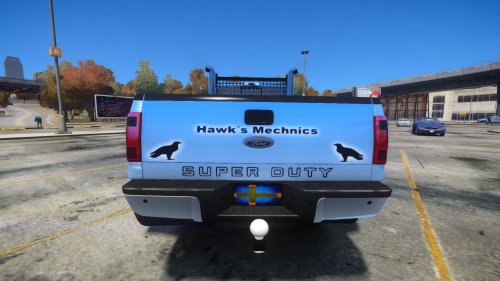 I actually reallly like this truck, there are a few things that need to be tweeked but I do like the idea that you had with this truck. Good work!
- 5 comments
- 1 review