


Thehurk
Members
-
Joined
-
Last visited
Everything posted by Thehurk
-
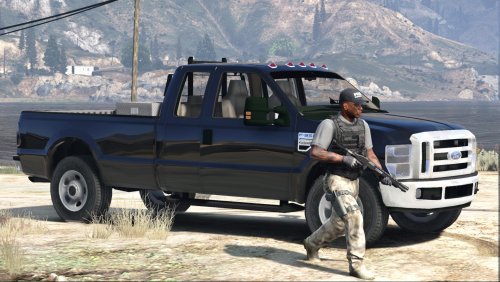 In my opinion, Psource should have released this vehicle since it seems as though he is the one who put in all the time and effort. It's like me converting a car and then giving it to a friend to bug fix, then him taking all the credit.
- 15 comments
- 7 reviews
-
 That makes no sense, changing the texture should do nothing but change the color of the lights.
- 74 comments
- 30 reviews
-
-
Yes, all you have to do is add your files to the .ytd and make sure its named chrgr_sign_# and replace the # with whatever number you need. All you have to do is go into the emerglights file and the emerglights ions file and make the red emissives white. Its quite simple really.
- 74 comments
- 30 reviews
-
-
-
It was a mistake i did in the description. The model is used as the police2, but the flies included are to change the slot if you need it. I used the bright settings in my game for radiance V and it worked perfectly. The emissives are actually the same multipler as my legacy on my 16 FPIU. I added another file to remove the ambers on the car when i released this file.
- 74 comments
- 30 reviews
-
-
The Emissives are white to add to how the vehicle grabs your attention. It's the way i mapped the lights to be.
- 74 comments
- 30 reviews
-
-

- 1
-
-
MODEL OVERVIEW ================================= - NAME: 2015 Dodge Charger - VERSION: V1.0 - EXTRA PARTS: N/A - OPTIMIZED FOR: Police2 (can be used in any slot) !!!!!!!IMPORTANT NOTE!!!!!!! IF YOU DO NOT READ THE DESCRIPTION/READ ME OF THIS FILE AND YOU AS A QUESTION THAT I HAVE ALREADY ADDRESSED, I WILL NOT RESPOND TO IT. If you are having issues with "lights being all white", make sure your shader quality is turned to very high and your postFX are turned to very high or ultra, and then install radiance V. Beyond this, I can not help you. IF YOU WANT TO HAVE THIS VEHICLE IN ANOTHER SLOT, YOU MUST MUST MUST GO AND INSTALL THE FILE I INCLUDED NAMED: use this to make any vehicle act like the police2. If you are content with it replacing the police2 and you're going to leave it at that then ignore this section! INSTILLATION INSTRUCTIONS ================================= To install this model, all you have to do is just put it in Mods>Update>x64>dlcpacks>patchday9>dlc.rpf>x64>levels>gta5>vehicles.rpf To install the CarVariations line, all you have to do is go to: mods\update\x64\dlcpacks\mpvalentines2\dlc.rpf\common\data Add what i put in the carvar.txt to the end of your carvariations. If you dont have patch day 9 in your mods folder, then just copy it from the base files EXTRAS LIST ================================= -Extra 1: Rambar with light-stick -Extra 2: nFORCE Interior Bar -Extra 3: nFORCE Exterior bar -Extra 4: Rambar without lights -Extra 5: Wrap around 1 -Extra 6: Wrap around 2 -Extra 7: Combo of 1&2 -Extra 8: Spotlight MODEL NOTES ================================= -This vehicle features 7 extras, the list is seen above. -It includes a few different setups in the way of lights, slicktop, marked or minimilsitic. -It features 2 different rambar with 3 different wraparounds. -It also features a moving antenna. -There has been quite a bit of time that's gone into this model, so if there are any bugs with it, please feel free to message me. -The skin on this model is simply a placeholder for something to release with. -The model uses the same template as F5544's 15 charger, so it should be compatible with every skin released for his charger. -To remove the ambers from the vehicle, all you have to do is open the .ytd and replace emerglights.png -I have attempted to make it so that AI vehicles spawn with a lightbar, but its not perfect -All the files you need for installing the vehicle, reskinning it, etc... are in the extras folder. -The instructions for installing this vehicle in another slot are included in the extras folder. -Once again i will state the importance of reading EVERYTHING IN THIS FILE before installing the vehicle. -BACK UP ALL FILES BEFORE REPLACING WITH MODDED FILES, I CAN NOT STATE THIS ENOUGH Disclaimer ================================= -You are not to attempt to modify or rip this model in any way shape or form. -I (Thehurk) am not responsible for any damages done to your game. Please make a backup of any edited files! -Do not attempt to make a profit off this model in any way shape or form. -Do not re-upload this file to any other site. -Do not claim this model as your own. -If you want to use this file in a clan, PLEASE ask me before doing so. GORGEOUS showcase by @mroxplay Enjoy!!
- 74 comments
- 30 reviews
-
-
-

- 26
-
-
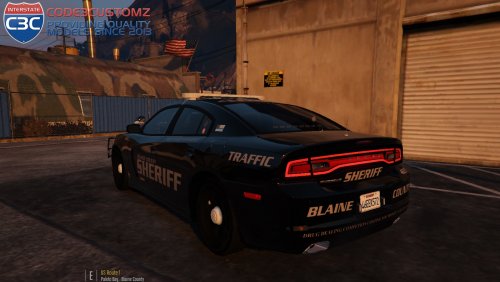 I mean you don't really have to use the car if you don't want to. They're are other chargers out there.
- 34 comments
- 17 reviews
-
-
- 1
-
-
From the album: Thehurk's WIPS
This car turned out 100x better then i could have hoped for. -
-
 The dirt mapping of the vehicle does not stick for some reason, I've remapped the dirt on it several times, but never does it stick.
- 269 comments
- 67 reviews
-
-
- 1
-
-
I did not use coronas because of the complexity of the lighting setup, to use them, i would have had to set the vehicle up with a lot less lights and then remake it.
- 269 comments
- 67 reviews
-
 Idk, around 170k
 -
Lightbar, interior bar and rambar are all spawnable extras.
-
From the album: Thehurk's WIPS
One of the newest creations i've come up with. Still have a few things to add to it then its done. -
-
-
It seems to be how openIV renders the textures. it does that to like 90% of my textures
- 269 comments
- 67 reviews
-
I've never had this purple issue so i can't help with it. It could be something with the carvar, or something else. I have no clue what it could be.
- 269 comments
- 67 reviews
-
-
Bug's car uses coronas. With a simple car like that youre able to. With my vehicles since i do more complicated things you cant. For some reason your visualsettings are not being replaced, therefore your lights aren't getting any bloom. Try looking for the visualsettings in mpvalentines2 and replace that.
- 269 comments
- 67 reviews
-
Try looking for a solution with the comments previous. I do not know what causes this.
- 269 comments
- 67 reviews

