


Thehurk
Members
-
Joined
-
Last visited
Everything posted by Thehurk
-
 There is already an interior in the works for this model. While i would appreciate everyone doing that it's not nessary no, it would still replace the sheriff2, if you want to replace another model with this, there is a comment by a user names nt55 on the previous page which will be able to help you. Your last part where you said no modification to varriations is what is going wrong, the sherriff2 uses a different siren setting then most cars. you can fix this by setting the siren setting to 1 By the looks of it you might not have radiance installed and your post fx and shader quality arent set to high
- 269 comments
- 67 reviews
-
-

- 1
-
-
Replace the name of the lines that the slot that the carvar.txt to police 3 and foilow the instructions
- 269 comments
- 67 reviews
-
-
-
The only reason why i don't do this on 90% of my models is because they all have window templates. If you wanted to tint the windows, just go into that and change the windows. It shouldn't im not sure where it would man, i've searched before and never been able to find it. What you could do and all you really need from the file is where the lines say <sirenSettings value="1" /> It shouldn't im not sure where it would man, i've searched before and never been able to find it. What you could do and all you really need from the file is where the lines say <sirenSettings value="1" />
- 269 comments
- 67 reviews
-
You I'm guessing you didnt install the file named: use this to make any car act like sheriff2, When installing it make sure to change the slot that the lines youre installing to whatever slot you want to replace. It's not hard, rename the file to whatever slot you want to replace, Then install the Lines in the file stated up above and replace the slot to police3 for instance. What...?
- 269 comments
- 67 reviews
-
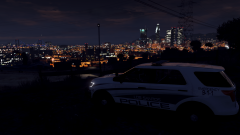 I might just ask you to do some screens for me in the future :p I'm glad you're enjoying it!
 -
-
-
Dude, this has to be one of the best screenshots i've ever seen
-
I dont use the settings from Radiance V for my game. The lights comming up as all white is caused by your visual settings. Try reinstalling radiance V
- 269 comments
- 67 reviews
-
It might be easier for you to type in french and i can just translate, but are you saying that you have your shader settings to high and your postfx to ultra.
- 269 comments
- 67 reviews
-
-
There is a small chance that the policeT reads from somewhere else. The only thing you really need to have to make the vehicle's lights to work is the line: <sirenSettings value="1" />
- 269 comments
- 67 reviews
-
-
Did you change the slot it replaces <modelName>police3</modelName> Change it to <modelName>policet</modelName>
- 269 comments
- 67 reviews
-
I'm forsure not going to do this as a dev release any time soon. The other vehicle is not mine to give out.
- 269 comments
- 67 reviews
-
THIS MODEL IS NOW OUTDATED, AND I DO NOT RECCOMEND USING IT! I HAVE UPLOADED A BRAND NEW MODEL OF THE 2016 UTILITY WITH A HQ INTERIOR, WITH GENERALLY THE SAME LIGHT SETUP. FIND IT HERE: MODEL OVERVIEW ================================= - NAME: 2016 LSPD FPIU - VERSION: V1.0 - EXTRA PARTS: N/A - OPTIMIZED FOR: ANY !!!!!IMPORTANT NOTE!!!!!! iF YOU WISH TO HAVE THIS VEHICLE AS ANY OTHER SLOT YOU MUST INSTALL THE FILE NAMED: use this file to make any slot act like sheriff2 IF YOU DO NOT USE THIS FILE, THEN THE VEHICLE WILL NOT LIGHT UP PROPERLY Instillation Instructions ================================= To install this model, all you have to do is just put it in Mods>Update>x64>dlcpacks>patchday9>dlc.rpf>x64>levels>gta5>vehicles.rpf To install the CarVariations line, all you have to do is go to: mods\update\x64\dlcpacks\mpvalentines2\dlc.rpf\common\data Add what i put in the carvar.txt to the end of your carvariations. If you dont have patch day 9 in your mods folder, then just copy it from the base files Extras List ================================= Extra 1: Hood Interceptor Text Extra 2: Whelen Inner Edge Extra 3: Whelen Legacy Extra 4: Westin Rambar Extra 5: Rambar Wrap Lower Extra 6: Rambar Wrap Upper Extra 7: Spotlight Extra 8: Traffic Advisor Extra 9: Boot Whelen Ions Model Notes ================================= - "YA FUCKIN CUNTS" -Goose, The man who Flys - YOU MUST HAVE RADIANCE V INSTALLED FOR THE LIGHTS TO HAVE BLOOM AND LOOK GOOD!!!!!!! - This is probably one of the most customizable vehicles i have ever made, and it actually features the use of every single siren available to GTA V. - There has been over 30 hours to get this vehicle to be in its current state. There are a few small bugs, but they aren't too noticable. - The interior is nothing how I want it to be, which is unfortunate but I have nothing better to put in the vehicle. - If there are any bugs with the model, please feel free to let me know. - This model is very highpoly, around 220k pollys. The file size is also on the larger size, around 6.5mb, I apologize for this. - I have included Multiple skins that you can install with the model, or you can install them all if you want to. **To install the skins, you must name them explorer_sign_# (replace # with whatever number you want)** - All skins are in 4k, so adding them all will increase file size - The file size of this model is quite large, as is the poly count (220k). If you cant use the vehicle, i'm sorry but i cant make it any lower for what i have on the vehicle. - Please check the extras folder for anything you need with the model, including templates, extra files, etc... - A huge thank you to everyone who made this vehicle possible to convert; Jasonct203, GTAxB0SS, and IronicRainbow - Enjoy! And before you ask, yes i will be doing a 13-15 Utility with a lightbar. Disclaimer ================================= -You are not to attempt to modify or rip this model in any way shape or form. -I (Thehurk) am not resposible for any damages done to your game. Please make a backup of any edited files! -Do not attempt to make a profit off this model in any way shape or form. -Do not upload this file to any other site, claiming it as your own. -Do not re-upload this file, make a link to it. -If you want to use this file in a clan, PLEASE ask me before doing so. Enjoy!! BEAUTIFUL video of the utility by MrOxPlay visualsettings.dat
- 269 comments
- 67 reviews
-
-
- 31
-
-
 As long as the skin matches up with the template provided it should go and work. my guess is that you'll have to edit it slightly
- 126 comments
- 41 reviews
-
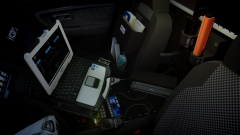 dude, that looks awesome
 -
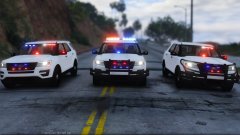 Thats a good idea, ill go back and dual map most of them, A LOT of the 16 utilitys in use today have the fog lights blocked off. After this release, im going to go and model the part that's missing behind there. This is all the same vehicle, so 80% of the car is spawnable.
 -
From the album: Thehurk's WIPS
So i've sort of decided on a lighting setup. Only thing im iffy about is the dominator under the Ford logo. If i could get some opinions on that or if i should put it on the rambar and make it spawnable with the rambar, i would greatly appreciate it! Release will most likely be in 2 days. -
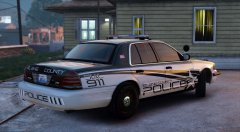 Oh my god, this looked beautiful the first time you made it. It looks even better now.
 -
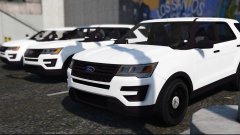 I will probably never release this unlocked, however i do plan on doing A lot of releases with this model
 -
From the album: Thehurk's WIPS
Spent a good 8 hours yesterday converting and poly filling then another 4 hours today on the grille, honestly i can say, this thing looks sexy as fuck . There are still a few bugs that need to be fixed but its almost ready for outfitting!

