


CG Blaze
Members
-
Joined
-
Last visited
Everything posted by CG Blaze
-
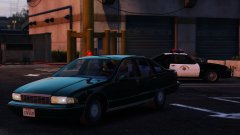 Not to knock the model shown, as I'd gladly still use it... but didn't CHP use police package Mustangs? Not the GT 'fastback' styled ones as shown here? You know who DID use the fastbacks?...
 -
Dat McDermott though... I might be able to hook you up with a skin if I have time. Super accurate NYPD skins are a passion project for me. Hardest part would be finding the windshield font they used back then.
-
-
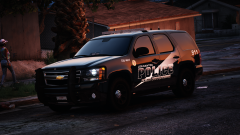 LOVE this look on that Tahoe. Would love to see something similar for Grapeseed.
 -
Hmm... So I updated BetterEMS today, along with everything else I run, and updated to RPH 0.45. Now BetterEMS tells me I have the wrong parkstools dependency. Any thoughts on why? Is it because of .45?
-
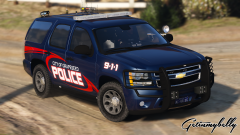 Dude nice! This is the exact type of livery I think fits perfectly with Grapeseed. One solid, dark color with a lil fancy graphic work. :D
 -
-
Getting really excited for this! Can't wait to see what this script is all about. Are you guys planning on implementing custom lighting for any of these cars? Also, it's a shame about the lore-friendly Humvee/Patriot. That's the one part of RDE I never liked - the real life military vehicles mixed in with the Staniers and the Grangers, etc.
-
Looks like a good start. I have to ask though, do you not have access to another Tahoe model? This one's rather dated...
-
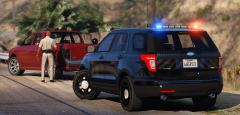 Thanks man! I dig a lot of your designs , so that means a lot coming from you.
 -
From the album: Blaze Plays V
Watch out, Los Santos commuters! As part of their Aggressive Driver Deterrence program (or ADD for short), the SAHP has been experimenting with new "stealth" graphics on several patrol cars throughout the greater Los Santos area. The cars appear unmarked, but a closer examination reveals a frosted version of the familiar SAHP seal. The SAHP hopes that the new, low profile cars will go unnoticed in traffic, allowing troopers to sneak up and target aggressive drivers in the act. The SAHP tells us that three "stealth" cars are already on the road, and as many as 15 may be deployed system-wide by the early fall. So, I stealth'd up (and SA'd) windows446's CHP skins, and added a couple frills before re-applying it to thehurk's CHP slicktop. I think I'm pretty satisfied with the results. What do you think? -
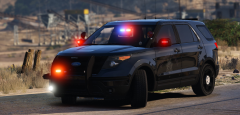
From the album: Blaze Plays V
Watch out, Los Santos commuters! As part of their Aggressive Driver Deterrence program (or ADD for short), the SAHP has been experimenting with new "stealth" graphics on several patrol cars throughout the greater Los Santos area. The cars appear unmarked, but a closer examination reveals a frosted version of the familiar SAHP seal. The SAHP hopes that the new, low profile cars will go unnoticed in traffic, allowing troopers to sneak up and target aggressive drivers in the act. The SAHP tells us that three "stealth" cars are already on the road, and as many as 15 may be deployed system-wide by the early fall. So, I stealth'd up (and SA'd) windows446's CHP skins, and added a couple frills before re-applying it to thehurk's CHP slicktop. I think I'm pretty satisfied with the results. What do you think? -
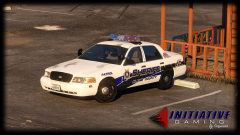 Those scuffs look familiar! ;)
 -
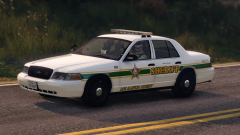 Yessss! That looks sharp.
 -
.png.5338949515c81080d5c0d7f4e62a358f.png) Nice! Good to see something different! I too am just coming to terms with Zmod3... I got the same problem man. This brave new world is not that simple. lol
Nice! Good to see something different! I too am just coming to terms with Zmod3... I got the same problem man. This brave new world is not that simple. lol -
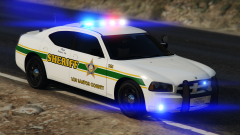 I don't want to impose, but that would be awesome! I'm sure others would enjoy it as well.
 -
Dig! I been looking for a green/white sheriff skin to use for LSSD for a while now. I think this nails it.
-
Jokes aside, I'm pretty stoked for this. Patrols in the countryside can get very boring compared to the boatloads of callouts and events designed for the city...
-
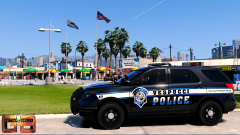 I dig it! For some reason, I think this would work really well as a Grapeseed skin too.
 -
I made a pack for IV waaaaay back in the day that's released on here. You could try to retrofit those if you'd like. Also, BradM just released a skin pack that has skins for Sandy Shores PD resembling NCPD...
-
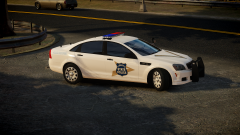 You got some kinda road texture mod there? If so, which? And also, what ENB? Looks great!
 -
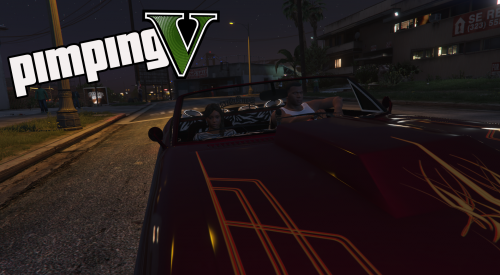 Nice to see something different! Love the idea of bringing another old school feature back. A couple of thoughts, though.... I don't know how in-depth this script goes, as there isn't much in the way of a description, but I'd love to see this expanded upon. I see that there's a chance a customer won't pay, but what about a chance of a police sting? I'd also like to see some kinda 'heat' meter implemented, making either the girl or the john reluctant to go through with it if there's a cop in the area. Also, what's this "I'll give you a percentage" stuff? If I'm a pimp, you best believe I'm gettin' that money! It's her that should be worried about gettin' a percentage! lol anyway, good stuff Alex.
 -
Hello all, It has come to my attention today, after finally updating about 1,200 scripts and figuring out what else GTA V didn't like about my LSPDFR setup post Stunts update, that playing LSPDFR is beginning to get a little....messy. It seems that nowadays, every callout pack, and every script, has to have it's own in depth menu. This is ok. I'm all in favor of functionality. However, it's starting to get, in my opinion, out of control. I start GTA V..... I load up LSPDFR.... I respond to a callout.... the callout suggests I hit F8 to end the callout via a menu. I hit F8... Three overlapping menus pop up! I try to navigate through the muck to end what was a simple call, but oh no! Suddenly, I've sent out a code 99 and AI police are coming from every angle! My character model has changed to a hairless white guy in a different uniform, and I've placed a cone! Worst of all, the callout is STILL ONGOING! Shit. ...I realize I'm being a bit ridiculous, but I think this is an experience that at least a few of us have shared on some level or another, and I'm sure you know as well as I do how frustrating such an experience can be. Now I know what you're thinking: "Why don't you just change the keymappings?" Well, consider just how tedious that is to do - to go in and manually change the key bindings for every script, and then again every time they update. One fat-fingered-flub could derail the whole script, wasting more time. Not to mention the obvious fact that... I'm running out of keys! Now I'm not suggesting that we do away with menus altogether. I like the menus! Like I said, I'm pro-functionality! And if including a special menu for your script/callout(s) adds more depth then by all means, go for it! But realize, as time goes on, more and more of us are going to be releasing scripts/callouts, and that 100 or so keys on your keyboard is going to get very confusing and very limited on assignable space very quickly. So friends, I propose to you an idea... With most callouts and scripts playing nice and communicating with each other via custom API's, why couldn't we solve this inevitable problem by consolidating all of these menus/functions into one menu script? Call it "Unified Menu," or something. Instead of assigning wacky key combinations and trying to remember what's what, we would be able to access everything with one keystroke. Callouts and scripts would be plug and play via "Unified Menu's" API, and their own custom menus could be accessible by navigating left and right, not unlike how LSPDFR's default menus are set up. Now, I'll be honest with you, I've no experience with scripting whatsoever, so I'm not even sure if such a thing is possible. However, if it IS, I think this could make the world of LSPDFR a better, more user-friendly place. Hell, I'll take on the project myself if someone could hold my hand through it... Just imagine... Anyway, food for thought, guys. Discuss!
-
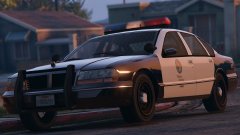 I'm probably gonna sound like an idiot for asking this, but where did this model come from? Was it in V? (the civ version. Obviously the police version was assembled by the great Lundy)
 -
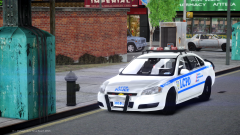 Stop it! You're making me miss IV!



.png.5338949515c81080d5c0d7f4e62a358f.png)
