


CastleBravo1
Members
-
Joined
-
Last visited
Everything posted by CastleBravo1
-
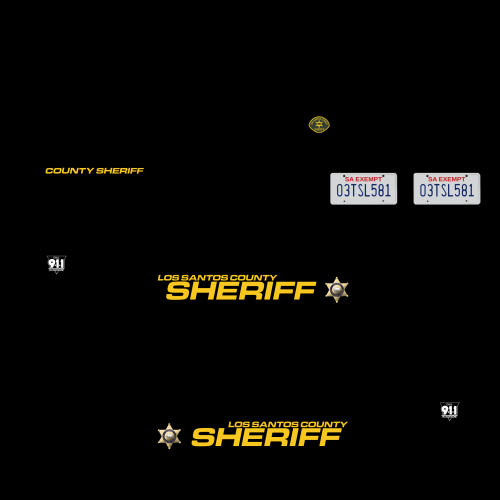 Sheriff textures for thegreathah's LSPD Pack. Just find and replace the "charger_sign_1" and "tahoe_sign_1" in the directory with the files. Let me know what you guys think! Not the best textures out there, but just some done in my free time. .
 -
-
 Has anyone had issues with the Tahoe? When they are spawned during a pursuit all the windows become opaque and the lightbar doesn't flash. Only the outeredge flashes, but very dimly. Not sure what the issue is? Edit: I spawned a Tahoe and the lightbar didn't work. The lights appeared to be flashing under the lightbar, but wasn't working as usual. I used the repair and wash commands and it appeared to have worked again, but was more tinted than usual. Otherwise, this pack is awesome! Great work!
- 101 comments
- 49 reviews
-
.thumb.jpg.1db0be3e377ccefdd47e57a95ec56762.jpg) The takedown lights on the lightbar wig-wag when the windshield is broken. Anyone notice this? It'd be cool if it would be able to do it without the windshield being broken! If I had to complain about something, this would be it. It's not much to complain about either. Great job on this model!
The takedown lights on the lightbar wig-wag when the windshield is broken. Anyone notice this? It'd be cool if it would be able to do it without the windshield being broken! If I had to complain about something, this would be it. It's not much to complain about either. Great job on this model!- 239 comments
- 70 reviews
-
-
-
-
That or a mapped Whelen Vertex with the black flange for exterior mounting.
-
Does anyone have any Whelen LINZ6s or could possibly provide a link to them? I've found some links, but they have been duds so far. Any help is appreciated. -CastleBravo1.
-
I've been goofing around with my Tahoe I've been working on...and I've run into a snag. I cannot figure out WHY my tire is showing underneath my model in OpenIV. I've been messing around with it on Zmodeler...but I can't figure it out. My previous Tahoe's have had this issue, but some how I corrected it. For the life of me, I cannot figure out how to correct it. It's been a couple of weeks since I've been working on it so, naturally, I've forgot how to do some things. Can anyone give me a push in the right direction? I'm sure it's some newbie mistake. Thanks for the help! -CastleBravo1 The image above is the one in OpenIV. The image below is the one in game with the model above.
-
Hmmm...well I'll tamper with it some more and see if I can't resolve the issue.
-
Does anyone have a set of WORKING (and mapped) Vertexes? I've tried to use Corleone's...but they didn't quite work out well. I'm nearly completed with my own personal model, but this is the last step to get it going. Thanks! -CastleBravo1
-
From the album: Slicktop Tahoe WIP
-
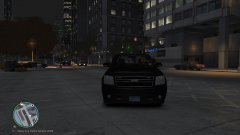
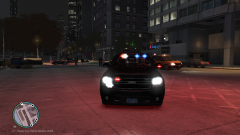
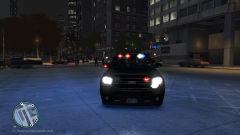
My first model made with Zmodeler. It took a bit of tearing down and building back up again. It's still a WIP and there are still changes I need to make. These aren't the best screenshots, but I'd like to see what others think. This is modeled similar to my agencies set up, so I tried to get as close to realistic as I could with the parts I could find.
-
From the album: Slicktop Tahoe WIP
-
From the album: Slicktop Tahoe WIP
-
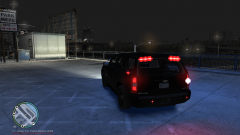
From the album: Slicktop Tahoe WIP
-
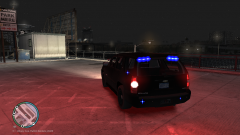
From the album: Slicktop Tahoe WIP
-
I think I figured mine out. I had to rename all my extra 1s and 4s temporarily and I imported a vertex I converted earlier to a wft file. Once I merged the z3d it merged with the converted vertex wft file. Before, I was merging the z3d vertex file and it was merging with other extras. Which is where your problem may be.
-
Are you having issues with the Vertexs appearing white in game? I have the textures added in Zmodeler but it still appears white. It's the only thing I have left before my set up is completed.
-
Update: I scrapped the OuterEdge idea, as it was a GIANT pain to get them to scale properly. Instead I replaced it with three Whelen Ions on each side of the center brake light. Now, the next problem I have is with the Whelen Vertex LED lights made by Corleone. I have added the textures that were supplied with the Vertex, but when I imported the Vertex it is appearing in the game as white. I've tried removing the textures and the models, adding the textures and models back again, so on and so forth. This didn't work at all. My next plan of action is to sacrifice a chicken. Sooo...has anyone else used this Vertex before? What in the world could I be doing wrong?
-
Well the "lightbar" or lighting set up I'm referring to is this: http://gtapolicemods.com/downloads.php?do=file&id=2147 I'm going for a "tactical" high-speed; low-drag slicktop set up. It's similar to what the agencies around my area use.
-
Just an update: I was able to figure out how to select all the parts and how to copy and mirror objects to the other side (thanks to those who helped!). NOW: I downloaded the OuterEdge that TraumaPak made that said it was specifically made custom for the Tahoe...just not the Tahoe I'm using haha. If anyone has tinkered around with this, just throw in your two cents. My problem lies in getting the OuterEdge lights to remain straight back while keeping the unit from going through the back windshield. I'm tempted to scrap this OuterEdge and start searching for another one. Thanks, -CastleBravo1
-
Awesome! Thanks for the help guys! -CastleBravo1
-
Thanks!


.thumb.jpg.1db0be3e377ccefdd47e57a95ec56762.jpg)

