



Ragnrok
Members
-
Joined
-
Last visited
Everything posted by Ragnrok
-
-
i keep forgetting how good this track isone of my new favorite "happy songs"
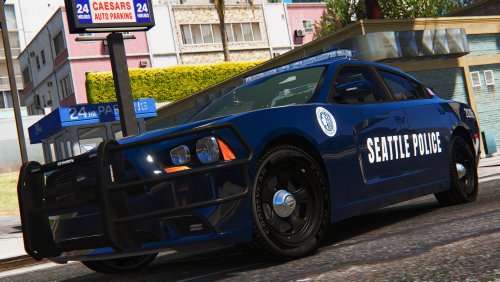 you know i generally dont like the Seattle PD livery and i hate their cvpis, BUT i dont mind it so much on the FPI, at least when the car has decent equipment
- 21 comments
- 7 reviews
this dude had a song with some drum & bass in it? WHAT???? its sounds like a gundam song... vehicle handling is probs still the granger. go into the handling.meta to change it
- 427 comments
- 75 reviews
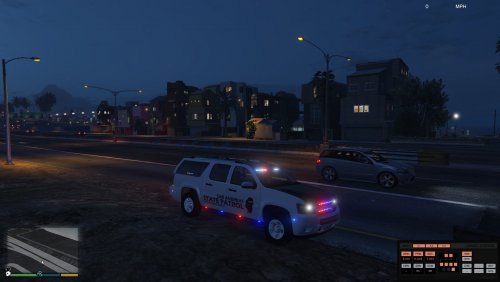 very interesting lighting set up. i like it. and thank you for doing a proper unmarked suburban
- 69 comments
- 11 reviews
ooooo mesa likesince we seemed to be on racing themes for a little bit there who remembers these? AND a great song for a modern one! because ford is totally copying you! http://www.topgear.com/car-news/modified/sema-2016-best-oems#8
- 158 comments
- 54 reviews
I think @Illusionyary might like theseGo on, oh oh oh Go on oh oh diving Go on oh oh go higher (and through it all) More stuffswow i remember this song! havent heard it in forever! i remember it was on TATW NO no avicii! Avicii is heardby banned from this thread! bad Original Light bad! i clean thisdouble check that your not having the exception access violation crash instead. cuz that causes everything to crash and its not rde in that case. alot of ppl who used rde or didnt prior to the update are having that crash after the biker updateWho doesnt need some Blackmill in their life? On a different note () and my favoriate Uppermost song





Account
Navigation
Search
Configure browser push notifications
Chrome (Android)
- Tap the lock icon next to the address bar.
- Tap Permissions → Notifications.
- Adjust your preference.
Chrome (Desktop)
- Click the padlock icon in the address bar.
- Select Site settings.
- Find Notifications and adjust your preference.
Safari (iOS 16.4+)
- Ensure the site is installed via Add to Home Screen.
- Open Settings App → Notifications.
- Find your app name and adjust your preference.
Safari (macOS)
- Go to Safari → Preferences.
- Click the Websites tab.
- Select Notifications in the sidebar.
- Find this website and adjust your preference.
Edge (Android)
- Tap the lock icon next to the address bar.
- Tap Permissions.
- Find Notifications and adjust your preference.
Edge (Desktop)
- Click the padlock icon in the address bar.
- Click Permissions for this site.
- Find Notifications and adjust your preference.
Firefox (Android)
- Go to Settings → Site permissions.
- Tap Notifications.
- Find this site in the list and adjust your preference.
Firefox (Desktop)
- Open Firefox Settings.
- Search for Notifications.
- Find this site in the list and adjust your preference.