raca
Members
-
Joined
-
Last visited
Everything posted by raca
-
-
-
-
-
-
-
-
-
-
-
-
 It works like a charm :) this is truly amazing piece of work, great addition to LCPDFR! If you plan to expand this further, I'd be really cool to have these kind of callouts available on Alderney Island aswell! because it's an awsome location, but nothing much really goes on there :P
- 97 comments
- 29 reviews
-
-

- 1
-
-
-
forgot it where exactly? I did add the vehshare truck textures in the zmodeler... I'm having this everything I make :( I didn't have it before it just occured now... I'm sure the trick is in the export but I don't know where -.-
-
Well phone just seemed a faster option... But still does anyone know what's wrong with this? If you need more pictures or info about the model just say so and I'll provide it.
-
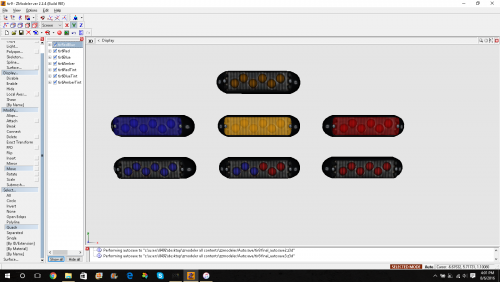
Hey! I'm creating a police speedo with my own lights setup. I add lights to the model in ZModeler, export it, no problems or errors, I add all the lights textures to the .wtd file in OpenIV and than replace the model with the one I created. When I try to view the model, it's all white and no texture is being used at all (not vehshare, vehshare_truck, noose (which is the model I'm trying to replace), nothing ). I don't know what's causing this, in the past I've created models this way with no problem, but now it just seems to not work any more... If I add the textures in OpenIV in Model Viewer the car loads it's textures and looks as it should, but when I close the Model Viewer again, the textures are gone again... And when I try to spawn vehicle in the game it says "unable to create object"... I posted pictures of Model Viewer and my export (Fraps didn't work in ZModeler for some reason so I took the picture with my phone). Notice the bottom right corner in Model Viewer, 1st picture is what I get when I open the Model Viewer, and two other pictures are what I get when I add textures - the problem is when I close it and open it again it's always the same all-white vehicle... How can I set the textures I want the model to use, so that the model will actually be using the textures in the game...? I really need help, I've tried to fix this but I just can't :(
-
-
-
-
this is so copying the Mordecki's EMS Mod that is going to come out very soon. Seriusly? This stuff is the same he announced in his trailers for EMS Mod, and you go and do this to him? Well, I don't even bother downloading this, I will wait for Mordecki's EMS Mod which will probably be flawless, no bugs whatsoever and will have plenty more feautres.
- 68 comments
- 12 reviews
-
-
-
raca 2/27/2014 NOTICE: Screenshots are stretched. PATRIOT HUMMER FIREFIGHTERS COMMAND VEHICLE This model is based on Slovenian vulunteer firedepartments command vehicle Hummer H3 (pics of the original car down below). As I couldn't get any unlocked Hummer model I just based it on the original patriot model which is in game by default and looks similar to the Hummer. This car is available in original cars texutre from PGD Slovenske Konjice (volunteer F.D). and in the L.C.F.D. texture. I also customized the lightbar and mini LED textures so YOU CAN CHOOSE the coloring of the lightbar and mini LED's of your preferation :) This download incloudes: - LIGHTBAR TEXTURES: *All blue *All blue with whites *All red *All red with whites *red&blue - MINI-LED TEXTURES: *All blue *All red *red&blue - MODEL TEXTURES: *PGD Slovenske Konjice (Original and Default set texture) *Liberty City Fire Department - SCREENSHOTS - CREDITS - DESCRIPTION - POLPATRIOT.wft and POLPATRIOT.wtd - TEMPLATE MODEL VERSION: LOCKED Credits: - MODEL: In-Game patriot - by RockStars, converted by raca - TEXTURES: Based on PGD Slovenske Konjice's Hummer H3, Liberty City Fire Deparment - by raca - LIGHTBAR: 911EP Galaxy - by Boatinman & WarDoG, LIGHTBAR TEXTURES customized by raca - CUSTOM MINI LED LIGHTS: modeled, converted, textured - by jasonct203 - TOMAR 200S TRAFFIC ADVISOR: by NickieB - WHELEN CENCOM SAPPHIRE: by NickieB - ARMA CONSOLE: COMMS RADIO and COMMS MIC - Arma and Delta Hawk for the Model, Evanscornelius for modifying and converting to GTA IV, raca for customizing (scraping out the microphone and the communications radio module) YOU DO NOT HAVE PERMISSION TO MODIFY OR REUPLOAD THIS MODEL OR TEXTURES ANYWHERE WITHOUT MY PERMISSION. IF YOU WOULD LIKE TO UPLOAD THIS SOMEWHERE, FEEL FREE TO ASK ME FOR MY PERMISSION v.i.a. P.M., I'M SURE WE CAN WORK IT OUT ;)
-
I figured out the problem, thank you :)
-
what do you do with that part with the same name? rename? delete?