


officer93
Members
-
Joined
-
Last visited
Everything posted by officer93
-
-
-
-
-
-
-
-
-
-
This is actually very simple to do. BTW it is all explained in the els use guide but,I will go ahead and give you a simple explanation. So, first the simple way to make a custom els settings .ini is just to edit the default file to the settings of your choice, BUT, just save the file as something else in the els folder. Examples: police2.ini or charger.ini. Now you open the _SLOTCONTROL.ini and where it says defualt_confiq under the vehicle name just replace that with whatever you called the file you made previously. Example, if you called the file police2 then where defualt_confiq is listed replace that with police2.
-
Okay, so this could be a few things. First, did you recently change or add an ENB? If you did, certain ENBs get rid of or alter the coronas files such as game4videos ENB. If that is the case follow this think to add one of the coronas files. http://www.gta4-mods.com/misc/coronas-pack-v10-f13642 Secondly, is the car set to defaultconfig in the slotcontrol.ini?
-
I can answer the first question. What I found to reduce the brightness and bloom of the reverse lights (Only if they are the coronas enabled through ELS V8 otherwise this won't work) without reducing the brightness of the other lights is by editing the coronas texture file. Here is a link to other coronas with varying degrees of brightness and bloom. http://www.gta4-mods.com/misc/coronas-pack-v10-f13642 Just use openiv to replace the coronas file in pc<textures. I also use game4videos enb and coronas 2 from this pack reduced the brightness and bloom of the reverse lights a lot and looks really nice. Now if the reverse lights were modeled with the car, then unfortunately, there is no way to decrease the brightness without reducing the rest of the lights on the car. So, I hoped this helped to answer your first question.
-
-
-
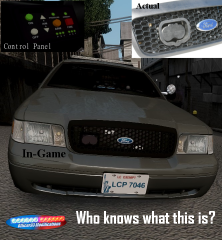 Yes it is
 -
-
-
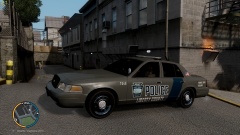
From the album: Liberty County Police Pack Preview
-
pics of my upcoming pack release
-
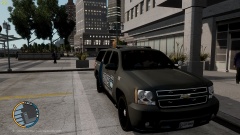
From the album: Liberty County Police Pack Preview
-
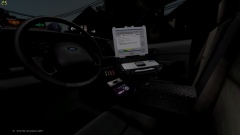
From the album: Liberty County Police Pack Preview
-
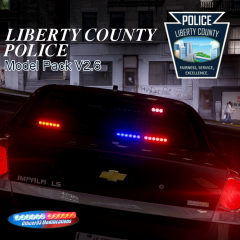
From the album: Liberty County Police Pack Preview
-
Liberty County Police Vehicle Model Pack Created by: Officer93 Released on 1/05/15 to LCPDFR.com This is my first model pack (first vehicle models I've made at all), so I hope you like it. More to come soon. Video: http://www.youtube.com/watch?v=PfYW437Hbcc Pack Exclusives: - Unique lighting setup that has a rear only lighting stage - StarChase included on cvpi - Some scratch modeled parts and textures - consistent vehicle set-up - ELS files included Credits: CVPIs - Model is Ford Crown Victoria from Driver SF, converted to GTA IV by F5544, modified by KevinDV and Cj24 - Rims by Bxbugs123, Textures by GreenAid - Honeycomb Grill made by KevinDV - Code 3 x2100 lightbar by GTAxBoss modified by Officer93 - Code 3 wingman by Lccop - Whelen TIRS by sebrion - Whelen Talon by Bxbugs123 - Whelen Spot Light by deco(Tim98) - Bodyguard Partition V1.2 by Bxbugs123 modified by Officer93 - LO-Jack by Caleb3019 - Toughbook computer by Ridgerunner Designs - Stalker radar by jasonct203 - Console modeled and textured by Officer93 - RLS control panel modeled and textured by Officer93 - Motorola Radio modeled and textured by Officer93 - Antennas modeled and textured by Officer93 - E-Printer modeled and textured by Officer93 - Ez-Pass modeled and textured by Officer93 - StarChase Launcher and Control Panel modeled and textured by Officer93 - Generic Equipment by Vertex3D - Med bag by Vertex3D - Trunk power control panel modeled and textured by Officer93 - Textures by Offcier93 Charger - 2013 Dodge Charger Pursuit by Olivia Benson (GeorgiaMoon) - Code 3 x2100 lightbar by GTAxBoss modified by Officer93 - Code 3 wingman by Lccop - Whelen TIRS by sebrion - Whelen Talon by Bxbugs123 - Whelen Spot Light by deco(Tim98) - Bodyguard Partition V1.2 by Bxbugs123 modified by Officer93 - Toughbook computer by Ridgerunner Designs - Console modeled and textured by Officer93 - RLS control panel modeled and textured by Officer93 - Motorola Radio modeled and textured by Officer93 - Antennas modeled and textured by Officer93 - E-Printer modeled and textured by Officer93 - Generic Equipment by Vertex3D - Med bag by Vertex3D - Textures by Offcier93 Suburban - Model is original "Chevrolet Tahoe" by 4x4 Full Driver - Hummer H2, modified for and converted to GTAIV by Stiopa - Converted in to a 2008 Chevrolet Suburban By Bxbugs123, modified by LtCaine - Model improvements & Modifions By Bxbugs123 - 08 Chevy Rims made & converted to GTA IV by Bxbugs123 - Code 3 x2100 lightbar by GTAxBoss modified by Officer93 - Code 3 wingman by Lccop - Code 3 command stick by Lccop modified by Officer93 - Whelen TIRS by sebrion - Whelen Talon by Bxbugs123 - Whelen Spot Light by deco(Tim98) - Bodyguard Partition V1.2 by Bxbugs123 modified by Officer93 - Toughbook computer by Ridgerunner Designs - Stalker radar by jasonct203 - Console modeled and textured by Officer93 - RLS control panel modeled and textured by Officer93 - Motorola Radio modeled and textured by Officer93 - Antennas modeled and textured by Officer93 - E-Printer modeled and textured by Officer93 - Ez-Pass modeled and textured by Officer93 - Rear trunk cabinet modeled and textured by Officer93 - Generic Equipment by Vertex3D - Stop Sticks by Vertex3D - Med bag by Vertex3D - Textures by Offcier93 Impala - Model is original Chevrolet Impala From Driver SF, modified for and converted to GTAIV by Bxbugs123 - converted in to a Police vehicle by Bxbugs123 - Seats By Bxbugs123 - rims by Schaefft - Code 3 x2100 lightbar by GTAxBoss modified by Officer93 - Code 3 wingman by Lccop - Code 3 command stick by Lccop modified by Officer93 - Whelen TIRS by sebrion - Whelen Talon by Bxbugs123 - Whelen Spot Light by deco(Tim98) - Bodyguard Partition V1.2 by Bxbugs123 modified by Officer93 - Toughbook computer by Ridgerunner Designs - Console modeled and textured by Officer93 - RLS control panel modeled and textured by Officer93 - Motorola Radio modeled and textured by Officer93 - Antennas modeled and textured by Officer93 - Ez-Pass modeled and textured by Officer93 - Generic Equipment by Vertex3D - Med bag by Vertex3D - Med bag by Vertex3D textured modified to LCoPD by Officer93 - Textures by Offcier93 YOU ARE NOT ALLOWED TO REUPLOAD, DISTRIBUTE, OR EDIT THIS FILE WITHOUT MY PERMISSION UNLESS IT IS FOR PERSONAL USE ONLY. I AM IN NO WAY RESPONSIBLE FOR ANY DAMAGE YOU MAY HAVE CAUSED TO YOUR GAME.
- 25 comments
- 7 reviews
-
It's not. The outside of it is black and the launcher tubes are gray. I created it based off the model my local department uses. The actual pic is the only one I could find online. It could just be my ENB though.
-
Correct! the official name is StarChase


