


officer93
Members
-
Joined
-
Last visited
Everything posted by officer93
-
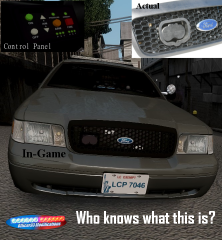 no but good guess
 -
From the album: Liberty County Police Pack Preview
Lets see how many people know their police equipment and know what this is :P This will be released in a upcoming vehicle model pack of mine and possibly as a Development Part as well; I haven't decided yet. -
my current WIP
-
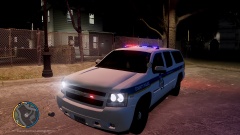
From the album: Officer93's WIP
Baltimore County Police model pack preview -
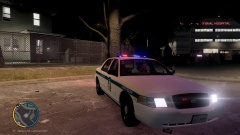
From the album: Officer93's WIP
Baltimore County Police model pack preview -
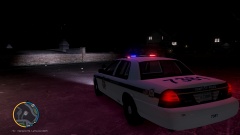
From the album: Officer93's WIP
Baltimore County Police model pack preview -
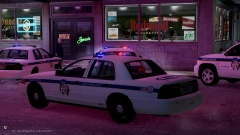
From the album: Officer93's WIP
Baltimore County Police model pack preview -
-
-
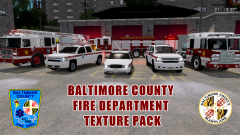
From the album: Officer93's WIP
Baltimore County Fire Department Texture Pack -
Baltimore County Fire Department Pack By: Officer93 This is the Fire Department addition to my Baltimore County collection. I hope you all enjoy and be sure to check out some of my other mod releases, including the Baltimore County Police texture Pack (A large model pack will be released in a few weeks w/improve textures, realistic lighting and equipment). This is a reminder that this pack is designed for realism. This Pack includes the FD vehicles: Fire Truck, Ambulance, Ladder Truck, Hazmat Response Truck, EMS Lieutenant, Brush Truck (Silverado), Battalion Chief CVPI Texture 1: E 01, Towson Station 1, Fire Truck Model: Spartan Gladiator Fire Truck Credit: gtapolicetrucker Link: http://gtapolicemods.com/downloads.php?do=file&id=1321 Texture 2: Medic 55, Perry Hall Station 55, Ambulance Model: International Durastar Ambulance Credit: KevinDV Link: GTA Modding Chest (unfortunately the site is no longer available; a lot of great mods have been lost because of it) It might be found somewhere else, but I couldn't find a link. Texture 3: Truck 17, Texas Station 17, Ladder Truck Model: 2013 Aerial Ladder Truck Credit: gangrenn Link: Texture 4: HM 114, Brooklandville Station 14, Hazmat Truck Model: Pierce Heavy Rescue Truck Credit: Firefighter767 Link: Texture 5: EMS 4, Middle River Station 12, EMS Lieutenant Model: 2008 Chevy Tahoe Credit: RobertB Link: I have modified the lights to all red (those light textures have been included in pack) Texture 6: Brush 16, Golden Ring Station 16, Brush Response Silverado Model: 2008 Chevy Silverado K9 Marshal Unit Credit: SnH Firefighter Link: http://gtapolicemods.com/downloads.php?do=file&id=2443 I have modified the lights to all red (those light textures have been included in pack) Texture 7: BC 11, BCoFD Battalion Chief CVPI Model: CVPI (from LA Emergency Services Vehicle Pack) Credit: Napoleon Link: (I have included ALL of the modifications (texture wise) I have made to any of the lightbars and/or lights with the files as an option for you to use) Installation Guide (if model is already installed): 1. Open SparkIV or OpenIV 2. Click browse; scroll down & click cdimages 3. Click on vehicles.img 4. Click on .wtd file of the vehicle you want and click edit 5. Find sign_1 and import this texture 6. Save and you are finished Notice that GTAIV only has 2 slots for a fire truck and an ambulance. In order to install all of these vehicles you have two options that I know of: 1. Use Simple Native Trainer and install the vehicles in the extra car slots 2. (if you are not a fan of SNT) Replace existing vehicles in the GTAIV archive; some suggestions would include: benson = ladder truck rancher = brush silverado e109 = EMS tahoe Ferroci2 = BC CVPI Regardless of which option you choose, to enable ELS on these vehicles, open the ELS slot_control conf. file and add in these vehicles with their file name. Be aware that since these are not originally GTAIV emergency vehicles, the siren will play however; it will not force other vehicles to yield. YOU ARE NOT ALLOWED TO REUPLOAD, DISTRIBUTE, OR EDIT THIS FILE WITHOUT MY PERMISSION UNLESS IT IS FOR PERSONAL USE ONLY. I AM IN NO WAY RESPONSIBLE FOR ANY DAMAGE YOU MAY HAVE CAUSED TO YOUR GAME.
- 10 comments
- 1 review
-
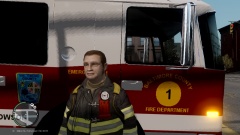 Nice to see my textures! I have a whole Baltimore county fire department texture pack finished. just never released it. I am also putting the final touches on a police model pack that is completely realistic, from the lighting setup to the interior. If you are interested in that, it should be released sometime in October.
 -
The problem is you have things checked that shouldn't be checked. Basically you should only have the L0's checked. You need to uncheck the L1's and COL's. For the wheels specifically the only things that need to be checked is wheel_lf, [wheelmesh_lf]. wheel_lr, wheel_rr, wheel_rf. You should not have the Collisions checked. This is just based on looking at your hierarchy
-
Well actually the ALPR scanner inside the vehicle is unrealistic. The cameras work by detecting reflections of vehicles and their license plates. That's why they will occasionally take images of reflective street address signs and other things.
- 17 comments
- 5 reviews
-
-

- 2
-
-
-
I ran into the same problem recently, but with a different object. Like you said, you can see them in zmodeler and openIV, but not in-game. Most of the time this has to do with textures, specifically shader configuration for the objects, in this case the antennas. If you follow this link: http://forum.zmodeler2.com/viewtopic.php?f=11&t=5565 , Towards the bottom of the page it provides what specific textures for each shader based on the name you gave the material. Different shaders need different texture combinations. I think mesh would be the best for the antennas. So at the end of the material name make sure it says mesh Then just follow these guidelines for editing the textures: Shader: gta_vehicle_mesh Texture layer #1: Main vehicle texture (usually vehicle_generic_detail2). Apply as GTA: Texture, UV#1 Texture layer #2: dirt texture, usually vehicle_genericmud_car. Apply as GTA: Dirt/Mud/Reflection, UV#2 Texture layer #3: Bump-map for main texture (usually vehicle_generic_detail2_normal) Apply as GTA: BumpMap, UV#1 Texture layer #4: Specular texture for main texture, (vehicle_generic_detail_spec). Apply as GTA: Specular, UV#1
-
Looks great!! The only thing I noticed is that in most CVPIs the rear panel of the trunk is usually black. That seems to be the case for Missouri Highway Patrol. I've attached a photo to explain what I mean
- 8 comments
- 2 reviews
-
-
-
-
-
-
-
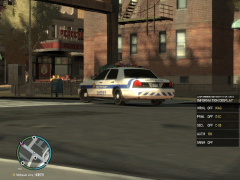 It's awesome seeing people enjoying my textures!!!
 -
I checked everything but when I use native trainer to spawn it that's when I get the error
- 51 comments
- 5 reviews

