


DMac18206
Members
-
Joined
-
Last visited
Everything posted by DMac18206
-
Here is another screenshot
-
I dragged it all the way down.. Changed it off read-only and it still goes back to the blue square
-
I don't believe so.. check this screenshot
-
I keep changing it off "readonly" and I click "apply and ok" and it goes right back to being check with a blue square!
-
-
Still getting the same error code (Picture below) never have gotten an error before like that. I have 6GB of Ram
-
So just like everyone else I download ELS V8 read all the documents that came with it and installed like it said. However I have ran into a problem, It is crashing my gta4Browser.. I have tried reinstalling still have the same issue. I run my game as administrator so that's not the issue.
-
R.I.P Trooper, So sad!
-
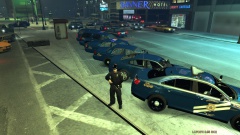 Yes please!
 -
Everything looks fine in my opinion, The TA was bigger I scaled it down a bit and the light bar is a FS Legend so yes it looks weird xD
- 2 comments
- 1 review
-
CODE RED MODIFICATIONS You are NOT Permitted to alter or upload these files anywhere else :Information: 2012 LCPD Dodge Charger Credits 2012 Charger - Lccop "DumpsterFire Arts - Original Model Civilian 2011 Dodge Charger R/T from SimRaceWay converted to IV by Dhruv - Edited To Police Pursuit Edition By Lccop - Mopar Wheels by GerryStudio Edited & converted for GTA IV by Bxbugs123 Federal Signal Legend - - Scratch modeled by Master Yoda. - Textured by Master Yoda. - Textures by GTAxB0SS and Master Yoda STL Pack (Traffic Advisor) - - STL Pack By CommanderHurricane Jays mini led lights - - jasonct203 CVPI GrilleGuard - - TraumaPak Arma 2 Center Console - - evanscornelius Spotlight - - Bxbuggs123 Dashcam - - Bxbuggs123 Setina Bodyguard - - Setina BodyGuard 6,7 Partition made by deco. Texture - - GTAGamerHD Coming updates - A newer texture will be added I through this one together for release. Please please be patient with me and I will update it ASAP. The car is very low poly with everything I added to it and it looks very nice in my opinion. Please leave some feedback it would be appreciated. :Suggestions: If you have any suggestions at all please leave a comment or private message me. I am looking for any one's opinion on cars so please feel free to leave some sort of feedback.
- 2 comments
- 1 review
-
5/5 and great work one of the first cars I have seen where the American flag wasn't retreating
- 4 comments
- 1 review
-
-

- 1
-
-
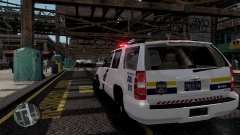
From the album: GTAGamerHD
-
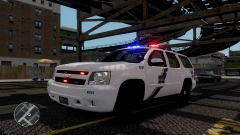
From the album: GTAGamerHD
Tahoe has hand made texture and red running light -
We could give that a shot! Ill message you a download link!
-
No success probably gonna have to re do it :/ Might not even bother! So many days and hours wasted!
-
Try relinking that bud, just get an error
-
Tried that they just turn black
-
Here are some in game shots It was working fine earlier when I tested it
-
Same thing as it does in Openiv, I tried going to night time to see if they would turn on and got no where with it
-
Negative! Didn't even do Strobes so never touched them.
-
Here ya go! Thanks for the fast reply!
-
So I am working on a car for about a week now and I am ready to release it.... But when it exported and put it into open IV i got this! I have never seen this before. Maybe some more experienced modelers have an idea on what's going on. The headlights are fine in zmod and as soon as we get into openiv there gone! Please help a lot of time have went into this car!
-
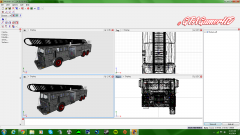 Being a fire fighter a ladder that huge is ugly! Non realistic
 -
From the album: MTL Ladder Project
Ok so I am going to take this ugly truck and make it look realistic as possible. This is going to take time and many hours, I hope people are interested in this enough to give me some idea's on it. Regards GTAGamerHD


