


DMac18206
Members
-
Joined
-
Last visited
Everything posted by DMac18206
-
 Cool story!
 -
Yes sir! I had to do the extras cause he put the extras to one set only so they would all flash at once!
-
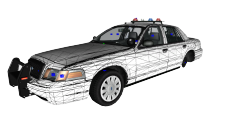
From the album: My W.I.Ps
Added a few things to the car! -
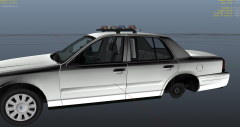
From the album: My W.I.Ps
Lowered the lightbar for IronicRainbow ;D -
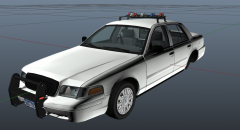 It's a W.I.P Original CVPI is made by CJ24
 -
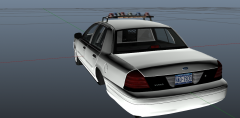 Bud I know I am fixing it -.-
 -
-.- W.I.P
-
It's sitting on it's mounts do hate me for being proper lool ;D
-
-
-
From the album: My W.I.Ps
-
-
I personally find it easier to get multiple ENBs and mess around and change some settings in the ENB.ini to make it look nice and to your liking it takes a good amount of time at first but once you get used to it, it's easy!
-
I LOVE YOU!! I would have never thought of that! :D lol
-
I have restarted it 2 times and I don't believe there is any texture conflicts
-
Yes sir
-
-
Rescue 62 has one I believe http://noxcorp.net/f.../FDNYPIERCE.rar
-
I am using the 09 CVPI Rim made by Bxbugs and they work but the texture seems to be messed up! I have tried remapping and got no where.. Wondering if someone who has used it before has fixed it and can let me know how to.. Thanks
-
Thank you sir!
-
Alright thank you I thought I heard about a script that would work
-
So today I decided to start working in 3DS Max again I first started using back in GTA SA for car models.. I am trying to figure out how to import and export GTA IV cars through 3DS Max if anyone has any idea please let me know any help is appreciated! Thanks again
-
-
-
CODE RED MODIFICATIONS You are NOT permitted to edit or re - upload these files anywhere else with out my permission! If you find any bugs/Problems please Private Message me ASAP and I can fix them ENJOY! All feedback is appreciated! Please let me know what you think! By downloading to this file you agree to the following terms: I will NOT edit or reupload this file with out permission Editing the texture is ok only for personal use! Credits 2003 Ford Crown Victoria - Model is Ford Crown Victoria from Driver SF, converted to GTA IV by F5544, modified by KevinDV and Cj24. - Rims by Bxbugs123, Textures by GreenAid. - Honeycomb Grill made by KevinDV. Whelen Galaxy - original 911EP galaxy by Boatinman, converted to gta iv by WarDoG and other few edits by WarDoG. Whelen Inner Edge TIR3 - Made by Tim98 Setina Bodyguard 6,7 Partition - Made by deco Rockwell Collins Laptop - Made & Converted by Bxbugs123 Textures By Bxbugs123 & DoTTGaMMa Arma Console - Arma and Delta Hawk for the Model. Evanscornelius for modifying and converting to GTA IV. CVPI GrilleGuard - TraumaPak: 3D Model Code 3 CommandStik - Lccop WatchGuard Video System - Made & Converted by Bxbugs123 Textures By Bxbugs123 & WatchGuard Video Unity Spotlight - Modeled & converted for GTA IV by Bxbugs123 Main textures made by Bxbugs123 Wigwags done by - GTAGamerHD Equipment - 3D Warehouse- Fire Ext and Cones Police Tape- Vertex 3D UV mapping- Vertex3D Stop sticks - Created and UV mapped by Vertex3D Texture - GTAGamerHD Vehicle Assebled by - GTAGamerHD
- 15 comments
- 3 reviews


