


mark 044
Members
-
Joined
-
Last visited
Everything posted by mark 044
-
 Video: https://youtu.be/6NDf-rnbUnY?si=Zo2cE0B0MUykbKmy [Flair_Police_Lights_v2.3_DayNight_Blend (1).fx] AFI_Bright_Pixel_Threshold=0.200000 AFI_Dark_Pixel_Threshold=0.020000 AFI_Day_Flare_Type=0 AFI_Day_Score_Threshold=0.050000 AFI_Night_Flare_Type=1 AFI_Transition_Width=0.120000 AFI_White_Importance=0.000000 AFI_Yellow_Importance=0.000000 Auto_Ray_Adaptation=1 Day_Intensity=1.500000 Flare_Type=0 Global_Intensity=2.000000 Night_Intensity=1.510000 Ray_Length=1.000000 Ray_Transparency=1.000000 Threshold=0.780000 Weight_Blue=1.500000 Weight_Orange=0.000000 Weight_Red=5.000000 Weight_White=0.160000 Weight_Yellow=1.000000 Installation: 1) Download ReShade from the official website. 2) Install all effects. 3) Download this file and place it in the reshade-shaders/shaders/ folder.
 -
 Hi! I noticed a bug here. When I'm sitting in a car with my seat belt fastened and try to spawn other cars (using the menyoo trainer), for some reason I get teleported to the ocean and the car becomes transparent and collision-free. When I unbuckle my seat belt and spawn other cars, everything is fine.
- 20 comments
- 3 reviews
-
-

- 2
-
-
Hi! The mod is great, but when I use it, for some reason the audio for mods like Grammar Police, Realistic Holster, and AxonSolutions stops working. Can you tell me what to do? Your mod is in my Plugins folder.
- 20 comments
- 3 reviews
-
-
- 1
-
-
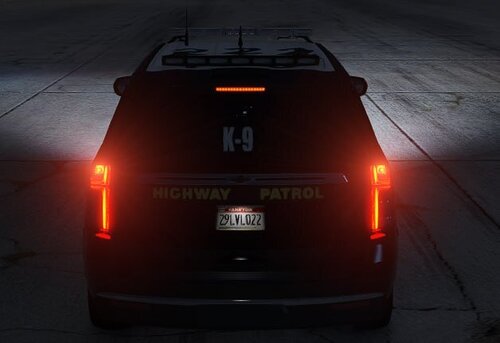 Hey! Glad you like the mod. If the lights turn bright white or wash out, it's a visual mod compatibility issue with emissive bloom values. Quick Fix: Restore your original visualsettings.dat (or graphics mod backup). Install Radiance V. Manually increase the brake, tail, and turn signal values from my visualsettings.dat into your file instead of replacing it entirely.
 -
This is the visualsettings.dat configuration I use in my game. I increased the light intensity for the rear lights, turn signals, and brake lights. The emergency lighting bloom is based on Radiance V, combined with QuantV 3.0 and ReShade as the graphical baseline. The vehicles shown in the screenshots are made by C3. Feel free to edit and tweak the parameters in visualsettings.dat to your liking

