Skip to content
View in the app

A better way to browse. Learn more.

LCPDFR.com

A full-screen app on your home screen with push notifications, badges and more.

To install this app on iOS and iPadOS
  1. Tap the Share icon in Safari
  2. Scroll the menu and tap Add to Home Screen.
  3. Tap Add in the top-right corner.
To install this app on Android
  1. Tap the 3-dot menu (⋮) in the top-right corner of the browser.
  2. Tap Add to Home screen or Install app.
  3. Confirm by tapping Install.

nemty

Members
  • Joined

  • Last visited

Everything posted by nemty

  1. Hello, if any of you have them, could you send me the game's default RESIDENT.rpf and WEAPONS_PLAYER.rpf files? I accidentally deleted it and my game won't launch; I can't refresh the files because that can cause issues with some mods.
  2. What is the reason for it being this way?[The problem has been resolved.]
  3. Hi, I installed Visual Vanilla for the game but I want to uninstall it. Do you know how I can do that?
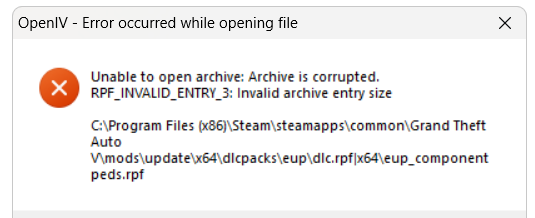
  4. Hello, when I try to open the eup file, it constantly gives this error and won't open. It crashes when I try to use it in-game, and it doesn't show up in the LSPDFR support bot.
Account

Navigation

Search

Search

Configure browser push notifications

Chrome (Android)
  1. Tap the lock icon next to the address bar.
  2. Tap Permissions → Notifications.
  3. Adjust your preference.
Chrome (Desktop)
  1. Click the padlock icon in the address bar.
  2. Select Site settings.
  3. Find Notifications and adjust your preference.