BJ USA
Members
-
Joined
-
Last visited
Everything posted by BJ USA
-
.thumb.jpg.f4bc86873cf1a46a9783299afc052cf4.jpg) Street-Legal-Enforcement V6.9A precision enforcement tool for Law Enforcement roleplay, designed for verifying vehicle equipment compliance, window tint levels, and license plate legitimacy. 👮 CORE FEATURESVLT Spectrometer Tool Portable device used to measure Window Tint percentages. Deployable via the [T] key when standing near a vehicle. Provides digital readouts to serve as evidence for citations. Neon & Underglow Detection Integrated logic to identify illegal roadway lighting. Supports a wide range of vehicle classes and custom lighting setups. Note on Neon Spawning: While the engine naturally spawns neon lights on select ”tuner” cars, this mod expands this variety significantly across a wider range of vehicle classes if enabled in the configuration. Plate Style Identification Recognition logic to help officers identify misused "Show Plates," "Antique" tags, or retired registration styles. Facilitates the discovery of "Exempt" or "Souvenir" plates being used on unauthorized vehicles by flagging restricted plate indices. All based on .ini settings and role play opportunities ⚙️ TECHNICAL SPECIFICATIONSEnsure all three files are present in your directory for full functionality: Street-Legal-Enforcement.dll Street-Legal-Enforcement.pdb Street-Legal-Enforcement.ini (Use this file to customize detection thresholds and keybinds) Note on Accuracy: While game engine lighting can vary visually, the Spectrometer tool provides the authoritative VLT reading for all legal and enforcement proceedings. 📋 ENFORCEMENT PROTOCOLObservation: Identify visual non-compliance, such as illegal underglow or suspicious plate types. Verification: Initiate a traffic stop and utilize the VLT Spectrometer to confirm exact tint levels. Action: Reference the tool’s output to justify equipment violation charges. Check out https://www.youtube.com/@pixelpgaming to see a normal guy playing GTA 5 LSPDFR. BJ-USA
Street-Legal-Enforcement V6.9A precision enforcement tool for Law Enforcement roleplay, designed for verifying vehicle equipment compliance, window tint levels, and license plate legitimacy. 👮 CORE FEATURESVLT Spectrometer Tool Portable device used to measure Window Tint percentages. Deployable via the [T] key when standing near a vehicle. Provides digital readouts to serve as evidence for citations. Neon & Underglow Detection Integrated logic to identify illegal roadway lighting. Supports a wide range of vehicle classes and custom lighting setups. Note on Neon Spawning: While the engine naturally spawns neon lights on select ”tuner” cars, this mod expands this variety significantly across a wider range of vehicle classes if enabled in the configuration. Plate Style Identification Recognition logic to help officers identify misused "Show Plates," "Antique" tags, or retired registration styles. Facilitates the discovery of "Exempt" or "Souvenir" plates being used on unauthorized vehicles by flagging restricted plate indices. All based on .ini settings and role play opportunities ⚙️ TECHNICAL SPECIFICATIONSEnsure all three files are present in your directory for full functionality: Street-Legal-Enforcement.dll Street-Legal-Enforcement.pdb Street-Legal-Enforcement.ini (Use this file to customize detection thresholds and keybinds) Note on Accuracy: While game engine lighting can vary visually, the Spectrometer tool provides the authoritative VLT reading for all legal and enforcement proceedings. 📋 ENFORCEMENT PROTOCOLObservation: Identify visual non-compliance, such as illegal underglow or suspicious plate types. Verification: Initiate a traffic stop and utilize the VLT Spectrometer to confirm exact tint levels. Action: Reference the tool’s output to justify equipment violation charges. Check out https://www.youtube.com/@pixelpgaming to see a normal guy playing GTA 5 LSPDFR. BJ-USA -
-
.thumb.png.656f907bc2febc81911b0b821cb502c8.png) I appreciate it. I tried going to alpha 1.52 but the data mismatch persists. Maybe I should go back farther? For example, this person is Noah Sharpe, but it's owned by family member Michael Sharpe. When it populates in ReportsPlus, the will share they same name of Noah, instead of the last name. Sometimes it's just completely different, but it seems to be regularly matching first names in ReportsPlus, despite having matching last names in STP. Thanks again just for reading.
I appreciate it. I tried going to alpha 1.52 but the data mismatch persists. Maybe I should go back farther? For example, this person is Noah Sharpe, but it's owned by family member Michael Sharpe. When it populates in ReportsPlus, the will share they same name of Noah, instead of the last name. Sometimes it's just completely different, but it seems to be regularly matching first names in ReportsPlus, despite having matching last names in STP. Thanks again just for reading.- 342 comments
- 43 reviews
-
.thumb.png.b720b5645f892097ea730cac04d3277f.png) 🏎️ Speedometer Simple (MPH)A high-performance, minimalist C# script for Grand Theft Auto V that provides a clean, reactive digital MPH display. Designed for players who want essential data without cluttering the screen with gauges. 📦 Included FilesSpeedometerSimple.dll — The main script assembly. SpeedometerSimple.pdb — Program database for debugging support. SpeedometerSimple.ini — User settings (auto-generated on first run). ✨ Key FeaturesReal-Time MPH Tracking: High-precision speed calculation calibrated specifically for MPH. Reactive Color HUD: The display automatically shifts colors to alert you of high speeds: 🟢 1-69 MPH: Neon Green 🟡 70-79 MPH: Warning Yellow 🔴 80+ MPH: Danger Red Interactive Menu (F10): Adjust the UI position and size in real-time. 🛠️ InstallationPrerequisites: Script Hook V Script Hook V .NET Deployment: Place SpeedometerSimple.dll and SpeedometerSimple.pdb into your GTA V/scripts/ folder. The NativeUI Requirement: Many users forget this! You must place NativeUI.dll directly into your GTA V/scripts/ folder (the same place as this mod) for the F10 menu to function. Launch: Press F10 in-game to open the configuration menu. 💡 Pro-Tips & TricksThe "Clean Shot" Trick: If you want to take a cinematic screenshot without the speedometer, simply use the Rockstar Editor or a trainer to hide the HUD; this mod follows the global HUD visibility settings and will disappear automatically. Instant Reload: If you edit the .ini file manually while the game is running, press the Insert key on your keyboard. This triggers Script Hook V .NET to reload all scripts, applying your new coordinates instantly without restarting the game. Performance Note: This mod is "Zero-Impact." It detects when you exit a vehicle and stops all calculations, meaning it won't eat up your CPU while you're in a shootout or walking around. Troubleshooting: If the menu doesn't open, ensure NativeUI.dll is not "Blocked" by Windows. Right-click the file -> Properties -> Check "Unblock" at the bottom if it appears. Safe driving is optional. A clean HUD is mandatory.
🏎️ Speedometer Simple (MPH)A high-performance, minimalist C# script for Grand Theft Auto V that provides a clean, reactive digital MPH display. Designed for players who want essential data without cluttering the screen with gauges. 📦 Included FilesSpeedometerSimple.dll — The main script assembly. SpeedometerSimple.pdb — Program database for debugging support. SpeedometerSimple.ini — User settings (auto-generated on first run). ✨ Key FeaturesReal-Time MPH Tracking: High-precision speed calculation calibrated specifically for MPH. Reactive Color HUD: The display automatically shifts colors to alert you of high speeds: 🟢 1-69 MPH: Neon Green 🟡 70-79 MPH: Warning Yellow 🔴 80+ MPH: Danger Red Interactive Menu (F10): Adjust the UI position and size in real-time. 🛠️ InstallationPrerequisites: Script Hook V Script Hook V .NET Deployment: Place SpeedometerSimple.dll and SpeedometerSimple.pdb into your GTA V/scripts/ folder. The NativeUI Requirement: Many users forget this! You must place NativeUI.dll directly into your GTA V/scripts/ folder (the same place as this mod) for the F10 menu to function. Launch: Press F10 in-game to open the configuration menu. 💡 Pro-Tips & TricksThe "Clean Shot" Trick: If you want to take a cinematic screenshot without the speedometer, simply use the Rockstar Editor or a trainer to hide the HUD; this mod follows the global HUD visibility settings and will disappear automatically. Instant Reload: If you edit the .ini file manually while the game is running, press the Insert key on your keyboard. This triggers Script Hook V .NET to reload all scripts, applying your new coordinates instantly without restarting the game. Performance Note: This mod is "Zero-Impact." It detects when you exit a vehicle and stops all calculations, meaning it won't eat up your CPU while you're in a shootout or walking around. Troubleshooting: If the menu doesn't open, ensure NativeUI.dll is not "Blocked" by Windows. Right-click the file -> Properties -> Check "Unblock" at the bottom if it appears. Safe driving is optional. A clean HUD is mandatory. -
 Added a bunch of vectors with proper headings, these were captured by hand: private readonly (Vector3 pos, float heading)[] blaineCountySpawns = { (new Vector3(2426.005f, 2893.755f, 39.757f), 315.682f), (new Vector3(2800.569f, 3410.840f, 55.265f), 334.474f), (new Vector3(2782.182f, 4537.769f, 45.862f), 14.626f), (new Vector3(2668.800f, 4955.232f, 44.246f), 11.227f), (new Vector3(2603.198f, 5286.061f, 44.104f), 17.229f), (new Vector3(1842.502f, 6371.044f, 40.054f), 79.999f), (new Vector3(1401.671f, 6489.430f, 19.703f), 76.983f), (new Vector3(571.797f, 6556.521f, 27.462f), 84.742f), (new Vector3(-965.713f, 5417.881f, 38.817f), 118.630f), (new Vector3(-1445.328f, 5071.627f, 61.249f), 127.512f), (new Vector3(-2231.715f, 4319.681f, 47.999f), 158.729f), (new Vector3(1913.825f, 3626.379f, 33.324f), 297.283f), (new Vector3(2311.828f, 3845.865f, 34.238f), 354.666f), (new Vector3(2722.210f, 4377.139f, 47.093f), 300.105f), (new Vector3(2071.439f, 3055.153f, 45.603f), 243.161f) }; private readonly (Vector3 pos, float heading)[] losSantosSpawns = { (new Vector3(1585.724f, -994.692f, 59.576f), 299.646f), (new Vector3(2467.166f, -156.913f, 88.435f), 334.078f), (new Vector3(2554.416f, 777.331f, 89.473f), 14.106f), (new Vector3(-3002.615f, 422.426f, 14.522f), 174.479f), (new Vector3(-2438.295f, -234.612f, 15.937f), 242.858f), (new Vector3(-454.835f, -545.044f, 25.118f), 340.849f), (new Vector3(1132.927f, -1876.680f, 30.579f), 202.668f), (new Vector3(1817.543f, 2133.373f, 54.093f), 188.367f), (new Vector3(2568.631f, 483.713f, 108.058f), 181.073f), (new Vector3(1377.448f, 688.062f, 78.825f), 140.195f), (new Vector3(-1698.002f, 867.090f, 146.550f), 330.646f), (new Vector3(-1530.274f, 1414.908f, 122.534f), 313.971f), (new Vector3(-1472.943f, 2030.788f, 64.130f), 27.114f), (new Vector3(-1363.992f, 2161.210f, 51.292f), 329.349f), (new Vector3(-1153.751f, 2641.986f, 15.755f), 133.056f), (new Vector3(-1940.944f, 657.573f, 123.814f), 152.401f) }; private readonly (Vector3 pos, float heading)[] lsiaSpawns = { (new Vector3(-871.255f, -2421.678f, 13.473f), 71.364f), (new Vector3(-1047.148f, -2715.130f, 13.209f), 240.530f), (new Vector3(-868.342f, -2633.694f, 13.490f), 328.651f), (new Vector3(-572.982f, -2211.542f, 5.464f), 139.273f), (new Vector3(-1000.008f, -2098.143f, 11.864f), 101.621f), (new Vector3(-1093.378f, -2025.239f, 12.553f), 213.849f), (new Vector3(-781.195f, -2177.081f, 15.272f), 133.228f), (new Vector3(-1081.490f, -2589.566f, 19.605f), 150.086f) };
- 84 comments
- 1 review
-
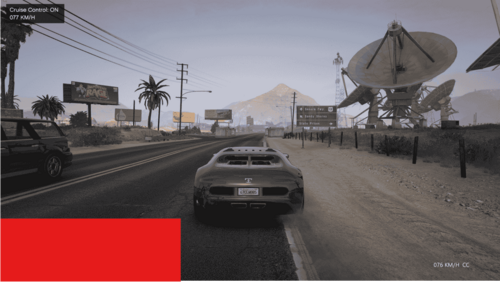 Is there any way to be able to place this using x,y coordinates instead of only the two position options? Thanks!
 -
This is absolutely my preferred program. Everything about it is great. The most recent release, however wasn't tested with stop the ped as explicitly stated and I feel like there is a lot of mismatched data in my mdt. I've tried to fix it in different ways, but I need to stop the ped because policing redefined isn't ready yet (I tried real hard and look forward to the future with it, later) so it'd be nice to make sure they work together. Maybe user error but I believe I've tried everything.
- 342 comments
- 43 reviews
-
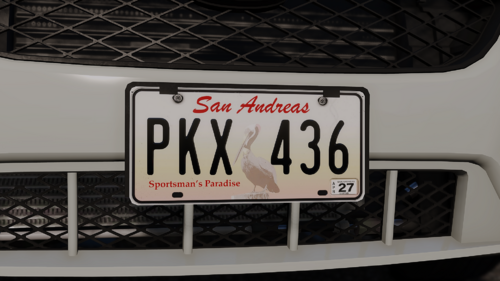 This would be amazing but it would require modification of Callout Interface. You can pick your plates and rename them to the ones in the callout texture folder, but Callout Interface limits the plates to those few random choices in the folder.
 -
Same issue. Happened after the patch. I had NVE installed already. I didn't change anything which was interesting. The game functions fine though. Stable game prior to the most recent GTA 5 and LSPDFR updates.
-
-
 Good start. Could add expired inspection, missing inspection, illegal inspection, visible outline of a concealed weapon or paraphernalia, unusual object (safe, body, et cetera), overpowering air freshener, smell of gasoline, blood stained clothes (on ped or off), excessive drowsiness, visible syringe or other paraphernalia, object hanging from rear view mirror, excessive cash, broken ignition (missing, screwdriver or other tool jammed in, hanging ignition wires, etc), excessive garbage, unusual odors (gasoline, burnt oil Lots of opportunities. Open Source would be great. Thanks for your hard work!
 -
I was thinking of making the ALPR in game dynamic to go along with AddOn Plates (https://www.gta5-mods.com/paintjobs/new-license-plates-add-on). Maybe I'll just suggest it here. Instead of having the one plate as a static image, it would be nice if it changed depending on which plate was being scanned.
- 342 comments
- 43 reviews
-
 While it may seem obvious or inherent, can you explain the .ini features? The readme is bare. What is the vehicle scan? Is it scanning for traffic violations or move over or? What is stop distance? True Vehicle speed? [General] EnableMoveOver=False VehicleScanRange=60 TrueVehicleSpeed=True [Behavior] StopDistance=15 StopSignRunPercent=5 YieldFailPercent=5 [Logs] EnableDebugLogging=False EnableLogging=False Thanks! Great mod!
- 128 comments
- 14 reviews
-
 Can you discuss these settings? [Same-sideYieldParams] SameSideYieldCompletionDistance=3 SameSideYieldAbandonDistance=45 SameSideYieldTimeoutMs=3000 SameSideYieldWaitDurationMs=3000 I'd be curious about the others too but mainly these. Thanks
- 110 comments
- 19 reviews
-
-

-

- 2
-
-
 Do we have a way to modify search items and questions? Explanation for charges (different class felonies, etc..)? Thanks for all your hard work
 -
I heard somewhere there was a converter to convert traffic offenses and the other stuff from Compulite and STP. Maybe I misunderstood, but has anyone found any conversion anything? I think I heard it on BLV. Thanks!
-
-
 This is an amazing mod. So if someone runs and the car never runs out of fuel, and I arrest the person and tow their car, then go code 4, soon after, the AI Fuel mod seems to still be ticking down: [5/30/2025 22:06:20.536] LSPD First Response: Inner exceptions: [5/30/2025 22:06:20.536] LSPD First Response: ------------------------------ [5/30/2025 22:06:20.536] LSPD First Response: Stack trace: [5/30/2025 22:06:20.536] LSPD First Response: at Rage.Vehicle.get_FuelLevel() [5/30/2025 22:06:20.536] at AI_Fuel.PursuitHandler.<>c__DisplayClass2_1.<CheckPursuitPeds>b__0() in C:\Users\jayde\Documents\Coding\LSPDFR Projects\AI Fuel\PursuitHandler.cs:line 63 [5/30/2025 22:06:20.536] at Rage.GameFiber.Main() [5/30/2025 22:06:20.536] LSPD First Response: ============================== [5/30/2025 22:06:20.536] LSPD First Response: [5/30/2025 22:06:20.538] LSPD First Response: [5/30/2025 22:06:20.538] LSPD First Response: ============================== [5/30/2025 22:06:20.538] LSPD First Response: UNHANDLED EXCEPTION DURING GAME FIBER TICK [5/30/2025 22:06:20.538] LSPD First Response: ------------------------------ [5/30/2025 22:06:20.538] LSPD First Response: Origin: Game fiber "<UNNAMED THREAD>". [5/30/2025 22:06:20.538] LSPD First Response: ------------------------------ [5/30/2025 22:06:20.538] LSPD First Response: Exception type: Rage.Exceptions.InvalidHandleableException [5/30/2025 22:06:20.538] LSPD First Response: Exception message: Operation is not valid because the specified Rage.Vehicle is invalid. [5/30/2025 22:06:20.538] LSPD First Response: ------------------------------ [5/30/2025 22:06:20.538] LSPD First Response: Inner exceptions: [5/30/2025 22:06:20.538] LSPD First Response: ------------------------------ [5/30/2025 22:06:20.538] LSPD First Response: Stack trace: [5/30/2025 22:06:20.538] LSPD First Response: at Rage.Vehicle.get_FuelLevel() [5/30/2025 22:06:20.538] at AI_Fuel.PursuitHandler.<>c__DisplayClass2_1.<CheckPursuitPeds>b__0() in C:\Users\jayde\Documents\Coding\LSPDFR Projects\AI Fuel\PursuitHandler.cs:line 63 [5/30/2025 22:06:20.538] at Rage.GameFiber.Main() [5/30/2025 22:06:20.538] LSPD First Response: ============================== [5/30/2025 22:06:20.538] LSPD First Response: [5/30/2025 22:06:20.541] LSPD First Response: [FATAL] Forced termination [5/30/2025 22:06:20.543] LSPD First Response: [TRACE] Released 1 entities from DefaultContentManager
- 12 comments
- 1 review
-
-
 Would there be a way to define patrol areas, so for instance only roam in Paleto Bay and Paleto Forest? Referencing the zone list. Thanks!
 -
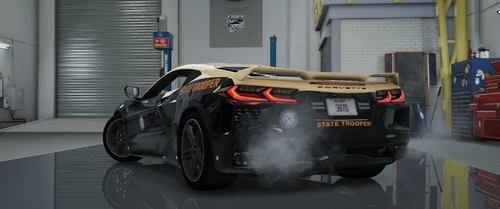 Oh no I wasn't looking for real life red and blues, I was looking for it in game 🤡 I really appreciate it the entire model man, thank you for your time and effort creating it. Maybe I'll play around with the ytd.
 -
How about a red and blue light option? This is great, thanks!
-
 Needs a traffic control feature option to be perfect.
 -
 Anyone willing and able to tell me which postal set is used ? (OCRP, Virus_City, etc.) I can't seem to find the matching one for callout interface. Thanks!
- 540 comments
- 26 reviews
-
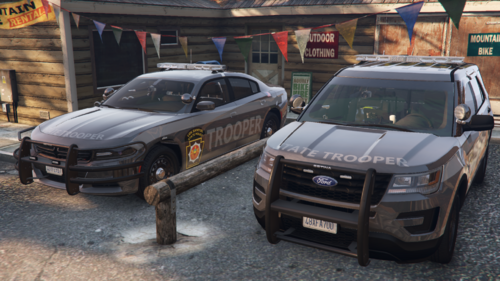 I like this especially being in PA. But Los Santos State Police doesn't work, for me, in Blaine County. Can you make it say San Andreas instead of Los Santos?

.thumb.jpg.f4bc86873cf1a46a9783299afc052cf4.jpg)
.thumb.png.b720b5645f892097ea730cac04d3277f.png)
.thumb.png.656f907bc2febc81911b0b821cb502c8.png)