


.jpg.0554cd52ff567583a97f716adc076f47.jpg)

CarmelaLemoShiba
Members
-
Joined
-
Last visited
Everything posted by CarmelaLemoShiba
-
it works now, thank you very much
-
Checking on the pack description it does say that SSLA is required. However, new issue has risen, that being that the lights for the default Ambulance, Firetruck, and other vehicles now light up as a giant png or very bright white light from a distance, and turn off once theyre near. Might this be related to SSLA being outdated as well?
-
I have encountered an issue where ELS doesn't work on some vehicles but works on the others, one example that is really troubling is the border patrol vehicles. ELS is downloaded correctly, same with the ELS files for the vehicles. Border Patrol pack as a whole is affected but so are some of the CHP vehicles, notably the slicktop ones. I have already uninstalled and reinstalled ASI managers on OpenIV like I read on some tutorials, and even ELS, issue persists. MedalTVGrandTheftAutoV20260402153438149 (1).mp4
-
.thumb.png.30177a0c051e229db6773959bc72cd65.png) Amazing mod! It has come to be really useful many times and has saved my patrol a lot of times including in this clip MedalTVGrandTheftAutoV20251204030600045.mp4
Amazing mod! It has come to be really useful many times and has saved my patrol a lot of times including in this clip MedalTVGrandTheftAutoV20251204030600045.mp4- 24 comments
- 4 reviews
-
-

- 1
-
-
-
-
Thank you very much, this was bugging me a little too much I tell you 😭
-
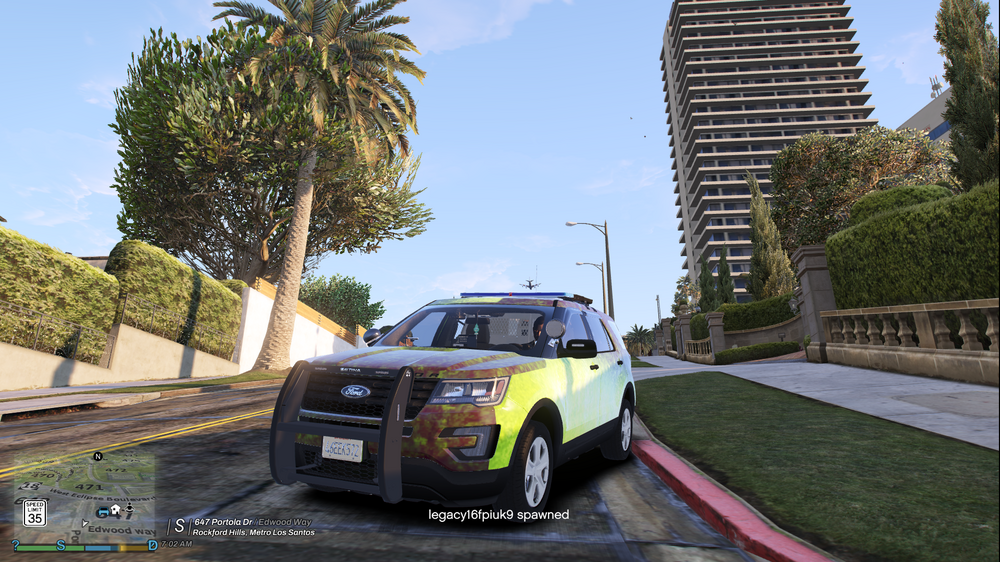
Hello, I seem to have an issue with several DLC packs that I've downloaded where the skins are completely missing, as seen below, or have skins for certain parts of the vehicle plastered elsewhere. I am really uncertain of what the issue is given that I've tried downloading these packs on fresh mod folders and the issue persists. I am unsure of what I've been doing wrong, my process of downloading DLC files is as simple as: 1. Open OpenIV 2. go to mods>update>x64>dlcpacks 3. drag and drop the DLC pack to the folder 4. edit dlclist to include said pack 5. boot up the game I am really uncertain what the cause of the issue is but would really appreciate it if someone could help me. This picture is of the K9 FPIU from scorpionfam's Legacy LSPD pack.
-
 I did reinstall completely several times and did remove some mods that I don't use but the issue really hasn't fixed itself. And idk what I would be doing wrong given the fact that I just drag the files to the dlcpacks folder, activate it on the DLC list as with any other mod.
- 146 comments
- 12 reviews
-
 The vehicles seem to have care put into them and, unlike a lot of DLC vehicles, are below 200,000 polygons with the highest polygon vehicle sitting at 58,000 polygons iirc.
 -
Im having an issue with the textures being misplaced on all vehicles except the crown vics, the 2018 tahoe, and the 2014 charger idk if it's something I did wrong on my end, I did what I usually do which is drag the dlc file from the zip file to my dlc folder. Only thing I changed on the files was the vehicles meta and i only changed their handling ID
- 146 comments
- 12 reviews
-
the vehicles aren't loading properly. everytime I spawn one the vehicle skins are extremely messed up.
-
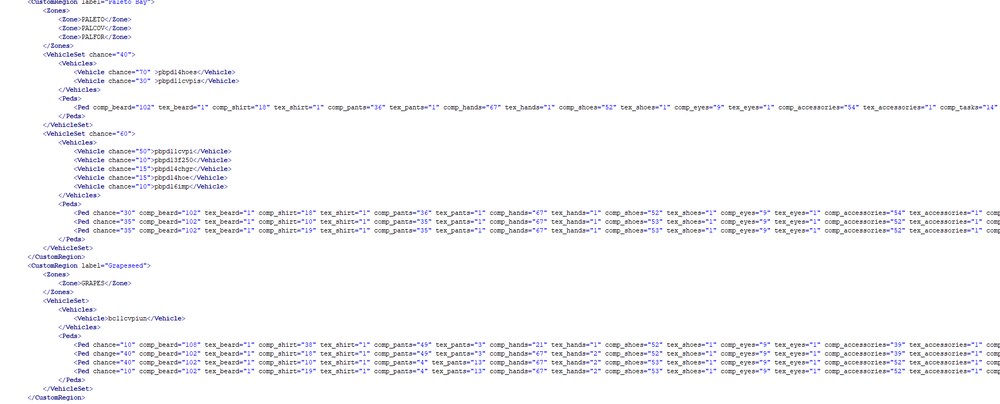
Recently I added the Grapessed Police Department, Sandy Shores Police Department, and the Paleto Bay Police Department. Whenever I go to call for Code 2 or Code 3 local backup, nobody shows up ONLY from the GSPD, and the SSPD only shows up in certain areas of Sandy Shores; Paleto Bay PD works fine as they spawn anywhere in Paleto. I set up the GSPD to only patrol: <Zone>GRAPES</Zones> meanwhile I set up SSPD to patrol: <Zone>SANDY</Zone> <Zone>DESRT</Zone> and <Zone>HARMO</Zone> Other units that have more than one region set to them work (*i.e. the LSSD patrolling Davis, Chamberlain Hills, and Strawberry. Idk what the issue could be because it resembles any other Custom Backup Screenshot of the units:

-
 Disregard btw, I figured out the problem.
 -
The ones in the DLS folder, yes. I even deleted and inserted them in manually and still the same issue
-
Hey so, for whatever reason the sirens are not turning on and the vehicle isnt responding to the normal DLS keybinds
-
-
 Amazing, absolutely amazing. Just wish there were the missing ones but I still fw it heavy one question tho, where do you make these? I usually make mine on canva but I encounter an issue when it comes to indenting the text because it doesn't achieve the reverse indent and just the normal indent.
- 13 comments
- 2 reviews
-
-
- 1
-
-
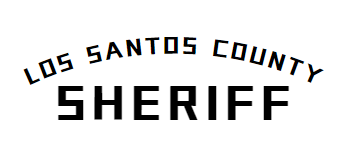
Hey! So ik this is now almost a decade after the question, BUT I may have found the answer on Canva or something close to it! The font I found is called Acuity and it looks like this More like this if you lower the spacing of the top letters to -82

-
 One of the best Los Santos County Sheriff vehicles I seen in a while, and to be honest probably the best LASD based one I'll see for a bit. Unfortunately not a lot of love for LASD based LS vehicles (this is the only proper one I found so far)😭😭 I hope you make more LASD based vehicles (i.e. chargers, explorers, etc.)
- 49 comments
- 24 reviews
-
.thumb.jpg.7d55798cc7d8d5ffcbed04ec280fd3d3.jpg) These are some liveries for the San Andreas Highway Patrol based on...a vision I guess. I'm not entirely sure where I came up with the liveries all I know is that I thought about them for like two days. This pack is optimized for Scorpionfam's Nevada Highway Patrol based pack. Some people say this looks similar to the Border Patrol cars but it isn't meant to be USBP. DO NOT RIP OFF THIS LIVERY Liveries made for these vehicles: - 2020 FPIU - 2020 Tahoe - 2021 Tahoe - 2016 FPIU - 2011 CVPI - 2018 Charger (both marked and unmarked) - 2014 Charger - 2016 FPIS - 2018 F150 - 2014 BMW R1200RT Scorpiofam's [ELS][Addon/Replace][NON/Reflective] San Andreas Highway Patrol Pack:
These are some liveries for the San Andreas Highway Patrol based on...a vision I guess. I'm not entirely sure where I came up with the liveries all I know is that I thought about them for like two days. This pack is optimized for Scorpionfam's Nevada Highway Patrol based pack. Some people say this looks similar to the Border Patrol cars but it isn't meant to be USBP. DO NOT RIP OFF THIS LIVERY Liveries made for these vehicles: - 2020 FPIU - 2020 Tahoe - 2021 Tahoe - 2016 FPIU - 2011 CVPI - 2018 Charger (both marked and unmarked) - 2014 Charger - 2016 FPIS - 2018 F150 - 2014 BMW R1200RT Scorpiofam's [ELS][Addon/Replace][NON/Reflective] San Andreas Highway Patrol Pack: -
-
 You need to put the XML files in the ELS "default_pack" folder. Only reason why the lights wont work but sirens will is if you download the ELS wrong This is the ELS folder in your main directory. Once you open the ELS folder you open this highlighted folder. Then you insert the xml files here. (Should look similar to what I have here)
- 239 comments
- 24 reviews
-
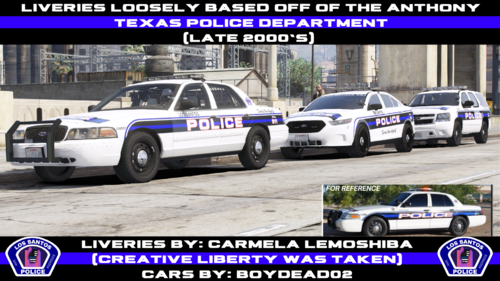 Thank you! Glad you found one!
 -
FIXED FILE IS OUT! EVERYONE ENJOY!


.thumb.png.30177a0c051e229db6773959bc72cd65.png)



.thumb.jpg.7d55798cc7d8d5ffcbed04ec280fd3d3.jpg)
