


Creators: Due to background reprocessing of files, approvals and file security checks may be delayed. Thanks for your patience.

ztgraphix
Members
-
Joined
-
Last visited
Everything posted by ztgraphix
-
I agree 100%...I could not resist watching some of the leaked footage before I could get my hands on the game...and I was so damn excited until I saw people crashing into things...I was like you have to be kidding right? I am a realist and like for any game I play to be almost a simulation or atleast close to it and now from the looks of things GTA V is going to drive and have damage like a old Gran Turismo game....IT SUCKS!!!
-
Over the past two days I have been watching live streams and leaked videos...and it doesnt look good. I have watched probably over 2-3 hours of gameplay all together and hardly saw a cop car once besides when the person raised his wanted level....pretty disappointing..
-
I sold my ps3 about a year ago because I simply got bored with the games that was out...but Im going this week to get one along with GTA V. There are quite a few games out that I want to play so i figured i would go drop 300 dollars...yay.
-
Simple answer is no. Just save more money and get you a decent gaming desktop. It will be worth it in the long run because there is always room for improvement/upgrades as more games come out in the future.
-
From the album: ZTGRAPHIX's ALBUM
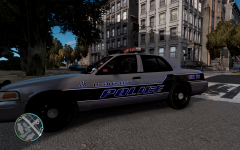
Hey guys..so im sitting around with nothing better to do until gta 5 comes out and was thinking about putting together a Liberty City skin pack. First...Is there any other skins created that look like this? I havent took the time to go through the countless pages to look, but if so im going to change some stuff up. Secondly..Would anybody care to use these if I take the time to make them..And lastly, Any suggestions or constructive criticism? I plan on making a few minor changes but this is my base so far. Let me know what ya think! -
From the album: ZTGRAPHIX's ALBUM
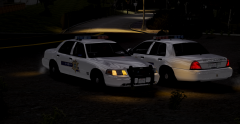
Two Ouachita Parish Sheriff Deputies doing a little chatting while watching for speeders and drunk drivers after the bars have just closed. Going to be a long night ahead of them! -
That is correct. I have no idea..never ran into this problem before and I usually change the lights around on all the cars I use..
-
I don't see what im doing wrong...there is no other files that look like that when I open up the wtd.
-
well if anyone could figure out how to change the colors of the two rear yellow flashers on this cars light bar I would be greatly appreciative... '?do=embed' frameborder='0' data-embedContent>> Oh and its DEFINITELY not in the emerglights_emise file...Ive already tried..
-
No No no lol I'm talking about what color the lights on the lightbar flash. Not the reflections on buildings and surroundings. And not the color of the lightbar glass. The actual color of the lights..
-
Yes I'm talking about what color the lights actually flash not the lightbar itself.
-
Hey guys, is there anyway to change the colors of the lights besides in the (emerglights_emis) texture file? I have tried every light texture possible in sparkiv. So is there another way that the light colors are mapped besides in those textures? Thanks in advance!!
-
Yeah would be nice if I could find the same! All the ones I have seen are always missing just once piece to the puzzle it seems....
-
-
-
-
-
From the album: ZTGRAPHIX's ALBUM
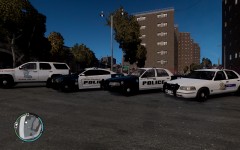
This is a skin pack I put together for myself, It contains West Monroe PD, Ouachita Parish Sheriff's Office and Louisiana State Police. All the cars I see on a daily basis here in West Monroe,Louisiana! This is my first time doing some skins for GTA IV, I usually just stick to race car wraps but thought I would try it out since I was bored..** and yes I know they are all kind of "plain jane" but that is exactly how they look in person..and I don't know why its blurry must be the jpg. they are crystal clear on game. -
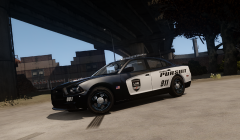 Yeah man please do release it, that is one good looking charger and skin! Excellent job bud!!!
 -
What model are you using??? Skin and the model are sick man!!!
-
-
That's what it was...I replaced the emerglights instead of emerglightse...my mistake man. works perfect! Thanks a ton for taking the time to help man its much appreciated!!!
-
that didn't work, the actual light color coming from the strobes are red and blue but the light bar glass itself still has the two yellow blocks on it...
-
'?do=embed' frameborder='0' data-embedContent>> This one right here!
-
Hey guys, could someone tell me how you can change the color of the light bar GLASS color? example whelen edge where it has the two rear yellow flashers on the bar. How could I make those red and blue like the rest of the light bar? I have tried every light texture in spark iv and still cant figure it out....any help would be great!


