




K4te
Members
-
Joined
-
Last visited
Everything posted by K4te
-
Attach screenshots of your main gta5 folder
-
Add whole GTA5 folder as exception at your antivirus + for whole gta5 folder set full access permissions
-
"EXCEPTION_ACCESS_VIOLATION" make sure that your removed all of your last changes, also your can try download custom gameconfig, heap adjuster and packfile adjuster. If you use ScriptHookVDotNet - make sure to use nightly build cuz normal versions like to cause problems. Sometimes it start cause problems after installing smh new - here it could be triggered by Open All Interiors - but after your change version to nightly build try with OAI again
-
I can't help much with first post but about second: I think ambient peds at mission row won't change his apperance by simply modified .xml file. Their info and apperance probably is scripted at mission row rpf file - I don't remember full path for this for now but at evening I will post here info with path
-
First of all remove your current SHVDN and try nightly build ps. jest time pls attach RPH log file (.txt or .log file in your MAIN gta5 FOLDER) instead crash reportaż like that
-
smh = something cuz I wasn't sure it will help with this problem but as we can see it works so hafe fun 😁
-
Remove Section136 Callouts and check if smh change
-
Any graphics mods?
-
Attach RPH log as file
-
MAIN gta5 FOLDER
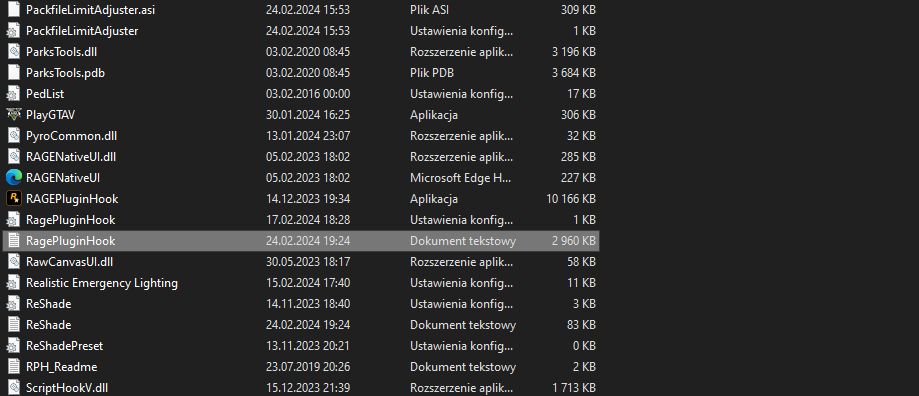
-
Remove Arrest Manager, LSPDFR+ and Traffic Policer
-
Set full access permissions for whole gta5 folder + add whole gta5 folder as exception to your antivirus Also check if you can launch gta5 without rph
-
Right click your gta5 folder -> properties -> security and here make sure that system, admins and users have set full permissions (everything should be marked as alow)
-
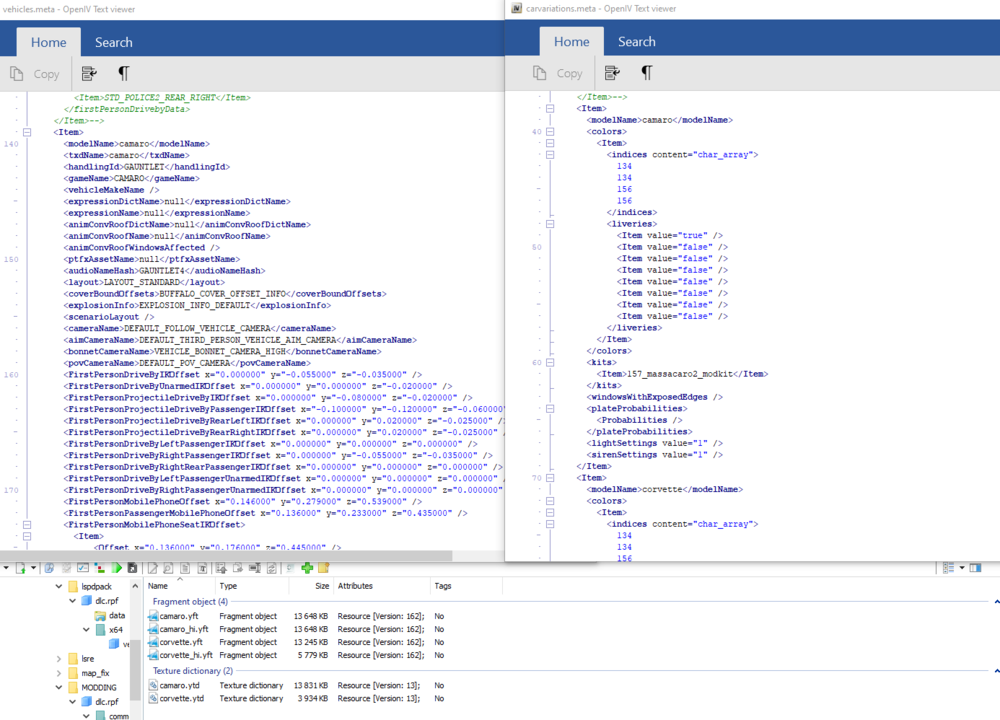
Make sure that modelName is same everywhere. If your .ytf and .ytd are typed with a lowercase letter then I suggest use it everywhere Here is example
-
Yeah, things like add-ons (vechicles, clothes, weapons etc) - same with replacement - can cause fps drops too if everything is in rly high quality - it's worth to remember As for your plugins - they seems ok for me, only Variety Callouts caught my attention cuz it seems quite outdated (last update at 2020) so for me it would be first thing to check. Also remember to keep up date rest of your plugins. If you don't know what callouts pack you should use to avoid problem then here you have some inspiration. Maybe soon I will update my post there too
-
Launch first original gta5, wait till intro end and when you will have option to play story mode -> alt+tab game, launch rph, wait till logo disappear, alt+tab again to game and you should have now option to start sotry mode with rph. Also add permissions for whole gta5 folder + add whole gta5 folder as exception for your antivirus
-
No mods/scripts/SHVDN -> can you launch original gta5? If you can -> try launch RPH with disabled loading lspdfr at start
-
It will help you get more stable FPS but this plugins shouldn't be so unstable. What else have you installed?
-
Increase PluginTimeoutThreshold to 60000 Attach screenshots of MAIN gta5 FOLDER, gta5\plugins and gta5\plugins\lspdfr Did you made some changes in lspdfr files?
-
Attach new RPH log and screenshots of gta5\plugins and gta5\plugins\lspdfr
-
1. You can try temporally remove (1 by 1) drmaynards Callouts, Forestry Callouts, HWY Callouts and Yobbin Callouts to check if this help - tbh I doubt it's fault of this plugins but it won't hurt to check. If it won't help feel free to add it back 2. I would also take a look at your gta5\plugins -> temporally remove (1 by 1) DebuggTackle, Persistent Weapon Flashlight and Scene Manager. Same as above - if it won't change anything feel free to add it back
-
I see scripts folder but I don't see there ScriptHookVDotNet (check this version) If this won't help - try temporally remove QuantV Also you have 3 trainers installed: Menyoo NativeTrainer TrainerV Maybe this is the issue
-
Remove Callout Manager, Custom Pullover and United Callouts Instead Callout Manager you can use Callout Interface
-
Remove: Custom Pullover United Callouts Keep on eye: BaitCar Chaos Callouts Yobbin Callouts
-
Attach screenshots of your MAIN gta5 FOLDER


