




K4te
Members
-
Joined
-
Last visited
Everything posted by K4te
-
Attach RPH log file (.txt or .log) from your MAIN gta5 FOLDER
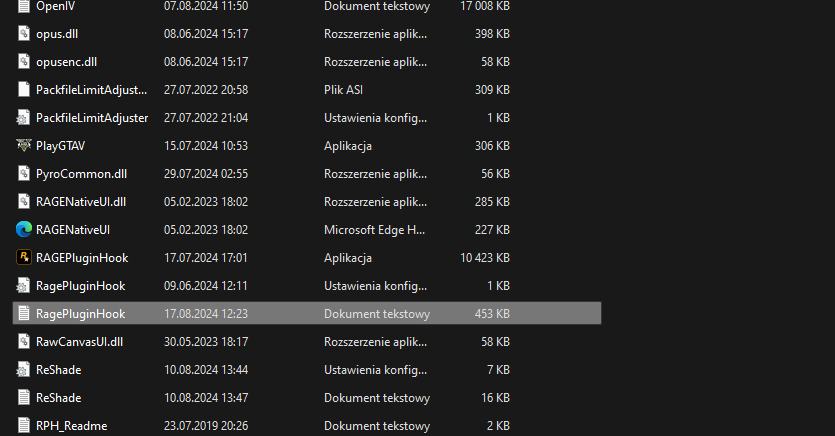
-
-
Yes
-
And this can be issue - to make sure it is rename your mods folder to _mods and launch game with disabled mods
-
-
PluginTimeoutThreshold at RPH settings to 60000 not 6000 You hae outdated RNUI - use this one
-
Add your whole gta5 folder as exception at your anti-virus + set full permissions for that folder
-
I wouldn't call it "high end system": no info what kind of i7 it can be 32GB ram - seems ok but same thing what above - what kind? ddr4 or 5, memory speed, latency etc? rtx 4060 - its more between low-mid end.. definetly not high-end
-
First try download 2.0.0.2 version of DLS if you are using previous one. But also it can be problem with this car itself.
-
Screenshot your main gta5 folder, gta5/plugins/lspdfr folder and gta5/plugins folderSame here, no issues ======== Maybe try and check if same thing happens with lower graphics quality
 Set PluginTimeoutThreshold to 60000 at your RPH settings. Also make sure to use newest RNUI cuz this one included in UB, STP and CompuLite is outdatedHeapadjuster PropLimitAdjuster ResourceAdjuster GTA5 Legacy don't scale good with new PC components, thats why most ppl wait for lspdfr and most mods to work on enhanced version - its just has been made better for current pc specs. Things I linked above should help with your problemYeah, there is 3521I suggest this one:Reinstall CalloutInterfaceAPI cuz u are missing files or u have paste them in wrong place Also make sure to use new Arrest Manager updated by Sparky81 for current versions of lspdfr and gta5Remove Custom Pullover - this one and few others plugins that u have are outdated and can cause issue with current lspdfr and gta5 version... if it still gonna crash remove we will remove more outdated pluginsTry launch gta5 first -> launch story mode -> after you load in story mode -> alt+tab your game and launch rph Also you can add whole gta5 folder as exception for your anti-irusDid you install RPH/LSPDFR compatibility included in optional files folder?Next time attach RagePluginHook log file from MAIN gta5 FOLDER. Revert changes that u made at assets files or check if u modified it as it should be.. maybe you forgot to "close cmd line" with ">" etc. (you can also check your .xml files with xml validation sites etc) Also u can change PluginTimeoutThreshold to 60000 <- it can help u with further moddingAttach new RPH logYou can try do it in 2 ways: Close rph while game is working and launch rph again and wait Launch gta5 first, load to story mode then alt+tab your game, launch rph and waitReinstall DamageTrackingFramework as its written at readme file also reinstall as it should be if you want to use Traffic Policer make sure to use new version covnerted by Sparky81 for current game versions (Traffic Policer 2025) As for EUP Menu crash - go to wardrobe.ini at gta5/plugins/eup and make sure it saved your outfit like that: cuz sometimes idk why it saves wrong: <-- so just edit it to look like ss above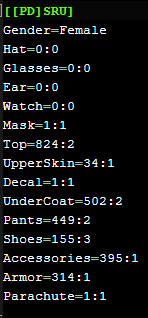
 Probably your EUP just overwrite another clothes slots and thats why ambient cops have "mess" on them... u can edit their clothes at outfits.xml at gta5/lspdfr/data or u can try install EUPFR but I'm not sure it can solve problem (if u already have EUPFR installed then u can also edit peds uniforms at .xml files - gta5/lspdfr/data/custom)







