xDuvii
Members
-
Joined
-
Last visited
Everything posted by xDuvii
-
-
-
 The website shows the file as clean, and i just checked in virustotal and comes back with 0 flags. check or update your antivirus.
- 38 comments
- 2 reviews
-
about the ini file I’ll think about it, I want it to be as much realistic as possible, thanks for that info I’ll check it out tonight. I’m planing to modify the tracking system in future updates
- 38 comments
- 2 reviews
-
-

- 1
-
-
It should be since it only affects the death vanilla system. Think it like this only adds a filter on top of the death vanilla system. Now I think about it maybe I should add attempts for calling the ambulance but that depends on y’all feel free to add some feedback here.
- 38 comments
- 2 reviews
-
Then you need to update to at least windows 10 (windows 10 ended support as well so be aware of that)
-
You mean UB, STP is just for managing the peds nothing related to backup. So yes it’s as it says in the description.
- 38 comments
- 2 reviews
-
INJURED STATE 2.0Welcome to InjuredState v2.0 — the most significant update to the plugin since its initial release. This version completely transforms the injury experience for LSPDFR, moving far beyond a simple ragdoll and countdown system into a fully dynamic emergency response simulation. When an NPC attacks you, the game now responds like it should. Police units are automatically dispatched Code 3 to pursue the suspect, an ambulance races to your location, and a tracking blip marks the attacker on your minimap in real time. If the suspect is taken down by responding units the blip turns into a skull at their last known position. If they are arrested it disappears cleanly. When paramedics successfully treat you, you automatically rejoin the active pursuit — no menus, no keypresses, no interruptions to immersion. Vehicle strikes are handled separately — any NPC driver that hits you triggers pursuit backup units to chase them down, with an ambulance only called if the impact actually injures you. Every injury type now has its own behavior. A headshot gives you just 60 seconds before your condition becomes critical. A leg shot sends you limping immediately. Torso hits are handled by health degradation as before. Treatment is no longer a guaranteed outcome. Paramedics have an 80% chance of saving you from a normal injury and a 50% chance from a headshot — reflecting the severity of the wound. If they fail, the screen fades and you bleed out. All of these values are fully configurable in the InjuredState.ini file that is automatically created on first run, along with toggles for the officer down system and vehicle pursuit backup. Both PolicingRedefined and UltimateBackup are fully supported with matching behavior — pursuit backup, ambulance dispatch, and treatment animations work the same regardless of which backup mod you have installed. RequirementsTo fully use all v2.0 features you will need the following installed: LSPDFR. RagePluginHook. DamageTrackerFramework (DTF) — required for bone-specific injuries, headshot detection, leg shots, vehicle strike detection, and the automatic officer down system. Without DTF the plugin runs in v1.0 compatibility mode — health polling, limping, and manual ambulance call only. PolicingRedefined or UltimateBackup — at least one is required for backup dispatch and ambulance. The plugin detects whichever is installed automatically at runtime — no configuration needed. InstallationDrop the compiled InjuredState.dll into Grand Theft Auto V/Plugins/LSPDFR/ Discord Server: https://discord.gg/kuCXPhY8Nq Name: Deputy Director Duvi, feel free to ask anybody around as well.
- 38 comments
- 2 reviews
-
-
-

- 7
-
-
 The problem is because QuantV has modified timecycle file, which mess with the plugins for some reason. i'd to improvise by replacing the timecycle code to adding a box with bunch of layers on top of it to make the vignette feeling look almost the same. it's either that or make the mod disable when emergency lights are on which isn't what I wanted.
 -
-
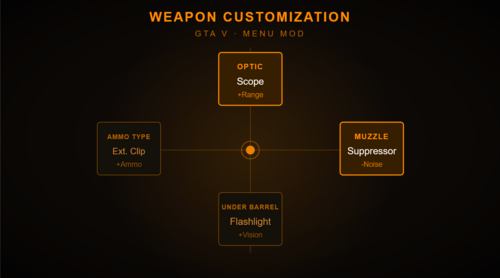 Weapon CustomizationA ScriptHookV.NET mod that adds an attachment menu to GTA V singleplayer. Press H to open a full-screen menu that lets you customize your current weapon in real time without pausing the game. Features: Four dedicated slots — Optic, Muzzle, Under Barrel, and Ammo Type. Per-weapon attachment databases with only verified, compatible components for each gun — no guessing, no failed equips Supports 35+ weapons across all categories: pistols, SMGs, shotguns, rifles, snipers, and LMGs Extended clips and drum magazines available where supported Mk2 weapons include full special ammo support — Tracer, Incendiary, Armor Piercing, FMJ, Hollow Point, and Explosive rounds Automatic attachment detection — switch to any weapon and the menu instantly reflects what's already equipped on it Loadout persistence via INI file — your attachments are saved and restored automatically every session Full controller support with D-Pad navigation and RB/LB scrolling All game inputs blocked while the menu is open so nothing fires accidentally Controls: Key Controller Action H Down + Sprint( A / X) Open W/A/S/D D-Pad Select slot Scroll Wheel RB / LB R1 / L1 Cycle options F X / Square Equip selected Escape B / Circle Close Requirements: ScriptHookV + ScriptHookVDotNet. Short DescriptionWEAPON CUSTOMIZATION IN REAL-TIME
 -
ok, I just tested and it does happen in my end but less noticible. thanks i'm going to work on that.
-
are you using any kind of vignette effect outside of the mod?
-
sorry to tell you but you might have something else running beside my mod. I have quantv and extreme ELS and don't have anything like that.
-
I checked it and everything looks fine with it from my end, so it's not the plugin. what kind of flickering are you seeing? if it's a blur effect on the top of the screen, i'll address that in the next update.
-
Thanks for that info, i'll check that out and see if i can come with any fix.
-
INTENSE EFFECTAdds a cinematic vignette effect that reacts dynamically to combat situations, bringing a new level of intensity and immersion to GTA V. The vignette pulses with every shot you fire, darkening the edges of the screen to simulate the adrenaline and stress of a firefight. When enemies are shooting nearby — even if you're behind cover — the effect still triggers, capturing that tense feeling of being pinned down under heavy fire. Features: Vignette pulses on every shot fired by the player Reacts to nearby enemy gunfire even through walls and cover Separate intensity levels for direct threats vs nearby shooting Smooth fade out between shots Fully cleans up on unload — no stuck effects Requirements: RagePluginHook Mod recommended to use with: Immersive Effects Installation: Drop IntenseEffect.dll into your Grand Theft Auto V/plugins/ folder and launch the game with RagePluginHook. DEMO: https://youtu.be/CLfXuIQYtCM
-
-
 it's not saving the tattos. i want to add for both arms, but if i add one from left arm it take off from the right arm.
- 14 comments
- 1 review
-
-
 don't worry you're alright. This feedback gives me more ideas to keep working and learn more about c# coding so thanks for that. And about the F's bike i think is because i forgot to add the model hash for that bike since all vehicles are being excluded by the model in case the user decides to change the car's plate, is it just the bike or are you able to use F's car as well?
 -
-
-
-
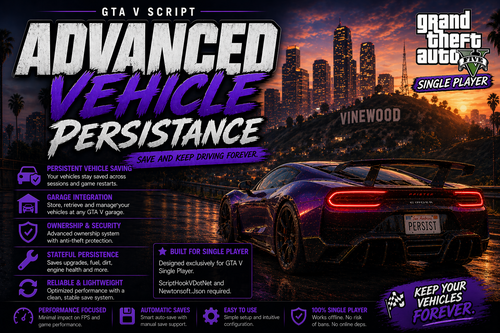
BEFORE UPDATING DELETE OLD SCRIPT VERSIONS TO AVOID SCRIPT CONFLICTS.ADVANCED VEHICLE PERSISTENCE A single-player script for Grand Theft Auto V that let you permanently keep and manage your vehicles across game sessions. Instead of losing cars when you switch characters, die, or restart the game, this mod automatically saves your vehicles after every session and prevents them from despawning. It also includes an auto-locking system to keep your vehicles secure, along with customizable keybinds so you can control its features your way. the script is optimized using ScriptHookVDotNet with Newtonsoft.Json for reliable data saving. INSTALLATION Drop the files in scripts folder as well as newtonsoft.json