


emptw1
Members
-
Joined
-
Last visited
Everything posted by emptw1
-
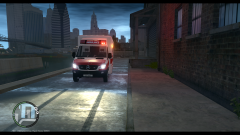
From the album: Random GTA IV Pics
A shot of the front of a SCDF ambulance. Needs a bit of work, but will be released next week, hopefully. -
A collection of pictures in GTA 4 taken by me.
-
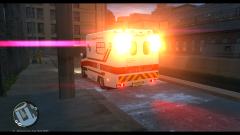
From the album: Random GTA IV Pics
Singapore Civil Defence Force Ambulance. Needs a bit of work, but will be released next week, hopefully. -
I do, I aim to work and practice my scratch modelling skills so if GTA 5 is moddable, I can produce more geunuine Asian emergency service packs.
- 64 comments
- 2 reviews
-
-
-
-
Re-reading it again, I can see that may be the case, I got confused with the ctrl+num1 part of the sentence. My bad.
-
In your vehicle configuration file, go to the [PRML] section and change ForcePatForLstg = off to ForcePatforLstg = on. Underneath that, you will see PatId_lstg2 = 0 and Patid_lstg3 = 0 Change PatId_lstg3 = 0 to PatId_lstg3 = n, where n is the pattern you want. You might have to change it to n-1, because the configuration file counts from 0, and I can't remember if ELS in game has a pattern 0 or not. EDIT: having re-read your question, you might be asking about having different patterns for different sirens, in which case, below the ForcePatForLstg, you'll see: ForcePatForSrnTones = off PatId_Yelp = 0 PatId_Alt1 = 0 PatId_Alt2 = 0 Use the same logic as above to edit these to what you want.
-
Open up the .wtd file in openIV or SparkIV, fine the emerglight_emis file and export it/extract to a location of your choosing, then load up paint, gimp or photoshop and simply copy and paste the blue lights over the top of the red ones.
-
It looks like ELS is breaking. Is anything happening to the script when you start up the game? Is the police vehicle in that slot set to be ELS enabled in the slot control .ini? Are all the ELS related files in the correct place? One time, I had my antivirus delete one of the ELS script files because it thought it was trying to some harm, so make sure your anitvirus isn't doing something like that either.
-
-
-
I could have a go, I'll have to find some vehicles, and I won't be able to start working on them until the weekend, but I'll try.
- 64 comments
- 2 reviews
-
Have you added the +livery extension to the models vehicle.ide line?
-
That might work, it's worth a try. What I've found out in my years of modding GTA 4 is that it is like fingerprints. Everyone's copy is different, for some people ELS V7 doesn't work at all, for others it's more stable than ELS V8, there are many vehicles that just don't work for my copy of GTA 4, even though they work fine for most other people, so, if you have an idea, try it, because GTA 4 is so unstable and unpredictable that it might just work.
-
I've done 2 skins, I'm going to do 1 more today and get it up today or tomorrow.
- 64 comments
- 2 reviews
-
Here's a non ELS British police van by Kinksta100:
-
-
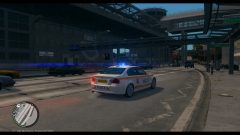
From the album: Random GTA IV Pics
A Singapore police BMW, part of the expressway patrol. An update to the Singapore Police Mini-pack which will be coming soon. -
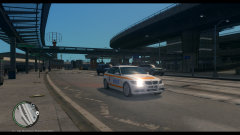
From the album: Random GTA IV Pics
A BMW being used by the Singapore police force -
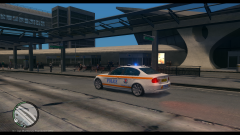
From the album: Random GTA IV Pics
A shot of an update coming soon to the Singapore police mini pack -
Thank you very much. I plan on adding express-way skins something this week or next weekend.
- 64 comments
- 2 reviews
-
Singapore Police Force Mini Skin Pack V1.5 is the final interation of this pack. No more work will be done on this pack. I have far too much to do and other projects that I need to get done. Feel free to edit textures and upload them. This is a pack of simple textures for 4 different vehicles. The textures are designed to look as close to Singapore Police cars as possible with the templates provided with the vehicles. Textures with different unit numbers have been provided for models that support multiple liveries, meaning there are 13 textures included in this pack. In V1.1, the expressway patrol has been added. In V1.2, special operations command has been added, to give a total of 24 textures in this pack. In V1.3, Ambulance, fire engine and uniforms were added, bringing the total of textures up to 39. V1.4 adds a bus texture, a total of 40 skins. The final version adds a police bike with light textures. The vehicles used in this pack are: -Holden VE SS (8 textures) -Ford FG MKII (4 textures) -Toyota Hilux (4 textures) -Ford Transit (1 texture) -Volvo V40 (1 texture) -BMW 3 (1 texture) -RG12 Nyala (1 texture) -Lenco Bearcat (4 textures) -Fire Engine (1 texture) -Ambulance (4 textures) -Peds (1 SOC upper_diff, 12 female upper_diff's, 16 male upper_diff's) -Mercedes Benz O457 SMRT bus with LED matrix skin -BMW Police bike with an emerglights_emis texture and light glass texture. All vehicles are ELS V8 compatable and links to models are provided in the readme, along with detailed installation instructions. Thank you for taking the time to check this mod out. Enjoy!
- 64 comments
- 2 reviews
-
I use Blender to create models for OMSI 2, it's free and pretty powerful, but it can't export RAGE engine files, and I don't know of a plugin for it that allows it to export .wtd, wft, .wdr etc. files, which means you'll have to use zmodeler or 3ds max as an glorified file converter, so it's probably best to use them and get your moneys worth out of them.




