


wmai20
-
Joined
Everything posted by wmai20
-
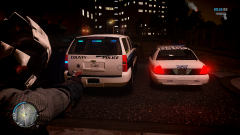 Is...is that an Arlington County PD skin I see on the Tahoe?!
 -
-
As a Catholic, nothing.
-
As said before, just don't worry about it. It's only an ego booster and serves no actual use other than being pointless numbers.
-
The Reliant Robin Fire-Police Interceptor of course! Jokes of course, I'm rolling with a Hillsborough County themed Ford Crown Victoria.
-
Currently have three local departments I'm going for. 1. Arlington County Police Department 2. Fairfax County Sheriff's Office 3. Arlington County Sheriff's Office
-
Regardless what game it is, this is a very unique and inexpensive way for Non-USA Residents to acquire this content. Good luck to those who participate.
-
Updated. I've gone from a "techy" look to a more nature oriented theme.
-
Some people don't really mind the bugs and would rather have the updated features of V0.95. It depends on one's own decision really.
-
Hi there, Answering your question straight up, it is possible to run LCPDFR with stability and little to no issues. Your first option is to use LCPDFR Version 0.91, as it is the most stable out of two released for the public. The most recent version of LCPDFR currently contains script bugs and errors which may cause some users some gameplay issues. The LCPDFR Dev Team is working on RC3 which mainly fixes these bugs. In addition to this, you may want to try using a traffic flow script of you haven't already (Such as ). TrafficFlow should be able to fix your "Disappearing Buildings" issue. Secondly, if you would rather use LCPDFR V.095, you may want to limit the amount of ELS enabled vehicles you have installed onto your game. ELS is known to crash users so limiting the amount of enabled cars should help (Example - Leave Police and Police2 Non-ELS and have Noose and FBI slots replaced with ELS enabled cars). The mod itself is recommended to be run with little to no other modifications to the game for stability. Using TrafficFlow or any other traffic loader is recommended with this option as well. Regards, Mai
-
http://www.youtube.com/watch?v=q-lxtPiz3dw Recently decided to move on to a new theme regarding the cars. I've searched around and installed several models along with a skins pack. Let me know what you think. Link to ENB: http://www.lcpdfr.com/files/file/1310-game4video-police-enb-new-version/ Used Skins: http://gtapolicemods.com/showthread.php?1012-Liberty-Sheriff-Pack-by-ncsflorida -Added links for convenience.
-
Ravens.
-
In addition to what Nicolai stated, there's an alternative solution but not everyone may have resources to use it. If you have the program Sony Vegas (Any Version), you can eliminate those black borders by right clicking the clip, going to Switches, and disabling "Maintain Aspect Ratio". This will stretch the video, eliminating the black borders. However, it may reduce video quality depending on the resolution you recorded the footage at. You can then render the finished video product as 720p (If you recorded at 1680x1050) or 1080p (If you recorded at 1920x1080).
-
I've also acquired the Sims City Beta (Just got the email Break :P). The gameplay felt pretty nice to be honest, and it played smooth for the most parts. I guess we'll have to see how it goes when the end product is released.
-
-
All ELS Enabled vehicles should be able to work with both ELS v5 and ELS v6.
-
You create a new Notepad file (txt) and paste one of those command lines into the text file (Depends on your choice of setting). After that, you go to File>SaveAs>GTAIV Main Directory>Save as filename "commandline". (Without the quotes.) Example file placement:
-
Let Me Google That For You - http://lmgtfy.com/?q=Gta+IV+tsunami+mod I've done the "Googling" for your own convenience. The Tsunami effect can be "started" with use of this mod (Video Installation Tutorial): http://www.youtube.com/watch?v=d00GwpF_4Is
-
http://www.youtube.com/user/HAZ0RZMedia GTA Videos, Minecraft, Battlefield, and Miscellaneous shit with Nicolai or Harper
-
Thanks! :) Updated.
-
Sorry for the troubles, how can one completely "disable" the Taskbar as you have shown in your SS? Or is it just auto-hidden?
-
Ah! /Didn'tnoticethechicken :D
-
What I recommend for you is to restore a clean backup of Minecraft, and try the Magic Launcher. It makes it a ton easier to install mods as all you have to do is load the mods, then add them to the game. Here's a tutorial if you need any assistance: http://www.youtube.com/watch?v=B2TNPieA_00
-
KU? :P
-
It's worth a shot, the one included in the installer is most likely optimized for the mod


