


wmai20
-
Joined
Everything posted by wmai20
-
Looks like that is Neolux's ENB, not many ENB's have the lightbar bloom added into it.
-
I loved the COH series when I was younger. Let's see if I can find my copy somewhere on the harddrive and test this mod out. ;)
-
I agree with Slimory.
-
Strange...
-
I don't think so, I also use ENB's made for 1.0.4.0.
-
No problem mate. =P
-
I've replyed to Iconography's post about his error with the N-Rage ENB. The link I provided him seemed to have been worth the research. Try the link provided below and see if it helps with your issues. Best Regards, Wmai http://www.gtaforums.com/index.php?showtopic=468670
-
I've done some off-site research. This method probably will work for you. Be sure to backup your GTAIV folder before trying this, as I'm not 100% sure of the method. http://www.gtaforums.com/index.php?showtopic=468670
-
For the weapon sounds, I use Real Immersive Weapon Sounds Mod. I agree with your statement on the last scene. I also plan to do some hardcore episodes as well. ;) *Edit* Just played some hardcore, now I've realized it would be smart to bring along a buddy for patrol... D; *Edit* Link for mod: http://www.gta4-mods...n-sounds-f10834
-
Be sure to make a backup of anything before you modify it just incase of installation errors.
-
Putting in cop models is basically just like installing a car mods. All you need to do is open componentpeds.img with SparkIV and import your downloaded files.
-
The following presentation below contains three clips of myself trying my BEST to respond to emergency situations with a somewhat more realistic approach. If you enjoyed the video, a Like would be much appreciated. Thanks *Edit* I've noticed that I just suck at doing this xD*Edit* http://www.youtube.com/watch?v=WA2K-x3AmBI&list=UUIyya0tgilaIyM3lopjKICg&index=1&feature=plcp
-
Hmm, try to set your screen's resolution in the "enbseries" file. You could also try to set "ForceDisplaySize" to false so you may set your resolution in the game itself.
-
That seems to be the case with me as well. I guess that's one of the bugs that needs to be fixed in LCPDFR RC3. I also believe that issue was already notified to the Development Team.
-
You must be using a high poly car modification. In the LCPDFR Config file found in your scripts folder, change the "PreloadModels" option from False to True. You should also try lowering your graphical settings, as your system may be overloaded.
-
LCPDFR Support will not provide helpful services to users with cracked games. If you do have a bought copy of the game, try the methods above.
-
*Disregard this comment, I misunderstood the OP's post*
-
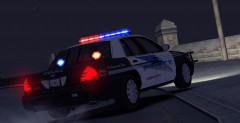 Good job Nicolai, very nice squad car.
 -
I honestly don't care which party runs the government. All I want is one good president that can get us out of this recession instead of concentrating on other unimportant things.. *Cough* Obama *Cough*
-
You have posted in the wrong section. This thread belongs in LCPDFR Support. Please read the stickys provided in that section before making a new topic about your issue. Thanks -Wmai
-
To link your LCPDFR.com account with your game, you simply just reinstall the modification again to your GTA IV folder. Cheers
-
I don't think that's my enb. That video was made in 2011 and the enb was released in 2012.
-
No comment... -_-
-
What ever happened to our great nation....
-
Hahaha, I just found out as well.


