


Tony Alvarez
Members
-
Joined
-
Last visited
Everything posted by Tony Alvarez
-
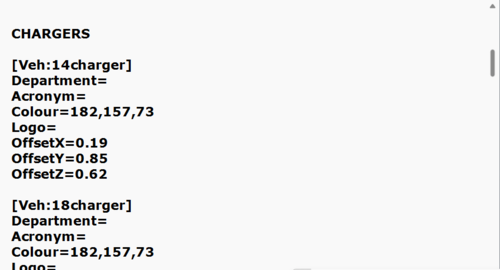 Tired of the weird default positions your dashcams come in? Is it too much work to edit them to fit the vehicle model you have? Fear no more, for I have done the work for you. Here is the position for the most common police models. Enjoy! DashCamV by PieRGud- https://www.lcpdfr.com/downloads/gta5mods/scripts/8257-dashcam-v/
 -
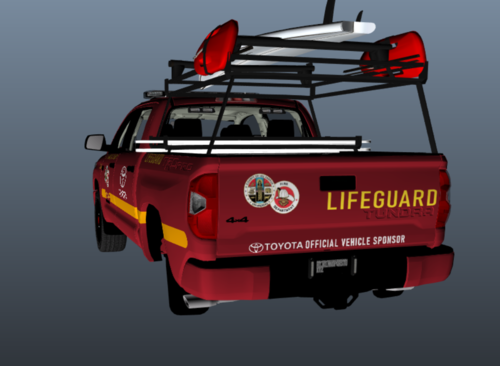 Based on the real FD Lifeguards of Venice Beach, I come to you with another real but lore friendly texture for your LSPDFR world. I am yet again surprised no one has made this before me, but I guess thats why I am here. Hope you guys can enjoy using it as much as I enjoyed making it. Heres a link to the original model to use this texture with by ZeakorDesigns: https://www.gta5-mods.com/vehicles/non-els-2019-toyota-tundra-life-guard
 -
 First off you need to relax my man. This isnt an issue with ELS, I have ALWAYS RUNNING on. Its an issue with Darker Nights. Mind you, its a very unworthy issue of anyones energy, I just posted it to see if there could be a known fix. Every other car works fine so if anything its an issue with the model. No need to be so damn hostile for no reason, I was never hostile or criticized.
 -
So I downloaded a police station that unfortunetly didn't come with Peds roaming inside. It feels very eerie and empty, so I wanted to change that. Are there any mods that allow you to set up peds with their own tasks like sitting and what not and save them so you can load them in whenever you are going into the building? If theres a way to edit a map to do this I would greatly appriciate if you pass on the knowledge. While we are at it, it'd be great to learn car spawns too so I can add spesific patrol cars to this station.
-
My Stage 2 lights spesifically become dark. They still flash, but barely visible. Its only stage 1 and 2 3 works perfectly. And its only when I get out of the car too. When Im inside it works fine. Very odd.
-
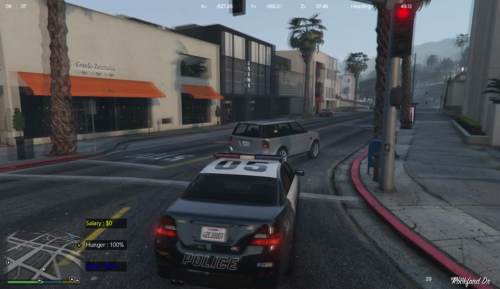 Hey man, I believe this is outdated. Its a shame because its an amazing mod. Is there any way you could update it?
 -
-
Dude I love you thank you so much. Ive been looking for these for so long.
-
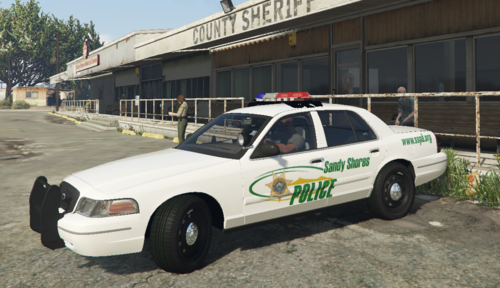 Actually the inspiration for this skin pack was a BCSO pack.
 -
-
There is a stunning lack of real-life equivalents for Sandy Shores PD. For that reason, I had to take it upon myself. This is Imperial County based skins, which is the County for which Sandy Shores is mostly based off of. The lightbars and ram bars are not accurate to the real department but its the closest I could find. Enjoy.
-
-
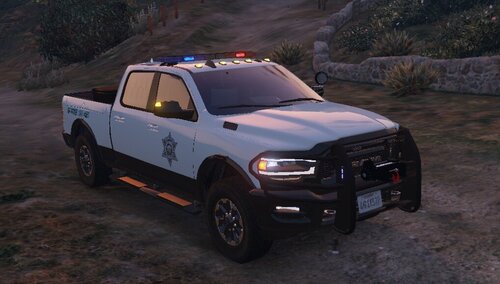 This is a San Andreas State Park Police RAM 2500 based on the California State Park Police, who serve as the Park Rangers for State Parks of California. The vehicle was made by EmergencyDistributors, the texture was made by me.
 -
 For me it was working fine and I hadn't changed a single thing in the files, and then suddenly both Callout Interface and Grammar Police said I was missing libraries. I dont understand.
- 452 comments
- 50 reviews




