


DREYDUS
Members
-
Joined
-
Last visited
Everything posted by DREYDUS
-
so far for me in 1.0 It's simply by pressing T alone but I have had to press it 2 to 3 times before it switches to my tazer
-
When it works correctly best Shooter on the market.. problem is it only works correctly less than 10% of the time. I have it on PC and PS4. The gameplay is well done but the game it's self was unfinished,rushed,thrown together & really a bad scam job. EU servers seem to perform better because for we US players.. wow is the "netcode" awful it's absolutely the worst I have ever seen in gaming. On local 40 or less ping servers I die before the enemy is even shown looking at me on my screen constantly. On hiss creen it shows something entirely different. I have tested some round on EU servers with 150+ pings and only that high of a ping does the "netcode" actually seem close to norm and legit gun fights etc. pretty dissapointing & shotty job done by EA & dice to be quite honest.
-
wow looks fantastic. So excited for this. Great job team and thank you for giving us this gift. Aww yeah DPD Tiger Unit is about to fire back up.
-
i keep checking back hoping it's out lol looking forward to this.
-
I love ETS2 it's a great relaxing game to stream actually. I usually do a day of runs once each week so I never burned out on the game. Gives me the feeling of being that trucker I never became. It's a great game and really cheap.
-
-
-
looks great really looking forward to this. Will add so much to this game as a great addition.
-
I deleted the mod again and this time redownloaded the script mod from this site( not just re install the copy I had saved on my PC)
- 90 comments
- 40 reviews
-
-
-
your not alone it's widespread from what i have read. myself I don't even like to bother calling for a "bus" anymore.. they just go nuts when they do actually come near.. crash into everything and just ugghhhhhh... lol
-
http://www.youtube.com/user/DREYDUS187 Multi platform/multigaming. From GTA on PC to Shooters on PC & console... I commentate and cover a balanced array of games on all 3 major platforms.
-
Nice appreciate the info.. I never thought about that but what u say makes total sense.
-
You can already force them out of the vehicle (felony stop style) if you have Braveheart's policing script installed. I do it all the time with bait car etc... Alt + K and it forces anyone in the car your looking/pointing at to immediately get out.
-
I'd like to be told/shown how to backup the entire game.. I know in 1 week i have had to re-install 4 times myself etc. Appreciate any info/help
-
New video up in OP Bait car episode 2
-
-
I will buy it on PS3 and if it is offered on PC of course get it on PC also for the Mods that will become available.
-
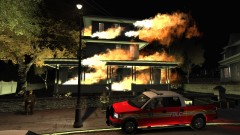 that is friggin awesome
 -
New Video up in Original post. Happy New year's to everyone out there & be safe.
-
-
-
-
for me it was a night patrol and a shooting on a freeway... During the clean up me and an ambulance collided and despite not much damage initially showing on the squad's bus.... both paramedics immediately jumped out of the bus both on fire completely and burned to death. Was a very weird occurance. I'll find the video for it today and post it.

