
TdePadua
Members
-
Joined
-
Last visited
Everything posted by TdePadua
-
Alright, I'll use it for now and reevaluate how it works in .4 thank you!
-
Is there any way I can reliably get the location of the callout currently running, even if it was created by a different plugin?
-
 Currently, there is no method of changing the ammo type for the MKII weapons. Additional attachments may be added in the future.
- 75 comments
- 33 reviews
-
https://www.gta5-mods.com/weapons/glock-17 https://www.gta5-mods.com/weapons/glock-weapon-icon
- 75 comments
- 33 reviews
-
 I set the variables DismissTime and DismissDistance in the .INI, however AI still seem to leave after only a few seconds. How can I fix this?
- 378 comments
- 23 reviews
-
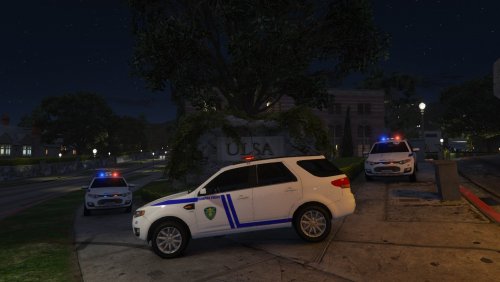 ULSA Campus Police skin Fits:
 -
-
It appears to me that your crash is related to callout manager. Unfortunately I do not have a computer with GTA in order to bug test the mod.
- 75 comments
- 33 reviews
-
-
LSPDFR Will crash if you have another plugin, like herocop, that adds a flashlight to the characters inventory. That is the only thing I've been able to work out until this point.
- 75 comments
- 33 reviews
-
-
-
My savior <3 Thanks Albo! FYI Your tutorials were what helped me start making plugins :]
- 75 comments
- 33 reviews
-
-

- 2
-
-
Im working on implementing the Fire extinguisher, however the Handheld flashlight is already included in this version.
- 75 comments
- 33 reviews
-
-
- 1
-
-
-
Yeah, unfortunately I haventI haven't been able to do much bug testing. I would try uninstalling one of the mods
- 75 comments
- 33 reviews
-
If I understand your question correctly, the line in the .INI file should be something along the lines of... Carbine Rifle Attachments = true Edit: at the moment, you can only choose between having both the scope and grip, or neither.
- 75 comments
- 33 reviews
-
-
- 1
-
-
The INI is there to let the player override the default LSPDFR Loadout with whatever weapons they want, speaking of which, yes. I will add those weapons soon!
- 75 comments
- 33 reviews
-
-
- 1
-
-
-
Now includes ALL weapons in GTA V! Tired of constantly having to reset your loadout with a trainer? On Duty Loadout lets the user determine which weapons and attachments they prefer via INI, the loadout is applied every time the player goes On Duty in LSPDFR. Set what you want when you download the mod, then always start playing with the right loadout without any key presses or menus! Add any of these items to your character: Known bugs: May conflict with Herocop or other plugins that give the player a flashlight causing LSPDFR To crash when the player goes on duty. Fixed by removing conflicting programs Changing character appearance using the EUP Menu removes weapon attachments (Solved by selecting uniform BEFORE calling forceDuty)
- 75 comments
- 33 reviews
-
-
- 12
-
-
-
Is there a way to make the AI cops use the modded uniforms?
-
Awesome mod! If I may suggest a few things: How about an option in the backup menu to cancel responding units and/or dismiss the backup thats already onscene, or notifications for when a unit arrives at the location like FinKone has on the Police Radio mod. Also, when I pull up the backup menu, LSPDFR's interaction menu pops up over it for about half a second then dissapears, not sure if this is just me.
- 378 comments
- 23 reviews
-
 Amazing mod, But was having crashes at first. Decided it was probably a conflict with another mod, and when I stopped automatically loading PoliceRadio.dll (FinKone) in the startup.rphs the crashing stopped.
- 423 comments
- 73 reviews
-
The main reason you'll see officers keep their tires turned is if a car in their lane hits the back of the police car it will roll into the street instead of rolling into the back of the vehicle they have stopped.
- 49 comments
- 11 reviews