
Kaariim
Members
-
Joined
-
Last visited
Everything posted by Kaariim
-
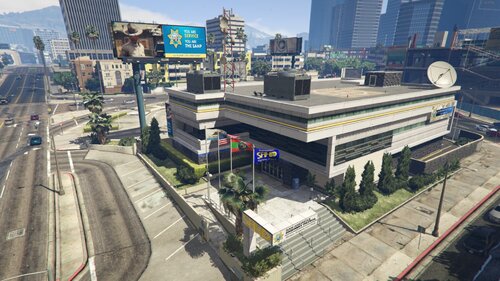 Hello! Thank you so much—I’ve been looking for an LAPD police station in this area! However, it seems to be just a "mapping" (visual layout); is it impossible to enter the garages or the station itself? Also, are there no personnel or vehicles present? Is it possible to register one's own vehicles there? Thanks!
 -
-
-
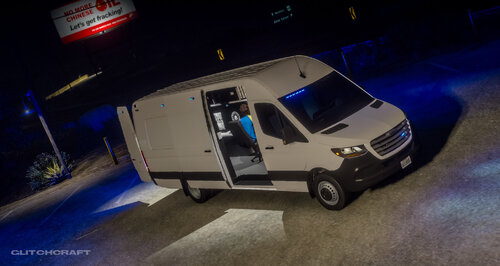 Add-ons vehicles ?
 -
-
-
-
-
-
-
-
 it looks cool; it's a shame the helicopter can only spawn at set locations and doesn't come straight to us. Also, during the rappel, the helicopter is way too high—can you configure or lower the altitude? Can you make it respond to a call or a pursuit?
- 9 comments
- 1 review
-
-
-
 hello , video pls?
 -
-
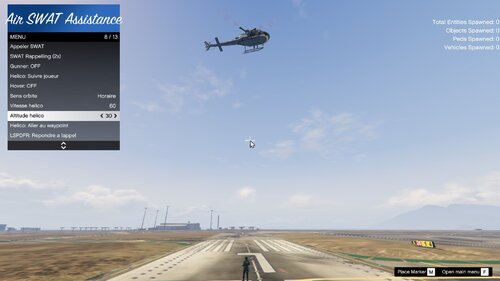 Hi , You might be using F6 for something else; it works perfectly for me.
 -
Très Content que ça te plaise , merci beaucoup , a l'avenir d'autres arriveronts :) Very glad you like it, thank you very much, more will come in the future :)
-
Glisser les fichier dans votre dossier script qui se trouve dans la racine de votre jeux ah et j'ai oublier de dire que vous pouvez faire descendre des gars du swat en illimiter quand y'en as 2 qui descend en rappel , deux autre spawn automatiquement a leur place et ainsi de suite Drag and drop the files into your scripts folder located in the root directory of your game. I also forgot to mention that you can deploy unlimited SWAT officers. When two SWAT officers rappel from the helicopter, two new officers automatically spawn in their seats, allowing you to deploy more units continuously.
-
🚁 CoPilote Assistance – Support SWAT aérienCoPilote Assistance est un plugin qui ajoute un système complet de support SWAT aérien pour LSPDFR dans Grand Theft Auto V. Il permet au joueur d’appeler un hélicoptère SWAT intelligent capable de suivre le joueur, intervenir sur des scènes, déposer des unités au sol et fournir un appui tactique. Le plugin est contrôlé via un menu NativeUI simple d’utilisation, accessible en jeu. ✨ Fonctionnalités principales🚁 Hélicoptère SWATAppel d’un hélicoptère SWAT avec équipage complet. Pilote et agents SWAT configurés comme forces de l’ordre. Hélicoptère blindé et optimisé pour la survie en combat. Blip visible sur la carte pour suivre l’hélicoptère. 🎯 Modes de suivi de l’hélicoptèreL’hélicoptère peut fonctionner selon plusieurs modes : Orbiter autour du joueur Suivre le joueur Suivre le véhicule du joueur Se rendre au waypoint Répondre à un appel LSPDFR Intervenir sur une poursuite L’hélicoptère utilise un système d’IA avancé pour : maintenir une altitude adapter sa vitesse orbiter autour d’une zone 🪂 Rappel SWATLes agents SWAT peuvent effectuer un rappel depuis l’hélicoptère. Une fois au sol : ils suivent le joueur ils défendent le joueur ils attaquent automatiquement les menaces 🔫 Support Gunner aérienLes agents dans l’hélicoptère peuvent agir comme gunners : tir automatique sur les menaces détection des ennemis proches priorité aux cibles qui attaquent le joueur tir depuis les portes de l’hélicoptère 🛡 IA SWAT au solLes agents SWAT déposés : suivent le joueur adoptent la posture du joueur (accroupi / furtif) prennent couverture engagent les suspects défendent activement le joueur 🎮 Contrôle via menuMenu accessible avec F6 : Fonctions disponibles : Appeler l’hélicoptère SWAT Activer / désactiver les gunners Choisir le mode de suivi Maintenir l’hélicoptère en stationnaire Modifier vitesse et altitude Envoyer l’hélicoptère au waypoint Répondre à un appel ou poursuite Faire un rappel SWAT Libérer les SWAT au sol Faire repartir l’hélicoptère 🤖 IA intelligenteLe plugin inclut plusieurs systèmes avancés : détection automatique des ennemis identification des menaces via blips rouges priorisation des suspects armés comportement tactique des SWAT gestion automatique des relations entre factions Compatible avec les mods qui modifient les groupes de relation police. 🎮 ContrôlesTouche Action F6 Ouvrir le menu CoPilote Assistance ⚙️ DépendancesCe plugin nécessite : RAGE Plugin Hook LSPDFR ScriptHookVDotNet NativeUI 📌 Objectif du pluginCe plugin a été conçu pour offrir un support aérien réaliste et tactique, permettant aux joueurs de disposer d’une unité SWAT complète et dynamique lors d’interventions à haut risque. ENGLISH VERSION 🚁 CoPilote Assistance – SWAT Air SupportCoPilote Assistance is a plugin that adds a complete SWAT air support system to LSPDFR in Grand Theft Auto V. It allows players to call a smart SWAT helicopter unit capable of following the player, responding to scenes, deploying SWAT officers via rappel, and providing tactical aerial support. The plugin is controlled through a simple NativeUI menu accessible in-game. ✨ Main Features🚁 SWAT HelicopterCall a SWAT helicopter with a full crew. Pilot and SWAT officers configured as law enforcement. Armored helicopter optimized for combat survival. Map blip to track the helicopter. 🎯 Helicopter Follow ModesThe helicopter can operate in multiple modes: Orbit around the player Follow the player Follow the player’s vehicle Go to waypoint Respond to an LSPDFR callout Respond to a pursuit The helicopter uses an advanced AI system to: maintain altitude adjust speed orbit around a target area 🪂 SWAT RappellingSWAT officers can rappel from the helicopter. Once on the ground they will: follow the player defend the player automatically engage hostile suspects 🔫 Aerial Gunner SupportThe helicopter crew can act as aerial gunners: automatic threat detection prioritize suspects attacking the player fire from helicopter side doors provide covering fire during pursuits and shootouts 🛡 Ground SWAT AISWAT officers deployed on the ground will: follow the player mirror the player’s stance (crouch / stealth) take cover when under fire engage suspects actively defend the player 🎮 Menu ControlsMenu accessible with F6. Available actions: Call the SWAT helicopter Enable / disable gunners Change helicopter follow mode Hold helicopter position (hover mode) Adjust helicopter speed and altitude Send helicopter to waypoint Respond to callouts or pursuits Deploy SWAT via rappel Dismiss ground SWAT units Order the helicopter to leave 🤖 Smart AI SystemThe plugin includes several advanced systems: automatic enemy detection hostile identification using red blips prioritization of armed suspects tactical SWAT combat behavior automatic relationship management between factions Compatible with mods that modify police relationship groups. 🎮 ControlsKey Action F6 Open CoPilote Assistance Menu ⚙️ RequirementsThis plugin requires: RAGE Plugin Hook LSPDFR ScriptHookVDotNet NativeUI 📌 Plugin GoalThis plugin was designed to provide realistic and tactical aerial support, allowing players to use a complete and dynamic SWAT unit during high-risk situations.
-
-
-
 It would be possible to add a small menu allowing players to select the tactics they want reinforcement units to use during the pursuit ?
- 74 comments
- 3 reviews
-
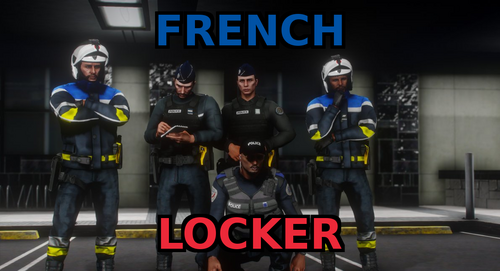 Bonjour peu-ont avoir une vidéo de présentation pour voir un peu les tenues ect ? Merci
- 13 comments
- 2 reviews
-
 Hey, is the map in the picture the French riveira?? How come there are NPC vehicles there??
- 21 comments
- 1 review
.thumb.png.4d67a45b2a96b42c8f8623a83e9ec63f.png)




.thumb.png.9d0943161b37f863c291d6d6664edefb.png)