


Eagle
Members
-
Joined
-
Last visited
Everything posted by Eagle
-
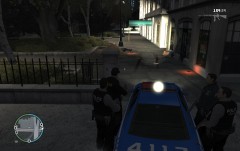
From the album: Liberty City Police Notebook
Crime rate decreased significantly since RRU is patrolling the streets. However this was an ambush attack on one of the RRU's. -
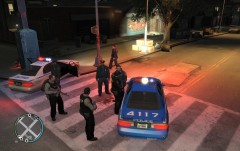
From the album: Liberty City Police Notebook
RRU dispatched to a 4 suspect shoot-out. Suspects were armed with uzies and police officers needed a backup. -
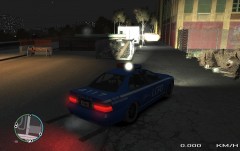
From the album: Liberty City Police Notebook
Nothing was found during the search. RRU moves onto next call. -
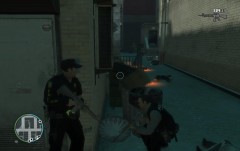
From the album: Liberty City Police Notebook
RRU called in. There were 20 casualties which 17 are suspects and 3 are police officers. -
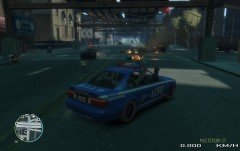
From the album: Liberty City Police Notebook
After a 15 mins chase, RRU Sergeant Mike Henderson (the driver) approved the use of deadly force. Vehicle bursted into flames and suspects died immediately. -
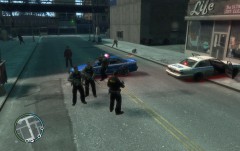
From the album: Liberty City Police Notebook
RRU cooperated with local police officers that needed backup soon as possible. -
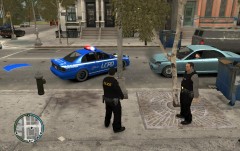
From the album: Liberty City Police Notebook
The vehicle damage is very large after a massive shootout in Algonquin. One officer lost his life. -
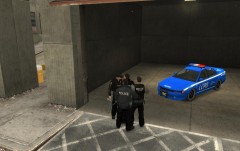
From the album: Liberty City Police Notebook
Liberty City Police announced new type of unit. We're talking about Rapid Response Unit (aka RRU). The primary task of this unit is rapid responding to high-risk calls such as shoot-outs, drug deals, suspicious activities and stopping armed suspects in their vehicles. Unit is consist of 2 or 4 fully armoured and armed with a M4, shotgun, handgun and a tazer. Unit mostly uses deadly force as there is no other option. -
-
Congrats to everyone who participated in making such a great community. :happy:
-
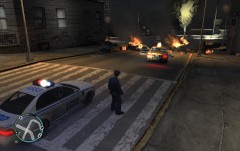 Because above was press release, I lied. I shot his ass with a pistol so he got caught on fire :DDD "YOU SHALL STOP! *BULLET* *BULLET* *BULLET* *BULLET* *BULLET* "
 -
From the album: Liberty City Police Notebook
Highway Patrol officer Engels Harper spotted a Speedo van being driven all over the road. He issued a traffic stop and driver fled. High-speed pursuit started and a police helicopter was called into action. After suspect ended in a traffic jam his vehicle caught on fire and soon after blew up. Explosion set other cars on fire and eventually blew them up. In the picture we see Highway Patrol officer Engels Harper securing the area. EMS & Fire units are on their way. -
I think Olanov made a reply on behalf of half (or whole) forum so yeah. :P
-
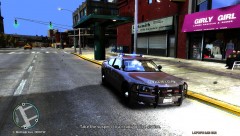 I don't like that model, it's like a disco on wheels.
 -
-
-
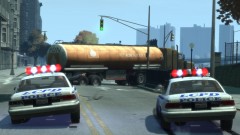 How you can attach a trailer?
 -
Awesome work mate. I would like to see your version, too. Your two released mods are quite fascinating so I can guarantee that mod will be appealing to public. :happy:
-
-
My experience with Serbian police is quite horrible. I am mostly pulled over for something that I didn't do so I never get a ticket as I record my driving or have another kind of proof of my innocence. Here's one story: I remember once I was driving 43 in a 50 km/h zone (They placed a 50 speed limit on a straight country road with no valid reason except to write tickets) and I was looking around the window as I was going slow, I spotted hidden patrol car next to the bushes and continued. From out of nowhere, I see that patrol car speeding without any lights or siren towards me and overtaking me. Window is rolled down, police stick says STOP POLICE. I stop and officer approaches. God day sir, license and registration please. Reason for stopping is using a mobile phone (I am like wtf, are you mentally retarded? I forgot my mobile phone at home and he's stopping me for using a mobile phone??!!). I give him my license and registration and started arguing. After 10 mins of arguing, I won and I didn't get a ticket. Even if I got a ticket I could appeal call log from my operator in court and still wouldn't pay for it! On the other hand, our special anti-terrorist units are cool guys not like these brainwashed traffic and patrol units. I know few of them and later I got to know the whole squad.
-
-
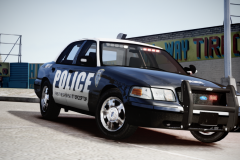 At first glance, I thought it's a real life car. :O Well done!
 -
If I understood you correctly, you don't see crime report on this page ( http://mdc.lcpdfr.com/view_reports.php?type=CRIMES )? Or suspect isn't in custody? Please be more descriptive. You are already an officer when your login is approved. About prosecutor status you must contact someone from below and state a reason why you wish to obtain that position: http://www.lcpdfr.com/user/722-jacko999/ - Jacko, Admin http://www.lcpdfr.com/user/3593-abowers/ - A.Bowers, Admin http://www.lcpdfr.com/user/1830-braveheart/ - Braveheart, owner of MDC.
-
-
1. It's an ongoing bug. I'll PM Braveheart for that. 2. After you updated warrant status to COMPLETE, warrant will be transferred to completed warrants section. You can't delete a warrant by no means. 3. You change your work area to all four sections so you can view warrants for all sections. You don't have to play online, you can use this in singleplayer too. As you said, it is a true role play scenario based on the honesty of every officer.

