


Eagle
Members
-
Joined
-
Last visited
Everything posted by Eagle
-
What you CAN do is to disable ELS on AI. I was crashing because of that. Now, I can play game and it has never crashed since. I'm using Traffic Flow (newest), IVDashCam, ELS v6, vehicle/sound mods and of course LCPDFR.
-
-
Added something in bold.
-
You may have already stated the reasons for upgrade. It's pretty much common sense. You won't upgrade if it isn't needed at some point. :thumbsup:
-
You have two options. One is to change keys to something else or to completely disable them as stated in previous post. You can change those things in .ini file of SNT.
-
You can spawn it by SNT or just press ` and console will open. After that, type in spawn [modelname goes here] For example. spawn police
-
-
I think we have a mod in our download section. That area livery and NickieB made textures for each part of town (AL, AQ, BHN, Broker & Dukes). Quite cool modification. Back on topic, NYSP has nothing to do with title lol.
-
"Do you clean your nose?" - Said by state trooper, I love to hear that lol. A That's impossible for now. However, it'd be cool to have it. Edit: Not possible, tried it in game.
-
Wuuuuuut?
-
You can do it by yourself. It isn't nuclear physics and everyone can do it. Follow the tutorials below.
-
Go on duty as regular, select model, car (and partner) and then after you get out of station and you have already selected a car, go to SNT menu and select Niko in Model Spawning.
-
It depends from your computer's speed.
-
As Harper said, you can change your keys in ELS.ini file. You can change it to whatever you want and list of the codes for keys should be at the end of that file.
-
All cops in US are the same just they have a different area of patrolling (and/or rules to enforce) as BroCop explained it.
-
Default one is Alt D not Alt VD.... You can change the keys in ini configuration file.
-
It's okay to use fat cop when you're gonna do only traffic enforcement. For running he's useless. Is there a way to speed him up as well as fat security guy?
-
What if your computer can't support GTA V? xD
-
Youtube.
-
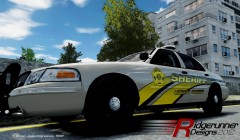 A badass Sheriff. Great work. :)
 -
-
-
I have some stock models that I'd like to insert a lightbar and few extra lights to make them police models. Can somebody tell me what I need and how the hell I do it? Thanks.
-
I don't know how to do it but if you hate default cars, then get LAPD pack for gta iv. Those are police depts in SA (without censorship).
-
Here are few great tutorials which learned me how to do it. As my country doesn't have much car pictures and our cars don't have much details (just simple text, badge and number to call along with blue line) texture isn't a great one. With the car you supplied, you can make an awesome texture. http://www.youtube.com/watch?v=UAj0K-T24f0 http://www.youtube.com/watch?v=X2aTB0oMQNM Have fun. :biggrin:


