


Creators: Due to background reprocessing of files, approvals and file security checks may be delayed. Thanks for your patience.

DukSezQuak
Members
-
Joined
Everything posted by DukSezQuak
-
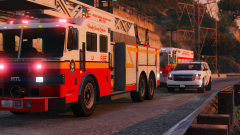
From the album: Termination Media
Lakeview County Emergency Services were dispatched to an industrial facility for reports of an electrical explosion with a possibility of a person down. Units arrived to find numerous workers down with injuries due to electricity, and all were successfully transported to local health care facilities, all in stable condition with serious injuries. An investigation is now ongoing to determine the cause of the electrical explosion. -
-
From the album: Termination Media
An Elkridge State Railways and Transportation officer witnesses sparks coming from the opposite end of a railway crossing while patrolling. The train activated its emergency brakes and stopped down the line; once the train cleared the crossing, the officer spotted a vehicle on the other side with heavy front end damage. It's suspected that the operator of the vehicle had stopped too closely to the railway crossing, and then proceeded to check their phone which resulted in them releasing their brakes slightly enough to roll into the train car. There were no injuries, however there was heavy damage to the vehicle as well as a few of the rail cars. The operator was charged with driving while distracted by a mobile device, failing to stop before a stop line, and damage to railway property. This same train crossing was the scene of a fatal collisions a few days prior to this incident; the Minister of Transportation is investigating ways to enhance warnings for the crossing, in addition to the existing crossing gates and alarms that are already present. -
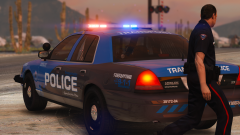
From the album: Termination Media
An Elkridge State Railways and Transportation officer preparing to walk alongside of a railway line after a locomotive collided with a vehicle, leaving one person dead and another person in serious, life threatening condition. -
We have approached the idea for those and plan to implement them when time allows. Both NefariousBonne and I are busy with personal commitments right now.
-
Federal Signal SmartSiren.
-
The only thing close to what you're looking for is this Kenworth crew cab. I'd suggest picking through the downloads section here for GTA IV. Just make the vehicle type filter for fire or ems and you might find something better.
-
It'd be a Ford F-750 chassis. Not sure if there is one for GTA V, especially in a 'rescue' outfit.
-
Personally I am impressed with these, especially for your first texture pack. I love the twist on trying to make your countries police into an 'American' style. They look very good! Keep it up.
-
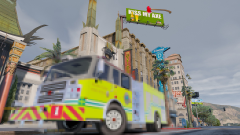 Does this mean that we might see the other fire engine models soon?
 -
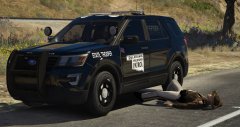 "Anyone else seeing stars?"
 -
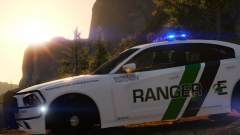
From the album: Termination Media
A mountain lion, that is. An Elkridge Ranger vehicle blocks a popular path after hikers reported an aggressive mountain lion on the trail. Fish and Wildlife officials responded to assist the rangers, and the mountain lion was ultimately tranquilized and was released back into a separate wooded area, away from popular paths and communities. -
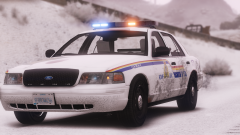
From the album: Termination Media
First snowfall of winter fall, RCMP out in force responding to numerous crashes and roadway incidents. -
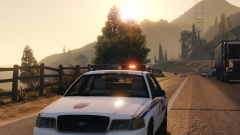 Why that's just the classic FORD fleet paint package; paint peeling included at no additional cost.
 -
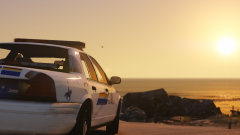
From the album: Termination Media
-
From the album: Termination Media
An old cruiser on scene of a pedestrian struck by a vehicle on the highway. Good ol' Crown Vic is still kicking, but she's tired. -
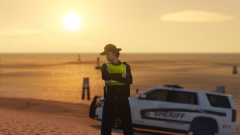
From the album: Termination Media
During one of the last weekends before snow flies in Lakeview County, the Sheriffs are on standby at an ATV beach race to ensure the riders play it safe, and that the public stays out of harms way. -
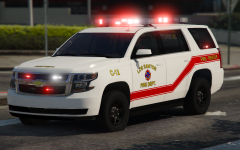 These lightbars on this truck are called the Whelen Freedom series, sister to the old Whelen Edge lightbars.
 -
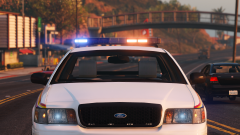
From the album: Termination Media
-
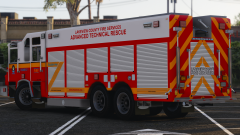
From the album: Termination Media
Lakeview County recently took delivery of their brand new Pierce Heavy Rescue unit. Through the help of a Regional Grant - Lakeview County purchased the truck (which previously was a demonstration unit) in July, where it was outfitted for the County. The new unit will be able to respond to various incidents in Lakeview County - including major collisions, heavy rescue, industrial incidents, and more. The apparatus features a mobile SCBA fill-station, light support, and various other features to make the firefighters' jobs much easier on the scenes. The new apparatus was placed in service about one week ago. -
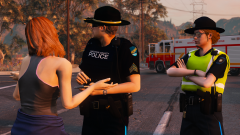
From the album: Termination Media
Lakeview County Police, Sheriffs and Fire officials are on scene of U.S. Route 1, attempting to piece together a collision between a semi-truck and trailer and a small sedan that has left two people dead. Police were called to the intersection just before 5 A.M. where the semi had collided with the side of the small sedan. It's believed the two occupants of the sedan were killed immediately. The driver of the semi, which later crashed into a nearby utility pole, was airlifted to a trauma center in serious, but stable condition. Police are speaking with witnesses, including a local who happened to be running in the area when the crash happened. The ages of the two deceased are believed to be in the late twenties to early thirties, however police are not confirming these details. Traffic is being diverted around the area until further notice, and police expect to be on scene for numerous hours for the investigation. -
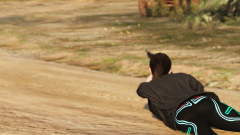
From the album: Termination Media
Cops can't avoid guns - even on their days off. A Lakeview County Police Officer enjoying her day off with some bird hunting. -
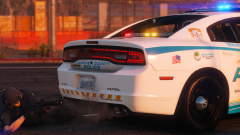
From the album: Termination Media
Gotta love that CO2. -
From the album: Termination Media
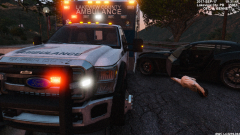
Lakeview County Emergency Medical Services were involved in a collision yesterday evening while responding to a call. After leaving the busy interstate, where vehicles were failing to yield to the ambulance already, the medical crew began travelling down a smaller highway towards the emergency scene they were originally responding to. Another motorist on the roadway, for some undetermined reason, swerved into the ambulances lane, which caused a collision with the ambulances front drivers side bumper. The occupant of the other vehicle ultimately passed out due to what is believed to be panic, before the medical crew was able to bring them back to consciousness. Police from Lakeview County attended shortly after, as they were responding to the same scene. The occupant of the other vehicle was incoherent, and transported by another ambulance to a Metro hospital. Police would like to urge motorists to pull over to the right when an emergency vehicle is approaching. If that's not possible, pull of to the closest side of the road that you can, to allow the emergency vehicle to pass. No charges have been pressed in this case, and the crews returned to work afterwards. Police and EMS officials are not releasing any more details on this incident. LCPD File # 2017918594 OFC. A. Bennett 35983 -
From the album: Termination Media
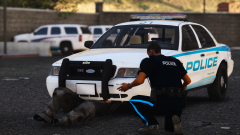
"How bad is it?" "Well, you probably shouldn't have hit those speed bumps so hard, trying to chase that crazy granny. It's bad."



