




Carrythxd
Members
-
Joined
-
Last visited
Everything posted by Carrythxd
-
L3EVO
-
Thanks so much! :D
-
-
-
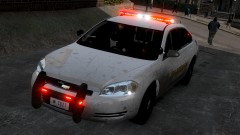
Nice, I really like the NoN-ELS packs =)
-
Thank you :)
-
-
Tutorial video on how to get ELS V7 to work in your Grand Theft Auto IV. Remember to read the "ELS USER GUIDE.pdf" It will give you alot of information that you will need. If the light's don't show up, 1. Make sure you have your Trainer keys disabled (if you are using a Trainer, SNT for example). If you don't know how to disable Trainer keys go to Options - Enable/Disable Trainer Keys 2. Make sure you have a ELS V6 or ELS V7 enabled vehicle that you are using 3. Make sure that you have read the "ELS USER GUIDE.pdf"
-
Tutorial video on how to get ELS V7 to work in your Grand Theft Auto IV. Remember to read the "ELS USER GUIDE.pdf" It will give you alot of information that you will need. If the light's don't show up, 1. Make sure you have your Trainer keys disabled (if you are using a Trainer, SNT for example). If you don't know how to disable Trainer keys go to Options - Enable/Disable Trainer Keys 2. Make sure you have a ELS V6 or ELS V7 enabled vehicle that you are using 3. Make sure that you have read the "ELS USER GUIDE.pdf" IF YOU HAVE PROBLEMS WITH ELS V7 PLEASE READ THIS TOPIC:
-
That is because of the map mod, and it cant be fixed.
-
Oh lol... Guys go to ELS.ini, then you'll see "[ FBI ] Status = off File = default_config" Change the Status = off to Status = on and it works :P
-
Same here
-
I have to go try this one out now! :D
-
-
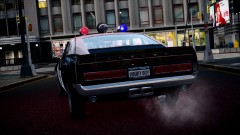
From the album: Carrythxd's Pics [IV]
Tiagoesanto's 1969 Police Shelby GT500 428CJ "CobraJet" Front: -
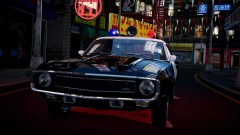
From the album: Carrythxd's Pics [IV]
Tiagoesanto's 1969 Police Shelby GT500 428CJ "CobraJet" Rear: -
It sure is nice! :)
-
This mod isnt by me... Yes, the sell your business option would be good too :P Ive been using the V1 once in a while after the release It sure is :) But about the Garbage Collector, it can be a bit buggy haha.. Since its AI driving the truck :DDDD But if you run into any problems with the option its just press M again restart the job :P That works for most of the problems
-
Hehe, it freaking is awesome! :D Ive been playing it for the last few days and gotta tell you its just amazing... One of the mods that I definetly will keep in my game!
-
FARNSWORTH'S BUSINESS MOD BY Prof_Farnsworth Download Link http://www.gta4-mods.com/script/farnsworths-business-mod-complete-v2-f21460 http://gtamania.ru/load/mods_for_gta_4/script_mods_for_gta_4/farnsworth_39_s_business_mod_complete_v2_0/128-1-0-5155 Now you can purchase and own businesses around Liberty City. You can also hire and fire employees at businesses you own. Hiring employees also has some bonuses at certain businesses, such as vehicles, custom peds, etc. The revenue of an owned business will change on a weekly basis, meaning you may make less or more than the week before. - Businesses appear as "destination" blips on the map, and are named (each business is named on the map when moused over) - When a business is purchased, the blip will change into a tie, signifying ownership of the business - When the income reaches a certain amount (varies for each property but is usually near the property income cap) the blip will change into a dollar sign. This signifies a high income at that property that should be collected soon. - SAVING THE GAME will save all businesses owned and statistics of each property (time owned, current income, etc) - You can change which keys are used for purchasing properties, collecting income, hiring/firing employees, starting jobs, etc. Change "RControlKey" and/or "RShiftKey" to whichever key you prefer to use (i.e. "O" or "J") and save the ini. Paramedic Missions To start a paramedic mission, drive to either of the purchaseable hospitals and while in an ambulance, park out front of the main doors. While stopped, a prompt will appear in the center of the screen, asking you to press whichever key is set in the ini (default "M") for jobs. Once the key is pressed, the prompt will report "Paramedic mission started". Wait a few seconds and an injured person will appear on the map. The objective is to pick up the injured civilian and return them to the hospital before their life expires (indicated by "Civilian Health" in the center of the screen), as quickly and safely as possible. To pick up the civilian, stop the ambulance next to them, and they will enter. Return to the hospital at which the paramedic mission was started, and park in front of the doors, indicated by a white checkpoint marker. After stopping in the marker, the civilian will exit the ambulance and proceed inside the hospital where they will be "rescued". Once they are rescued, wait until dispatched again (or pick up remaining civilians from the current round). If you collide with anything while a civilian is inside the ambulance, they will lose a portion of their health (based on the force of the impact) thereby giving you less time to get them to the hospital. If the civilians health reaches zero, they are dead and the paramedic mission will be over (Can be restarted anytime). If you leave the ambulance at anytime, the paramedic mission will be over as well. If you are able to rescue the civilian, the portion of their health remaining will be given to the player in currency. Once you have rescued 5 civilians consecutively, they will start appearing two at a time, then three at a time after 12 consecutive rescues. While driving the ambulance with the siren on during the paramedic mission, you can choose to avoid police detection by setting "police_wanted_wd_amb" to "0" in the ini file. Deliveries There are now two different types of delivery jobs you can perform around the city: Food Delivery: Located at 4 businesses (superstar (2), 69 st. Diner, and Blarney's), you will find the opportunity to work as a delivery driver. You will need to be in a vehicle to start a food delivery shift. Park in front of the business and press the "jobs" key (default "M"). You will be prompted that your shift has started. Go inside to pick up a food order (on front counter at Blarney's and 69 st. Diner, counter at back of bar at Superstar). Once you have the food, the customer will be identified by a blip on the radar (Male person icon) and a time will be presented across the bottom of the screen. The objective is to get the food there as quickly as possible. You will be paid based on the amount of time remaining once you reach the customer (NOTE: time stops counting down when you are near them and the display reads "Deliver the food."). Then return to the business for another order, or press the "jobs" key to end your shift. Vehicle Delivery: Located at AutoEroticar, Westdyke Auto's, and Grotti dealerships is the opportunity to work as a truck driver delivering vehicles. Approach the business interaction marker (Arrow where purchasing, collecting, hiring/firing is made) and press the "jobs" key to start your shift. A blip will appear on the radar indicating where the truck is parked. Go to the truck (Side lot of AutoEroticar, around back of Grotti at their loading dock) and enter it. Once inside, the customer will be identified by a blip on the radar (Yellow garage symbol) and a time will be presented at the bottom of the screen. The objective is to deliver the cars within the timeline without having them detach and losing the load. Vehicles can become detached two ways. By colliding with something too hard, or keeping the wheels off of the ground for 3.5 seconds; the vehicle(s) will become detached and you will be fired (Can restart shift anytime by returning to the business). When you reach the customer with the load intact, they will approach the truck and the vehicle(s) will be detached and drop onto the road. You will be paid based on the amount of time remaining on delivery (NOTE: time stops counting down when you are near them and the display reads "Park to drop off the load."). Then return to the business for another load, or press the "jobs" key to end your shift. Garbage Collector Work at the sanitation department as a garbage collector. To start the job, stand under the marker at the sanitation department and press the "jobs" key. You will be on the back of the truck which will drive until you come upon some trash to pick up. When trash is indicated, press the "RELOAD" button to get off of the truck. Go to the marker to pick up the trash, and return it to the truck. Once there are no more nearby trash bags, press "RELOAD" to get back on the truck. Press the "jobs" key if you want to end your shift early. You can determine whether the garbage truck obeys traffic (takes much longer) or not by setting the value "garbage_obey_traffic" to true or false (default is false). You can also determine whther the cinematic camera is active while riding on the back of the truck by setting the value "cinematic_trash_view" to true or false (default is true). Security Detail You can work for the Boatyard or The Majestic Hotel as a security escort protecting a client. Go to the interaction marker and press the "jobs" key to start your shift. The objective is to keep the client alive until they reach thier destination (or are extracted from the boat) by killing the pursuers. You can choose to ride in the client vehicle instead of the escort chopper by setting the value "security_ride_in_car" to true (default is false). If you are in the vehicle when it is destroyed, you will die. Toxic Waste Disposal You can work as a Toxic Waste Disposal driver at the Eugenics warehouse. At the interaction marker, press the "jobs" key and a truck will be loaded with toxic waste which needs to be dumped off-site, indicated by the marker. If the wheels leave the ground for too long or the truck collides with anything too hard, some barrels will be detached and dropped. If all of the barrels become detached, you will be fired. If the time expires before you reach the dump site, the LCPD will be notified of your location and you will recieve a 2 star wanted level. Fuel Acquisition At any purchasable gas station, you can work as a fuel acquisition specialist. After pressing the "jobs" key while under the interaction marker, a rival company's fuel truck will be indicated on the map. The objective is to recover their truck without destroying the fuel. Once in the truck, the drop location will be identified on your map. Lunatics Almost all businesses now have a chance of a lunatic spawning while you are near the business. The lunatic will start killing the patrons of the business, and it is up to you to stop them. As they kill more patrons, the business income will start to decrease (even into the negative). You can let nearby police deal with them although it is recommended to dispose of them as soon as possible to avoid heavy income loss. This feature can be toggled on/off by changing the "lunatic_spawn" value in the ini ("1" is active, "0" is inactive). Robberies Some businesses can now be robbed. When the income of certain businesses (bowling alley, fast food restaurants, strippers, etc) becomes high enough, that business stands the chance of being robbed. If a business is being robbed, you will be notified in the top left corner of the screen (as well as an audible beep three times), and the Tie icon for the business will be colored red. There will be a time limit to get to the business before the robbers escape with your cash. If you arrive in time, you must dispatch the thieves and reclaim the money they stole (Will be located in a black bag, identified by a "$" blip on the map, and a white arrow marker. To reclaim the money, you need to kill the thieves, and recover the black bag (can be recovered by standing over it). After which it will need to be returned to the business (return the money to the business marker where you purchase, collect income, and hire/fire employees). If the thieves kill you or escape, or you fail to return the money, it is gone, and you will be notified via text at the top left of the screen. This feature can be toggled on/off by changing the "robberies" value in the ini ("1" is active, "0" is inactive). General notes Some businesses have been eliminated from the previous version in order to make room for new ones. Unfortunately, if you own these businesses, they will be lost, as well as their income. If you already own businesses that still exist in the new version and you want to save their status, open "businesses.ini" and copy the values from "business_income" and "business_owned" from your ini into the new version ini file (where "business" is the name of the business you want to copy). SCREENSHOTS: VIDEOS: Wanna see more mods like this? Check these out:
-
-
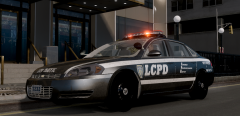 The skin looks amazing! :D
 -
Heres the San Andreas one, download link in the Desc: http://www.youtube.com/watch?feature=player_detailpage&v=cIV9kDfRvcw#t=147s
-
-
When I first read the title I was thinking about something like this would show up...



