


Marc1407
Members
-
Joined
-
Last visited
Everything posted by Marc1407
-
 Thanks bro
 -
Grammar Police and NPCAI have config files in which you can set up everything. You can find the Grammar Police config under Plugins > LSPDFR > Grammar Police. Your NPCAI config is also in the LSPDFR folder and is called "NPCI.ini".
-
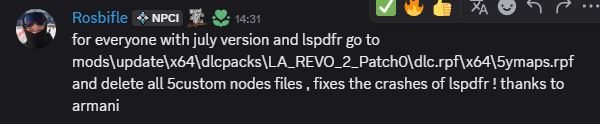
Okay, so, apparently the new LA Revo 2.0 update crashes lspdfr for some reason. I found multiple people complaining about it on their discord and they are fixing it in the next update and posted a "temporary fix". Thank you for your time anyway!
-
Yeah I have LA Revo 2.0 installed but never had any problems with it
-
Of course and it fixed it. Have you read anything specific in the log file? Like I said, yesterday worked everything completely fine and now suddenly a crash. And I also didnt really change anything since that.
-
So, I played yesterday without a problem. When I started it today LSPDFR is suddenly crashing out of nowhere with the typical "Unhandled Exception" Error. I already tried different things but none of them helped. I dont really know how to read the Log thats why I make this post. RagePluginHook.log
-
Found the fix! I accidentally installed a file from LA Revo 2.0 that wasn´t compatible with my other mods. It´s called "Real_Traffic_4", for anybody that has the same issue.
-
So, it seems like my game is crashing super randomly... Also, there is this one spot in Sandy Shores where the game will always crash. For whatever dumb reason last week everything worked fine. I tried to update the gameconfig.dll, the dinput8.dll, HeapAdjuster and the other "basic" stuff but nothing seems to work. Maybe a dev can look into my crashlog and see whats causing the problem 😄 RagePluginHook.log
-
-
 Thanks for the reply! Is there a way to make them park behind you? In UltimateBackup there was a feature that when you call for code 2 backup the ai parked directly behind your vehicle, even if there are other npc‘s blocking the way because they just despawned. However, if you call for code 3 backup they park the car „anywhere“, just like it is now.
- 716 comments
- 50 reviews
-
Incredible plugin! Although the mod is a complete gamechanger and a welcome upgrade for two plugins that many of us have been using for SEVERAL years I have two points, that I have to make: 1. I dont know if im the only one but I have the feeling that the police AI became "dumber". It would be great if backup units could park behind your vehicle, after you called them. Also, they crash a lot more frequenlty after being called. 2. Everything works as it should but in my opinion the whole menu setup is pretty boring to look at. I think some more colour would help here. If there is a customisation feature that I missed, ignore what I said 😀
- 716 comments
- 50 reviews
-
.thumb.png.75c93a6122f392c5578eb7f30e724543.png) Great! Could you make a LASD version?
Great! Could you make a LASD version? -
Fixed!!! I tried verifying my game files and for some reason it installed almost 1,5 gigabytes. It was a completely fresh install but hey, its working now 😃
-
 The best LAPD siren on the site! For some reason it´s really hard to find good ones.
 -
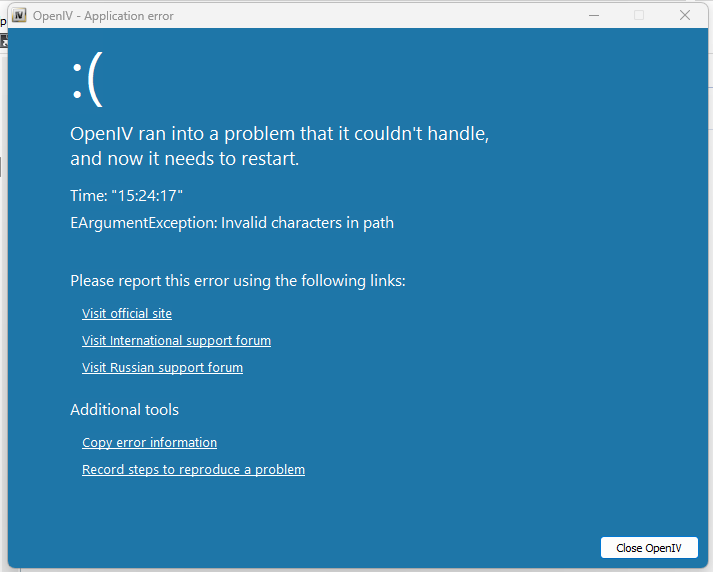
I recently bought a new PC with Windows 11 Pro. Since then I am unable to open the plugins.rpf folder with OpenIV. I already tried reinstalling different OpenIV versions and GTA. I dont have any other mods downloaded right now. ASI Manager is, of course, also installed.
-
Alright, tell me how it went!
-
 On my old PC (RTX 3060ti) i had everything on high, except the texture setting, that one I had on medium. Also, deactivate Reflection MSAA.
 -
You have to change following lines in the lspdfr.ini for it to work: Chase.DisableTrafficDensityAdjustments = true Main.DisableMultiplayerMap = true Main.PreloadAllModels = false
-
I used it with LA Revo 2.0 and QuantV and had no problems. It will propably also work with NVE. If not, you can uninstall it again with the vanilla backup provided in the download.
-
Apparently not 😅
-
A lot of the road signs in Los Santos are placed "illegaly" according to the California "Manuel on Uniform Traffic Control Devices (MUTCD)" code. This mod corrects this. It replaces wrong placed signs with the right version and removes unnecessary ones that sometimes even conflict with eachother. Not my video, look at the credits
-
Very interessting. Are you sure that you installed the xml for the ELS correctly?
-
Very weird... Never heard that before 😅 The first thing I would do is probably looking for another vehicle model and see if that fixes it.
-
Does it crash when loading it up or only when opening the menu? When it crashes directly after loading it up make sure that you have EUP Law & Order AND EUP Serve & Rescue installed.
-
Make sure that you have following things installed/updated: 1. The newest Gameconfig.xml 2. ScriptHookV 3. ScriptHookVdotnet (nightly build) 4. RageNativUI 5. HeapAdjuster 6. PackfileLimitAdjuster 7. RessourceAdjuster Also, try to go on duty with the "ForceDuty" command via your RageHook Console (F4)



.thumb.png.75c93a6122f392c5578eb7f30e724543.png)
