


Slimory
Members
-
Joined
-
Last visited
Everything posted by Slimory
-
I wanna learn how to make my own
-
I'd like to edit my own Visual Setting's and possibly TimeCyc, but am not getting the best result's , when editing either of them do i turn values up or down to get the best result's? i would like it too look good with ELS
-
um he want's it uninstalled, so if you uninstalled it, that's why it doesn't work ..
-
I've tried aim +E doesn't work
-
Try just pressing "E" while on foot, i'm really not sure if they completely took the feature out
-
i think you can only issue citation's, you can't run licenses to on foot civillian's, i just arrest them lol
-
I honestly can't remember, i thought it was just some sort of bug that wouldn't allow me too issue citation's, cause previous version's you could, another member would know.
-
maybe try "I'm new so PLEASE help me" that's a good start, now, be specific on what your wanting to start, vehicles, weapon's, engine sound's, weapon sound's?
-
It's called patience, this is a forum, not a hot line for your personal need's, for your question, if you have everything to run GTAIV, then you will have no problem's.
-
-
Don't hijack thread's start your own topic EDIT: Ninja'd by MoonShine
-
Apparently being a hippie in California is against the law, the terminator banned hemp usage .. :dry:
-
It's related to Vehicles, so yes, you are posting in the right spot, a bigger picture and i may be able to help
-
Why do you post pretty much the same comment all the time? this is a public forum, it's a legit question, so i say, if you don't know what your talking about don't comment, and i mean at all.. @everyone else, do you know if there is a pinned topic on how to properly install vehicles for new member's to read?
-
google Search bar my friend : https://www.google.ca/
-
LCPDFR is way better, and someone came out with a seperate strobe effect script about a week ago or so :
-
either: 1) Get the suspect out of the car (you can't search it with the driver inside, passenger's you can though) 2) Press "~" to open console and type "reload script's" 3) exit the mod and go back on duty
-
Yeah i got it too work finally, only took me 3 hours lol
-
Okay, thank's for the help Asuna! +1!
-
I haven't changed anything in the control panel that relates to sound since i built my computer, however, my whole rig has been acting funny, mainly due to the fact the graphic's card fan goes crazy, maybe part's are starting to give up now? i do take extremely good care of it.
-
there are 3 colour coded ones, the plug from the speaker is green, so i plug it into the green port in the back of my computer, there are also 2 port's in the front for a mic and headphones, which i don't use.
-
yeah it's a 3.5mm plug, i've had the computer for over a year, never any problem's, tried both set's of speaker's on my IPOD and they both work great.
-
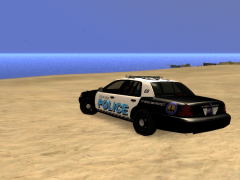 I made a stilwater PD skin, it looked pretty gay and i released it anyway, nice work
 -
Hey all, was wondering if anyone could help me out with a sound problem i'm having, it started a few hour's ago, i do not get any error's or anything, and the sound mixer still display's as if sound is still going through, but i get no sound whatsover, i had to fix my speaker cause the plug with teeth that plug into the subwoofer were bent, so, i bought a new speaker which suck's complete ass, i unplugged the shitty one to play in my girlfriend's laptop before i fixed the good one, then plugged it back in and no sound at all, i tried ro explain it the best i could, i also checked to see if i needed to update any driver's, don't need that either.
-
Don't hijack thread's and use the google search engine before posting topic's.


